Tipard Blu-ray Creator

Product Page: https://www.tipard.com/blu-ray-creator/
interface.jpg

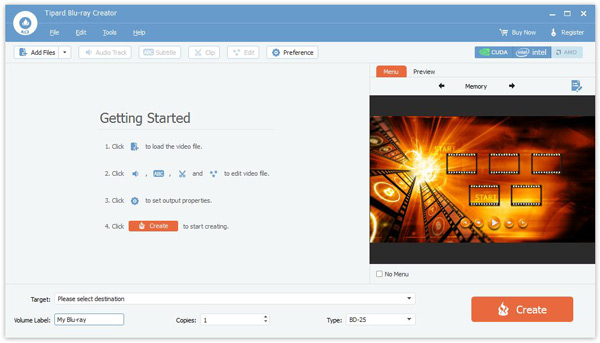
With Tipard Blu-ray Creator, you can create Blu-ray disc with your own video and convert any video to Blu-ray folder/ISO file for better playback and preservation. It enables you to burn any video into Blu-ray disc/folder/ISO file with high quality and fast speed. Whether you want to make Blu-ray disc for your Blu-ray player, or create Blu-ray folder or ISO file for long-term preservation and better sharing, this powerful Blu-ray creator can be your best choice. Functions: 1. Create Blu-ray disc with any video Tipard Blu-ray Creator has the ability to burn Blu-ray disc with any video file like AVCHD video, 4K UHD/HD/SD video, downloaded YouTube video, recorded video, QuickTime video and more. It provides two creating types for you. You can burn video to BD-25 and BD-50 as you like. This marvelous Blu-ray disc creating software can work greatly on Windows 11/10/8/7/XP/Vista computer. 2. Burn video to Blu-ray folder/ISO file Besides creating Blu-ray disc, you can also use this Blu-ray creator to burn video to Blu-ray folder/ISO file for future use. It supports any format of video, such as MP4, MOV, MKV, M4V, AVI, TS, M2TS, TP, TRP, VOB, WMV, MXF, etc. 3. Customize output Blu-ray and audio track/subtitle/menu This fantastic Blu-ray creator is equipped with many editing options for you to edit video and customize the output Blu-ray effects. With its help, you can handily clip the video to save the useful part you want, crop video to fit your screen, set output effects by adjusting brightness, contrast, saturation and hue, add your personal watermark. 4. Excellent user experience and acceleration tech With its intuitive interface and user-friendly design, you are allowed to easily burn video to Blu-ray disc and create Blu-ray folder/ISO file with any video you have. Even as a fresh hand, you can create a Blu-ray disc out from the recorded or downloaded video with a few clicks.


Graphcat<

Tipard TS Converter for Mac

Product Page: https://www.tipard.com/ts-converter-for-mac.html

screen.jpg

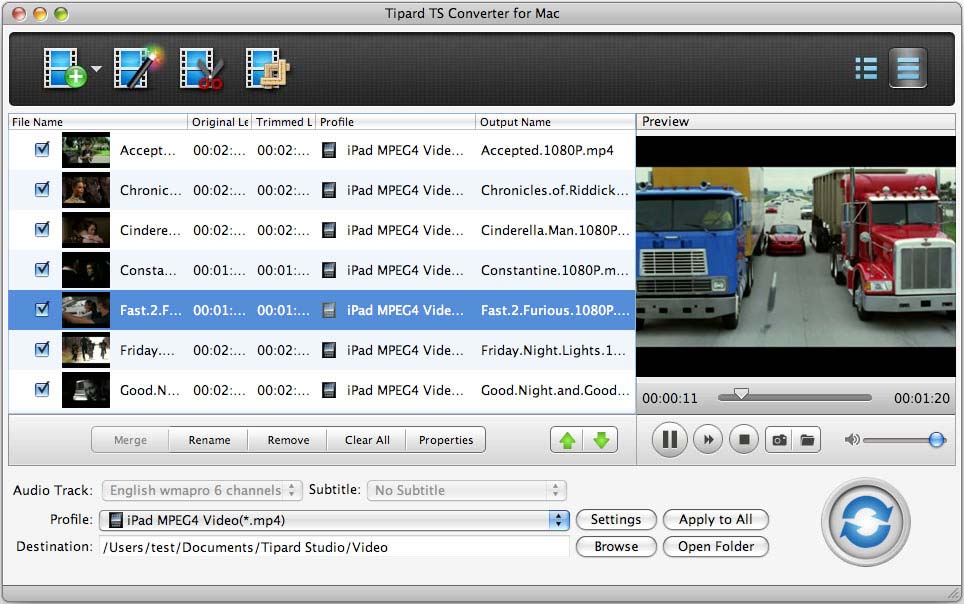
Tipard TS Converter for Mac has powerful functions in converting TS to many popular video formats on Mac, like VOB, DAT, MP4, M4V, TS, RM, RMVB, WMV, etc. What’s more, it can also convert popular video formats to TS. Plus, it has the latest system kernel, superior encoding and decoding performance, and it supports iPhone, iPad, iPod, PSP, Wii, Zune, Xbox. Key functions: 1.Convert between TS and popular video formats Tipard TS Converter for Mac is able to convert TS file to 3GP, 3G2, FLV, SWF, AVI/MPG, WMV, SWF, MOV, etc. It can also convert MPEG to TS, TS to MPEG, and other formats to TS file in lossless video/audio quality. 2.Editing function Tipard TS Converter has some powerful video editing functions, which can not only trim any clip of a video and merge video pieces for better enjoyment, crop the video playing region and aspect ratio; and watermark your video as you like in the form of a text or image, but also adjust the video brightness, saturation and contrast. 3.Precise parameter You can adjust some output settings with the output profile, such as Video Encoder, Frame Rate, Video Bitrate, Audio Encoder, Sample Rate, Channel, Audio Bitrate. 4.Preview and snapshot Users are able to preview and compare the original/final effect before generating files. You can also capture your preferred picture when you preview.

SAM Broadcaster Cloud 2022.1.3017

Product Page: https://spacial.com/sam-broadcaster-cloud/

samvibe-screen.png

Start your own online radio station with SAM Broadcaster Cloud – Go from zero to pro in 10 minutes!

SAM Broadcaster Cloud is a powerful cloud Internet radio broadcasting solution that allows you to broadcast from anywhere using just a computer with Internet access!


Have fun while sharing your passion for music or spread your message. Be in control. Upload your own music, news, jingles, station imaging, promos, weather, sports, podcasts, voice tracks or any other unique content you might have, set rotation rules and relax.

Quick specification:

– Automation scheduling: SAM Broadcaster Cloud is keeping your station running 24/7 even if you are not around to operate it. No servers or staff necessary! It’s the easiest way to create a radio station.
– Cloud/No hardware issue: Broadcast from anywhere using just a computer with Internet access!
– Live source switching: Stream live shows using SAM Broadcaster Live DJ.
– Multi DJ: share the station management with friends or hire multiple DJs to run a live 24/7 radio station
– Manage multiple radio stations easily from one single music database. Give permission access to your station managers and DJs.
– Music Library: up to 50GB of storage (or even more) in the Cloud to organize large music libraries quickly into multiple categories.
– Web Integration: easily embed your radio station player or included web widgets on your website.
– Streaming: every SAM Broadcaster Cloud station comes with 40 listener slots. No complex encoder to setup, no need for IP address, port number and whatever complex configuration. Also compatible with Shoutcast v1 and Icecast v2 streaming servers.
– SAM Broadcaster failback option.

SAM Broadcaster Cloud has all the professional broadcasting features you need and is by far the easiest way to start your own Internet radio station.

Try Our 14 Day Trial https://spacial.com/sam-broadcaster-cloud-free-trial/