Enterprise WiFi System 2.0.0.3

Product Page: https://starthotspot.com/enterprise-wifi-system/
tab-features-new-splash-800x413.png

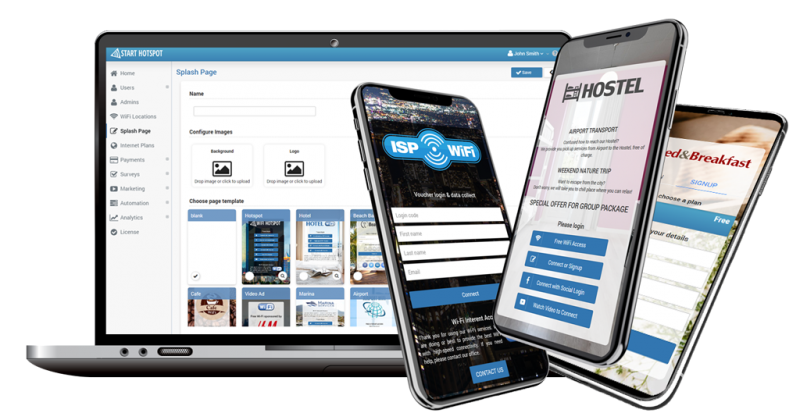
ENTERPRISE CLOUD WIFI SYSTEM is a platform for WiFi user management that can be deployed on your server or Virtual Machines. It consists of Captive portal, AAA Radius, database, Virtual Controller server, and builds up an Intelligent WiFi system.

Cloud WiFi System will be deployed on servers hosted and managed in your company, or in a cloud environment dedicated exclusively to your business.


The system is scalable and can be expanded in multiple servers to increase the number of Access Points and simultaneous users connected. The system can be deployed in one or multiple VM, located in the cloud, or their data center.

Provide WiFi access within your organization while keeping all customer data secure in your own servers and network.

CLOUD WIFI is a system of great possibilities which connects various devices into an intelligent WiFi network.

It provides centralized device management, WiFi network control, access methods settings, guest accounts updates, extraordinary analytics and reports, easy network expansion.

CLOUD WIFI system provides you with both advanced WiFi network control and a reliable connection with all users.Track your customers behaviors, analyze the demographics and habits of your clients, display location-based ads or fully-featured Email marketing campaigns that target customers by age, gender, and interest.

Graphcat<

Aiseesoft DVD Creator for Mac

Product Page: https://www.aiseesoft.com/dvd-creator-for-mac/

screen.jpg

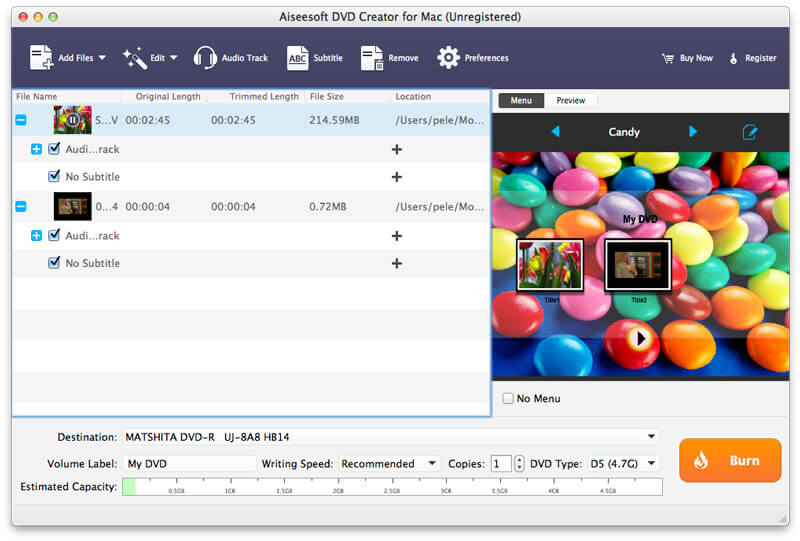
Aiseesoft DVD Creator for Mac lets you create DVDs easily on Mac OS X 10.9 or above (macOS Big Sur and macOS Monterey) from all kinds of popular video formats, such as MP4, AVI, MKV, VOB, FLV, MXF, MOV, etc.

Features:

1. Create DVD from any video
With DVD Creator for Mac, you can easily merge multiple video files in different formats and burn them into a single DVD or a DVD folder or into ISO image files.

2. Customize DVD menu
There are dozens of DVD menu templates built in this Mac DVD burning software, such as Animal, City, Festival, Plant, Scenery and more. You can personalize your own DVD menu by defining the menu frame and button, editing the menu text, defining its font, size and color, adding a background picture, and more.

3. Add audio tracks and subtitles
You are able to add multiple audio tracks as well as subtitles into your video files before burning DVD. You can even adjust the subtitle’s position, font, size or color and the audio track volume, and select the audio encoder/bitrate/channels as you like. Moreover, if the audio track doesn’t match the video scenes, this DVD burner for Mac allows you to adjust the audio latency, so do the subtitles.

4. Edit video effects before creating DVD
You can adjust the brightness, hue, saturation, contrast and the output volume, cut, crop, add watermark to your source videos to enhance the video quality. After that, you can burn the videos to most types of DVD+-R/RW/R DL, DVD-RAM, DVD-5(4.5G) and DVD-9(8.5GB) discs.

Aiseesoft PDF Converter Ultimate

Product Page: https://www.aiseesoft.com/pdf-converter-ultimate.html

interface.jpg

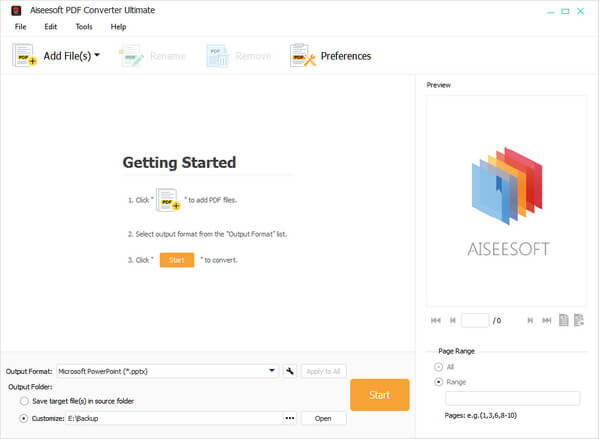
Aiseesoft PDF Converter Ultimate is specially designed for users to convert PDF to Text, Word, Excel, EPUB, PowerPoint 2007, HTML, and image(TIFF/JPEG/PNG/GIF/BMP/TGA/PPM/JPEG2000) format. And users can define the image size, color, quality, customize output layout, text encoding, image format/quality/resolution, etc., choose the output language, and convert self-defined page(s) or all pages. Moreover, it has been added Digital Signature function.

Key Features

1. Convert PDF to multiple formats
With this software you can get Text file from PDF and enjoy it with WordPad, doc and rtf Word format to read in Microsoft Office 2007/2010/2013, Excel, Poweroint2007, EPUB, HTML format and images such as TIFF, JPEG, PNG, GIF, BMP, TGA, PPM, and JPEG2000 format for further editing.

2. Customize&Edit PDF
Aiseesoft PDF Converter Ultimate provides numerous, flexible output settings for you to get customized output files and improve the output effect. For example, you can set the layout, text encoding, and image format/resolution for document formatting. You can set the output image size and color for image formatting.

3. Support OCR technology
With the advanced OCR technology, this PDF converting tool can accurately recognize over 190 languages like English, French, Chinese, etc. in PDF file.

4. Convert in batch
With this software, users can convert several PDF files to different output formats with merely one click.

5. Support PDF files in many languages
It supports multi-language PDF files, such as English, German, French, Japanese, Latin, Korean, Turkish, Thai, Greek, Cyrillic, Arabic, Chinese, etc.