ACDSee Photo Studio Ultimate 15.1.1.2922.1

Product Page: https://www.acdsee.com/en/products/photo-studio-ultimate
screenshot.png

The Photographers Secret Weapon
With the explosion of digital photography, doesn’t everyone need a secret weapon? Compact and efficient by design for both the novice and skilled photographer! ACDSee Ultimate 2022 breaks the shackles of repetition and combats the agents of bland by unleashing a world of creative control and endless possibilities.

Ultimate 2022 offers incredible time-saving tools such as the all-new Media mode for interacting with the ACDSee photo database; and People mode, an AI engine that seamlessly places a name to a face. Add a bevy of new selection tools to an already robust Layering Editor, and you have a secret weapon for building your photography empire in an overcrowded digital world.


PEOPLE MODE
Putting a Name to a Face just got Easier
People Mode is new to ACDSee Ultimate 2022 and is born of a union between ACDSee’s industry-leading Face Detection & Recognition feature and a keen application of machine learning. Photographers from all walks of life will enjoy the dedicated space for distinguishing by client, family member, or person of interest, allowing for the management of people by merging, renaming, or deleting faces, or taking labelling suggestions from the AI assistant for grouping similar unnamed people.

MEDIA MODE
Filter at Lightning Speed
Media Mode is ACDSee’s database-driven powerhouse for viewing and accessing the folders you have either browsed in Manage mode or cataloged into the ACDSee database. This streamlined, uncluttered view of the media assets managed by ACDSee offers sorting, grouping, and filtering in any combination.

EDIT MODE
Channel Your Creativity
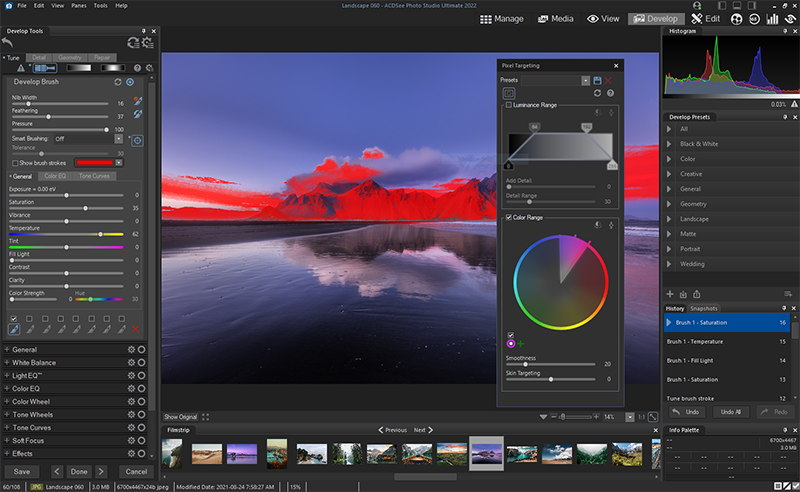
New for ACDSee 2022 is the paradigm-altering power to fine-tune a variety of selections that were previously impossible. Use Channel Selection and Channel Filtering in conjunction with a new Selection Basket to craft subtle or majestic selections that can be stored and unleashed with any whim.

Graphcat<

QnE Companion 1.10

Product Page: https://www.terabyteunlimited.com/qnecompanion/

ss_qne_large_a-min400X300.jpg

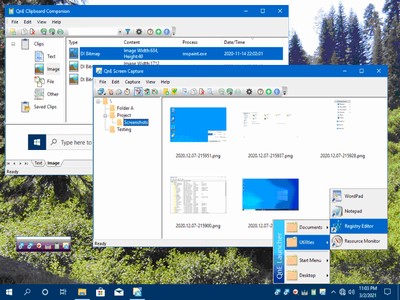
QnE Companion, by TeraByte, Inc., is a set of quick and easy to use utilities for your PC. Boost your productivity with a clipboard manager, screen capture utility, launcher, and desktop icon utility. These utilities can be conveniently and quickly accessed from the Windows taskbar, a small floating window or through traditional shortcuts.

The QnE Clipboard Companion gives you easy access to all your clips and makes the standard Windows clipboard much more powerful. You can search your clips, sort them, and even save them for repeated use.

The QnE Screen Capture utility makes it easy for you to capture a picture of your screen. Capture the entire screen or just a specific area with ease. Multiple monitor support is included.

The QnE Launcher provides a handy popup menu that you can populate with the programs, folders, and documents that you use the most. You can organize the menu with cascading submenus and get quick access to the things you use the most.

The QnE Desktop Companion is available as both a floating window and a taskbar toolbar. Whichever form you use it, it provides access to the QnE Icon Companion and a single location to quickly launch the other utilities included in the package.

The QnE Icon Companion, which is accessed through the QnE Desktop Companion, provides you with all the functionality you need to work with the location of icons on your desktop. Save and restore locations easily, search on a wide range of criteria, and more.

QnE Companion is an excellent package that you owe it to yourself to try.

SAM Broadcaster PRO 2022.3

Product Page: https://spacial.com/sam-broadcaster-pro/

sam-broadcaster-screen.gif

Start your Internet radio station with SAM Broadcaster, the number one Internet Broadcasting Solution since 2003

Sound Professional: Advanced audio features like cross-fade detection, gap killer, volume normalization and 5-band compressor and limiter.

Stream in multiple formats: Formats include AAC, aacPlus, AAC-HE, MP3, mp3PRO, Ogg and Windows Media. Servers include SAM Broadcaster Cloud, CheapestStream.com, SpacialNet.com, Shoutcast v1, Shoutcast v2, Icecast and Windows Media.

Web Integration: Give your station website a pro look with our easy to integrate web widgets. Keep your listeners engaged, show them now playing info, let them browse your media library and even request their favorite song!

Listener Statistics and reporting: See in real-time how your audience is growing. Access data logs for performance reporting and other useful reports on your station playback history.

Media Library: Organize large music libraries quickly into multiple categories, import information from tags and automatically look up track information via Amazon.com.

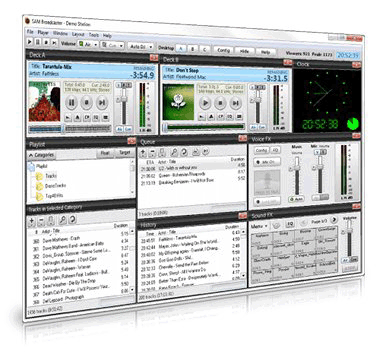
Dual deck players: Dual Deck players allow you to queue and position the next song while another song is playing – or let Auto DJ take care of it for you. Also allows for professional sounding cross-fading between tracks. The cue channel allows you to preview the songs over headphones before you play it live to the audience.

Crossfader and gap killer

Our smart crossfader will automatically detect the very best point to start fading tracks, or you can manually specify the best point. The Gap killer will make sure there is no silence between tracks – providing uninterrupted music all the time.

– Multi DJ management
– Integration with SAM Cloud solution
– Automatic failback to SAM Broadcaster Cloud
-Includes, SAM Cloud integration, upgrades and support for 12 months

Try Out Our 14 Day Trial