DocuFreezer 4.0.2207

Product Page: https://www.docufreezer.com
docufreezer-800-600.png

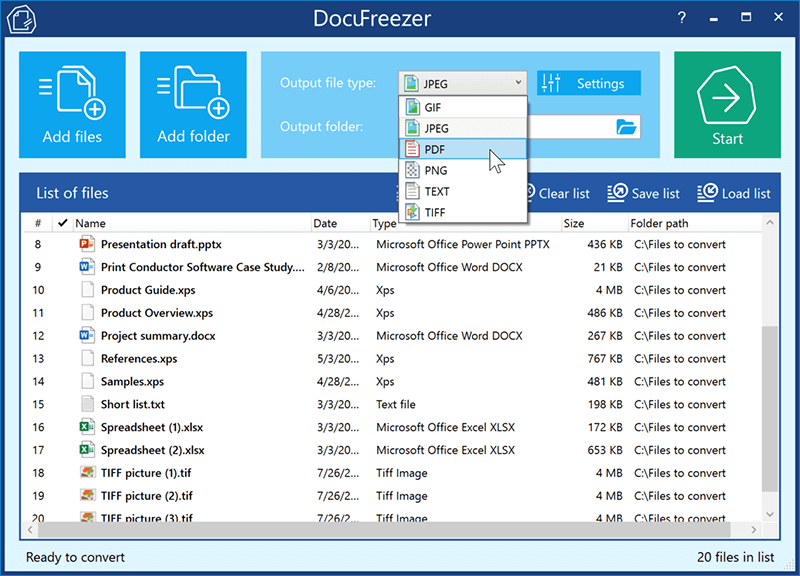
DocuFreezer is a batch file converter for Windows. DocuFreezer file conversion core processes different documents and images: Word, Excel, PowerPoint, Project documents, AutoCAD, SolidWorks, Solid Edge, Visio drawings, images, text files, and more. This simple software can batch convert multiple files at once. Popular scenarios & tasks: PDF to JPG, PDF to TIFF, DOC to PDF, XPS to PDF, XLS to PDF, JPG to PDF, Outlook emails to PDF, HTML to PDF, Text to PDF, OCR PDF to words, and more.

DocuFreezer automatically converts many files added to a list preserving the structure and color attributes of your original files. DocuFreezer output files are device independent and will be properly displayed on most PCs or other devices after conversion. The software can handle 80+ types of files and convert them to PDF, JPG, PNG, TIFF or TXT formats. It is also an OCR app – it can recognize text and save files to searchable PDF or TXT. You can find more information about DocuFreezer features at https://www.docufreezer.com


Users of Microsoft Office 2007 SP2, 2010 or 2013 (or newer versions) can benefit from the ability to convert Microsoft Office Word documents, Excel worksheets, PowerPoint presentations, Publisher, Visio files. Advanced options are also available for eDrawings, SolidWorks, AutoCAD, Solid Edge users – they can quickly save their DWG, DXF, DFT and other types of drawings to PDF or popular image formats.

What’s new in the latest version:
– New supported formats: iPhone HEIC images (.heic, .heif), vCard (.vcf)
– New rotation and auto-rotation operations
– Ability convert XLS, XLSX files without Microsoft Excel
– Ability to convert DOC, DOCX, RTF files without Microsoft Word
– Ability to convert MSG and EML files without Microsoft Outlook
– Added tooltips for each setting in the Advanced Settings
– Renewed Settings panel: Page range selection added to the Common tab
– Other improvements and fixes

Graphcat<

TSplus Remote Work 15.50

Product Page: https://tsplus-remotework.com/

Remote-Work-Graph-800x600.png

Out of necessity, millions of workers have been dispersed from their classic central office surroundings. The cost and logistics of duplicating software licenses alone can be enormous.
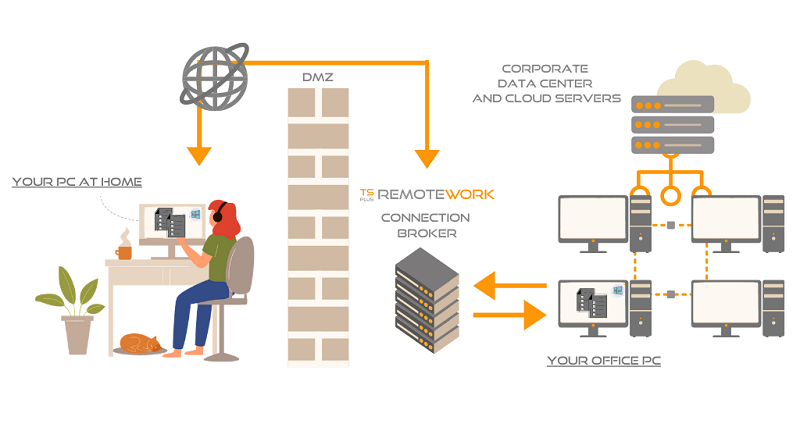
TSplus Remote Work provides users with secure remote connection to their office PC desktop for a seamless home office experience. It is an effortless and cost-saving solution for creating a complete work-from-home environment in no time!

– Cost and time saving:
Using Remote Work to access corporate desktop PCs can save organizations enough money in licensing costs to pay for itself on the first day of deployment. The Remote Work Admin Tool is fast to install and easy to configure and there are no Windows Server roles to install. A single server at the office running the software is enough to get started.

– Secure for your data:
It acts as a gateway, brokering connections between remote users and their office desktops.

– Multi-devices:
The gateway is also a web server, offering an easy to use, secure web portal to give users the ability to remotely access their office PCs via any device and any web browser!

– Familiar:
More than that, it connects them with the same session they would normally see whenthey are in the office. From License management to web portal customization, Remote Work keeps management simple for a successful and optimized transition to home office!

Download the first major version for a free 15-day trial.

ACDSee Photo Studio Professional 15.1.1.1982.1

Product Page: https://www.acdsee.com/en/products/photo-studio-professional

screenshot.png

Empower Beyond Photography
Kaleidoscopes have the power to inspire the artistic eye to look at life from a different angle. In a similar vein, ACDSee Professional 2022empowersphotographersafter the blink of a lens by granting them access to inspirational tools that can shape the world they share. Professional 2022 offers diverse new tools such as the time-saving Media Mode for interacting with the ACDSee photo database; and People Mode, an AI engine that seamlessly places a name to a face. A spectrum of new vision awaits you with Professional 2022s improvements to Pixel Targeting, Tone Curves, and a sharper command of noise reduction.

Putting a Name to a Face just got Easier
People Mode is new to ACDSee Professional 2022 and is born of a union between ACDSees industry-leading Face Detection & Recognition feature and a keen application of machine learning. Photographers from all walks of life will enjoy the dedicated space for distinguishing by client, family member, or person of interest, allowing for the management of people by merging, renaming, or deleting faces, or taking labelling suggestions from the AI assistant for grouping similar unnamed people.

Filter at Lightning Speed
Media Mode is ACDSees database-driven powerhouse for viewing and accessing the folders you have either browsed in Manage mode or cataloged into the ACDSee database. This streamlined, uncluttered view of the media assets managed by ACDSee offers sorting, grouping, and filtering in any combination.

Non-destructive Constructive Tools
The surgical precision of the Pixel Targeting tool has been added to Develop Mode and includes the familiar color wheel. Pixel Targeting is now teamed with the currently selected brush or gradient, meaning each brush or gradient gets its own Pixel Targeting settings. Use these highly effective selection methods to achieve a perfect edge without derailing your pursuit of creativity and discover a new preferred method for creating masks.