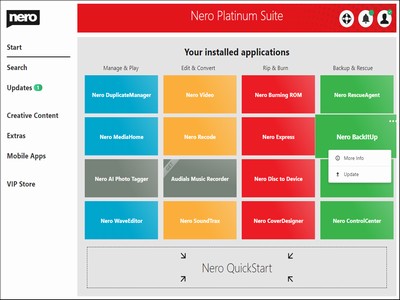
Nero Platinum Suite 24.5.89

Product Page: http://www.nero.com/eng/products/nero-platinum/

Right-Context-Menu400X300.jpg

Nero DuplicateManager Photo cleans your photo archive quickly and reliably.

Nero BackItUp
Nero BackItUp quickly and easily backs up your valuable data to an external hard drive, optical media, or the cloud.


Nero Video
Nero Video leaves nothing to be desired when it comes to creating videos and slideshows in an easy, fast and professional way. Get sharper than reality with the 8K playback feature.

Nero Recode
Nero Recode converts and rips videos and music to all standard formats for your mobile devices.

Nero MediaHome
Nero Media Home is the ultimate media organizer. Now featuring a world first: the Nero AI Photo Tagger.

Nero Burning ROM
Nero Burning ROM is still the #1 software for burning and copying data, video, photos, and music to CD, DVD, and Blu-ray Discs.

Graphcat<

BW Meter 9.0.2.4

Product Page: https://www.hexagonwebs.com/bandwidth-monitoring

bmicon512X512.png

BW Meter is a powerful bandwidth meter, monitor, traffic controller and firewall, which measures, displays and controls all traffic to/from your computer or on your network. Unlike other products, it can analyze the data packets ( where they come from, where they go, which port and protocol they use). BW Meter creates statistics for all computers in your network, measuring and displaying all LAN traffic as well as download and upload from the internet. This makes it possible to distinguish between local and internet traffic for example. BW Meter can also be used for traffic control by setting a speed limit for all kinds of connections or restricting access to certain internet sites. You can even define filters which show your transfer with certain internet addresses ( e.g. to see how much data you download from your favorite news server). BW Meter is ideal for home users to get an overview of how much bandwidth they use, as well as small to large businesses, where on computer can control the traffic and maintain the statistics of downloaded/ uploaded data of all computers in the network. The product is easy to configure and offers a rich set of options and features for beginners as well as experts and network administrators.

UFS Explorer RAID Recovery 9.9

Product Page: https://www.ufsexplorer.com/ufs-explorer-raid-recovery.php

2400X300.jpg

UFS Explorer RAID Recovery is an accomplished software product geared towards RAID-related data recovery cases, besides usual simple tasks. The program allows reconstructing RAID systems of various configurations, including standard, nested or custom RAID patterns, and effectively restores data lost due to various logical issues, while a set of helpful options like file sorting, search, filters, preview, indication of a state, etc. make the process easy and smooth. The software supports a wide range of file systems used in Windows (NTFS, FAT, FAT32, exFAT), macOS (HFS+, APFS), Linux (Ext2, Ext3, Ext4, XFS, JFS, ReiserFS, UFS/UFS2, Btrfs), BSD/Solaris (ZFS) and is capable of working with various modern storage technologies, like mdadm, LVM, LDM, MS Storage Spaces, Drobo BeyondRAID, Synology Hybrid RAID, Btrfs-RAID, Apple Software RAID, Apple Fusion Drive, BitLocker and APFS encryption. The utility makes it possible to build RAID in a virtual mode, edit RAID parameters or save them for further work. Also, the software features an embedded hexadecimal viewer for brief analysis of data on partitions and disks. Furthermore, the program provides an extensive set of instruments for work with damaged drives. It allows defining settings related to access and usage of a storage device, creating a full or partial disk image with configurable parameters and rules for the omission of bad blocks. Drives and arrays with bad blocks can be processed using bad sector maps generated during imaging, through recognition of a given pattern or created by other compatible tools. In addition to RAID and RAID-based devices, like NAS, the software is applicable for data recovery from other storages: PCs and laptops, USB flash drives, memory cards, external hard drives, virtual machines, disk image files, etc. Among the supported virtual technologies are VMware, Hyper-V, VirtualBox, QEMU, XEN, Parallels, disk images of Apple, EnCase, R-Studio and other formats.