TSplus Server Monitoring 5.2

Product Page: https://tsplus-servermonitoring.com/
Server-Monitoring-Graph-1-800x600400X300.jpg

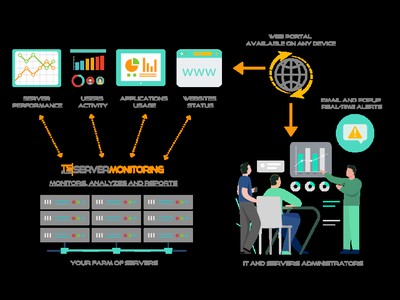
Server Monitoring is the smart monitoring and reporting solution to set up on your server(s). It tracks, records and analyzes users activity in every application, over Remote Desktop and Terminal Services connection method. With session recording, Server Monitoring records all user activity from the moment a user logs into a Windows machine via RDP or Terminal Server. It captures all activity taking place in the opened session over the time. Server Monitoring performance and applications’ analytics instantly alert IT teams to abnormal or suspicious user activity. It delivers an enterprise-scale porting of all terminal servers sessions, Citrix session and other standard remote control software in a compressed and searchable format. It checks websites performance, visits and stability and send real-time alarms in case of suspicious event that could lead to a failure. The result is a complete solution for identifying and managing your production’ environment. You can see the details of all Windows sessions, sorted and grouped according to each server. In many cases, this report list is already enough information for your auditing and troubleshooting needs. You can set customizable alerts regarding any sensitive, unusual, suspicious threshold you fixe and get proactive warnings to troubleshoot important issues faster. By making important events visible in real time, it is possible to quickly and effectively respond to any deliberate or inadvertent threats to IT security, system integrity, regulatory compliance or company policies. Overcome employee idleness with user activity monitoring. Never find yourself over- or under-licensed with license usage reports. Understand, Predict and avoid incident on yout servers at a glance: download Server Monitoring now for free!


Graphcat<

Guiffy eXpert Windows 12.0.543.0

Product Page: https://www.guiffy.com/Merge-Tool.html

Guiffy117W10_800x600.png

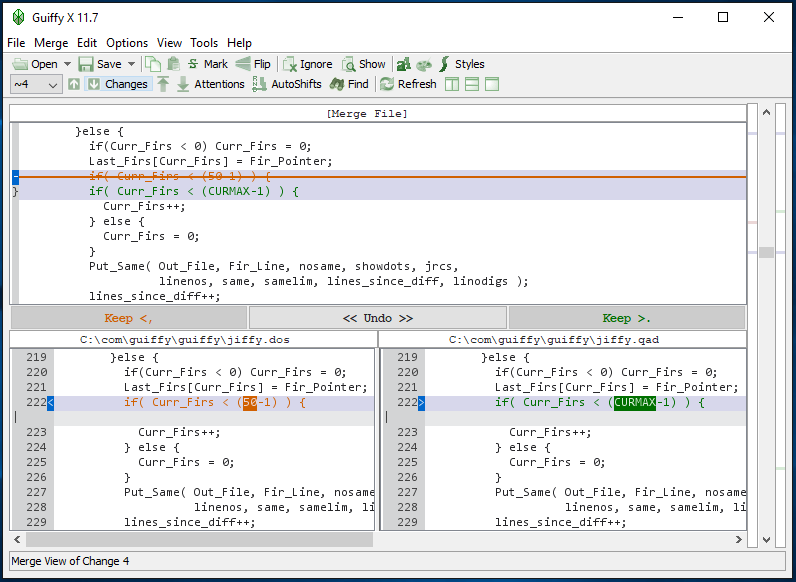
Guiffy eXpert is a visual file compare Diff tool, Merge tool, and Folder compare tool all-in-one that makes comparing, merging, and upgrading sources as easy and reliable as possible. Guiffy comes with: command line interfaces, an API package, Eclipse and NetBeans integrations and Explorer integration. Guiffy recognizes over 150 source file encoding formats (such as UTF8, UTF16, and many other mutlti-byte formats). Advanced visual compare features include in-line difference highlighting and syntax highlighting for more than 20 source code languages. Our Trustworthy 3-way merge, SureMerge, was designed from day 1 to avoid all the problems that plague other 3-way diff based merge tools. SureMerge surpasses all other merge tools with its intelligent hybrid algorithms and ease-of-use. See our SureMerge White Paper which includes test kit files for evaluating 3-way merge tools. Guiffy is implemented entirely in Java with a Swing GUI. Its cross-platform and available for: Windows(2000, XP, 2003, 2008, 2012, Vista x32 and x64, Windows 7 x32 and x64, Windows 8 x32 and x64, Windows 10 x32 and x64), MacOS X, Linux(any architecture or distribution), Unix(Solaris, HPUX, AIX, Others), and any Java-enabled platform. This download includes an easy-to-use Windows installer.

BCWipe Total WipeOut 5.02.1

Product Page: https://www.jetico.com/data-wiping/wipe-hard-drives-bcwipe-total-wipeout

erase20hard20drives20wizard_0.png

Before selling, disposing or donating used computers, securely erase hard drives with BCWipe Total WipeOut. Trusted as the de-facto standard for the U.S. DoD, BCWipe Total WipeOut erases boot records, filesystem structures, operating system files and service areas like Host Protected Area (HPA) and Device Configuration Overlay (DCO). BCWipe Total WipeOut comes built with the U.S. Department of Defense (DoD 5220.22-M) and U.S. Department of Energy (DoE M 205.1-2) standards, as well as other popular wiping standards. In addition, you can also create your own customized wiping scheme. The wiping procedure can be run on any hardware platform with x386 and 64-bit AMD/Intel architecture, Itanium or 64-bit SPARC, regardless of the operating system installed on the computer.