Byte Recovery 1.2.2.193

Product Page: https://www.byte-recovery.com
byterecovery-main.png

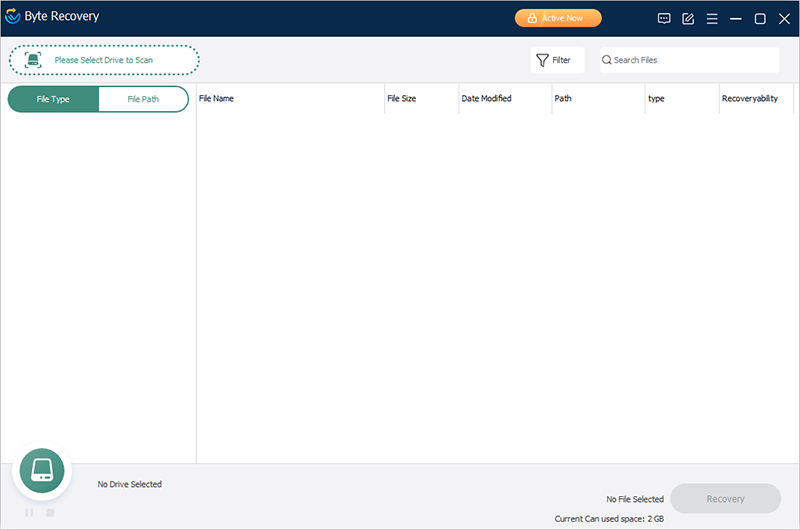
Byte Recovery is an easy-to-use Windows professional undelete tool that can help you recover deleted 1000+ types of files, such as png, doc, mp3, mp4, pst, HTML, etc. even have been permanently deleted. It supports recovering deleted files from local disks, external disks, USB drives, SD cards, and other removable devices, even formatted disks. The recovery success rate can be up to 95%.
1. Recover Files For Different Loss Situations
Accidental & permanent deletion, Disk formatted, virus attack? No problem! This professional data recovery tool helps you recover files easily.
2. Recover Data From A Variety Of Devices
Byte Recovery recovers data from HDD, SSD, External hard disks, Floppy Disks, USB flash drives, Memory cards, Digital cameras, and any other storage devices.
It supports recovering data from FAT, NTFS, HFS, HFS+, HFSX, Ext2, and Ext3 file systems.
3. 1000+ Types Of Files Can Be Recovered
Byte Recovery searches for multiple types of files, not only documents but also videos, audios, emails, etc.
4. Fastest Scan
With an advanced algorithm, Byte Recovery can finish the Scan process in a short time, saving you a lot of time. You can also choose your recovery file types or type in keywords in the Search Files box to narrow down searching results and save more time.
5. Interactive Experience
The results of scanning can be shown in two ways: file type or file path. Wise and easy file filter by file name, file size, date modified, path, type and recovery ability. Select and preview the files before recovering them.
6. Compatible with Almost All Windows Versions
It allows you to recover lost files in your Windows system (64 and 32-bit). It has been developed and fully tested to work great on Windows 11, 10, 8.1, 8, 7, Vista, and Windows XP.
7. Portable Available
Byte Recovery also has a portable version, which means that you don’t have to install it, you can use it on your PC without writing to the hard drive.


Graphcat<

BALKAN OrgChartJS 8.04

Product Page: https://balkan.app/

screenshot-orgchart-js.png

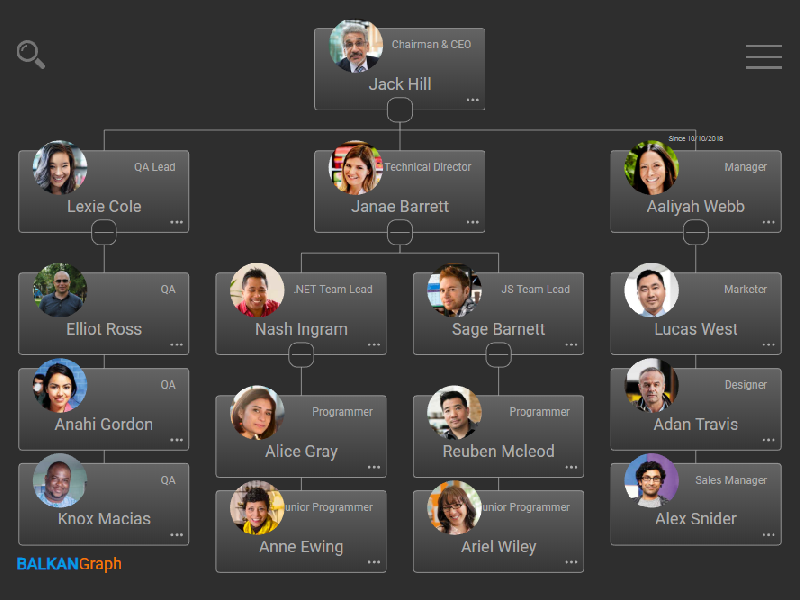
OrgChart JS is designed for making neat flowcharts using HTML5, CSS, and JavaScript. Using server-side components, developers can implement a specially crafted editing interface. To create unique appearance for your app, you can make use of a set of default skins and color palettes or make your own set. If your users work with big diagrams, a search field which allows finding a particular item will serve as a handful tool.
The edit mode makes it easy to create and edit diagram items. All you have to do is type a name, title, some additional info, and OrgChart JS will create or edit the item and rebuild your diagram automatically. If you work with a big data set, you can collapse your diagram leaving only the part you are working with. OrgChart JS has a zooming and scrolling features One of the best things about OrgChart JS is that it does not require any special programming skills due to simple configuration syntax.
OrgChart JS features the ability to build organization charts of any complexity. An organizational chart represents the most natural way of displaying the hierarchical structure of an organization. You can use it to show the structure of a company, business, or project team.
OrgChart JS allows you to export your chart/diagram to PDF, PNG, CSV or SVG using our export service. You could also install your own export service.
OrgChart JS component consists of nodes and connectors. You can use nodes of some particular type: just textual, with an image or any other custom HTML and SVG elements, or create your own. Creation of a unique style for your diagram will be easy. The look and behavior are fully customizable, so you can set up any appearance you need via CSS or object properties.
You can easily integrate this OrgChart JS library in any web app. It supports the data loading in the JSON format, and can be used with any server-side back-end.
OrgChart JS supports unlimited number of sub trees in one chart object and two states of a node.

Print Conductor 8.0.2207

Product Page: https://www.print-conductor.com/

print-conductor-7-0.png

Print Conductor is a batch printing software. If you regularly have to open and print multiple files, this smart tool can be a real time-saver.

Manually printing several files is tedious work – it generally requires opening and printing each file separately in the applications used to create them. Once you add files to print, Print Conductor automates the rest of the process.


Print Conductor is easy to use. Just add files to be printed to the list and click the ‘Start Printing’ button.

All popular file formats are supported: PDF files, plain texts, Microsoft Office and OpenOffice documents and presentations, RTF, HTML, MHT, XML files, AutoCAD, Solidworks and Inventor drawings, Visio charts, Photoshop PSD, JPG, TIFF, PNG, PCX, DCX, BMP and JBIG images, WMF and EMF metafiles.

Print Conductor can batch print large quantities of documents on any type of printer: desktop printers, network printers or virtual printers. If you select Universal Document Converter as a virtual printer to use with Print Conductor, you can batch convert a list of documents, presentations, worksheets or drawings to a variety of other formats: PDF, TIFF, JPEG, PNG, GIF, PCX, DCX, or BMP.

What’s new in version 8.0:
– Printing DOC, DOCX, and RTF files without Microsoft Word
– Printing EML, MSG message files without Microsoft Outlook
– Redesigned Advanced Settings panel with options to export/import current settings
– Ability to set paper source for a specific page range of a document
– Ability to skip repeated pages of documents
– Ability to reverse the order of files in the List of Documents
– Ability to resume printing only when the printer queue is empty
– Ability to process files without extension by checking their signature
– Printing XML and HTML files as source code
– Ability to print HTML files in “fit to page” mode
– Ability to limit the number of copies in a print job
– Other improvements