Vidmore Player

Product Page: https://www.vidmore.com/vidmore-player/
main-interface.jpg

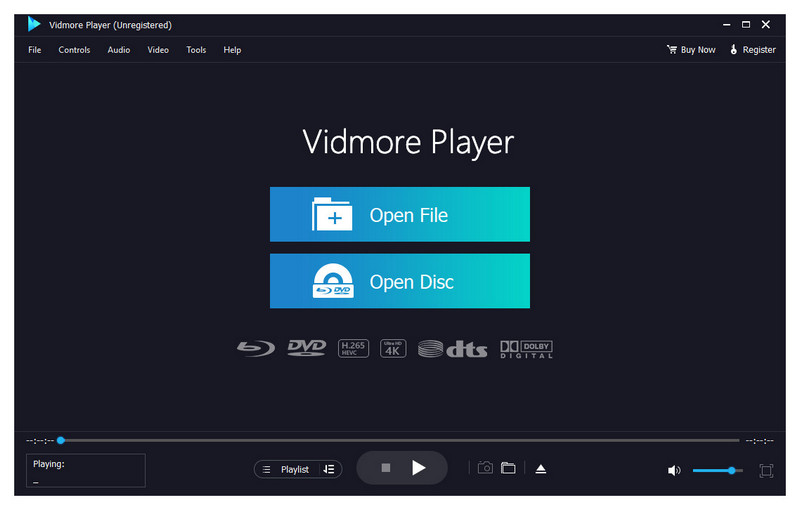
Do you have trouble in playing your Blu-ray disc/folder/ISO files and DVD disc/folder/ISO files? Are you looking for a powerful media player? Vidmore Player is your top choice. With it, you could play your Blu-rays and DVDs without any hassle.

Key functions:


1. Play Blu-ray disc/folder/ISO files
With Vidmore Player, you could play your Blu-ray disc/folder/ISO files with the lossless sound effect as well as HD image quality. It supports various Blu-ray disc types, such as BD-5, BD-9, BD-25, BD-50, etc. It provides the function to customize video effects like adjusting the hue/brightness/contrast/saturation and Gamma.

2. Play DVD disc/folder/ISO files
Do you want to play old DVD discs which you collected before? Do you want to play DVD folders? Do you want to play ISO files? Vidmore Player could accomplish this for you. It is able to play DVD disc/folder/ISO files and also lets you change the subtitle track/audio track.

3. Play any common videos
If you want to play any popular video and audio files, you could have a consideration of Vidmore Player. It could not only play Blu-ray disc/folder/ISO files and DVD disc/folder/ISO files, but also play other common videos like MP4, MPG, M4V, TS, MTS, M2TS, MXF, WMV, ASF, MKV, F4V, FLV, VOB, etc. In addition, you can enjoy the 4K UHD and 1080p/720 HD videos as well.

4. High output quality
With advanced audio decoding technologies like Dolby, DTS, AAC, TrueHD and more, you could enjoy the high quality of your media files. You could also click the Snapshot icon or use the shortcut key to take a screen shot when you play your movies.

Graphcat<

Apeaksoft Video Editor for Mac

Product Page: https://www.apeaksoft.com/video-editor/

interface.jpg

Apeaksoft Video Editor for Mac is powerful for you to deal with video editing. With it, you are able to easily crop, clip, merge or watermark videos as you like. If you want to remove the annoying letterbox from your favorite videos, its crop feature can do you a good favor.

Key functions:

1. Rotate and crop videos
With Apeaksoft Video Editor for Mac, you could rotate or flip your videos vertically or horizontally according to your need. If you want to cut off the unwanted part of your videos, the crop function could do you a favor. After selecting the crop size, you can get the part you want simply.

2. Clip your videos and add watermark to videos
Apeaksoft Video Editor for Mac allows you to clip your videos easily. It provides Basic Clip and Advanced Clip function. With the Basic Clip function, you could keep or remove the selected part from one video. Via the Advanced Clip function, you could clip the video into several parts and merge them together. Moreover, you are able to add watermark to your own videos.

3. Join video and audio files
With the Video/Audio Joiner function, you could merge several video and audio clips into one media file. Just in few minutes, you could finish this process.

4. Add video effects and enhance videos
After loading your source files, you could adjust brightness, contrast, saturation, hue as well as audio volume according to your need. Its Video Enhance function lets you remove image noise of videos, reduce video shaking, etc.

Aiseesoft Mac FoneTrans 9.1.50

Type: Shareware
Cost: $20.76
Size: 70.67 MB
Release date: Apr 11 2022
Platform: Mac OS X,
Publisher’s Site:  https://www.aiseesoft.com/
Publisher’s Product Page:  https://www.aiseesoft.com/mac-ios-transfer/
Country: China


Aiseesoft Mac FoneTrans

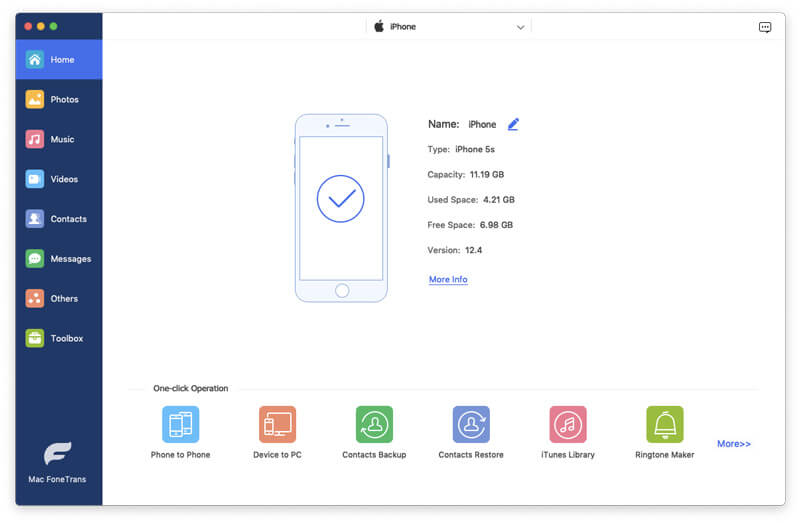
Aiseesoft Mac FoneTrans is the first-granted iPhone Transfer software, which does well in file transfer between iOS devices and computer. It can transfer video, music, photo and many other multimedia files from computer to iOS devices. It also enables you to make iPhone ringtone and convert image format from HEIC to JPG/PNG and more. And now it enables you to rotate photos when previewing them.

Key features:

1. Transfer file between iOS device and Mac
Aiseesoft Mac FoneTrans can help you import video, music, photo, and other media files from computer to iPhone/iPad/iPod for enjoyment anywhere and anytime. It also allows you to export files from iOS devices to Mac for backup.

2. Share files between iPhone/iPod/iPad
Apart from transferring files between computer and iOS devices, you are allowed to transfer files between any iOS devices for file sharing and the shareable files include music, movie, picture, TV show, Podcast, iTunes U, eBook, camera roll, ringtone, etc.

3. Back up iPhone SMS (MMS) and Contacts
With Mac FoneTrans, you can copy SMS to Mac for backup and they can be saved in excel, text or html format. Users can also back up the important contacts to Mac in case of losing or damaging of their iDevices.

4. De-duplicate Function
To avoid repeated contacts/music, you can delete repeated ones or merge different contacts of the same person.

5. Ringtone Maker and HEIC Converter
You can make ringtones for your iOS device at ease with this iOS data transfer tool. You can also convert HEIC images to other common formats like JPG or PNG.