Centurion Setup 40.0

Type: Shareware
Cost: $130
Size: 23.18 MB
Release date: Jul 19 2021
Platform: Win2000,WinXP,Win7 x32,Win7 x64,Windows 8,Windows 10,WinServer,WinOther,WinVista,WinVista x64
Publisher’s Site:  http://www.Gammadyne.com
Publisher’s Product Page:  http://www.gammadyne.com/centurion.htm
Country: United States of America

Centurion Setup

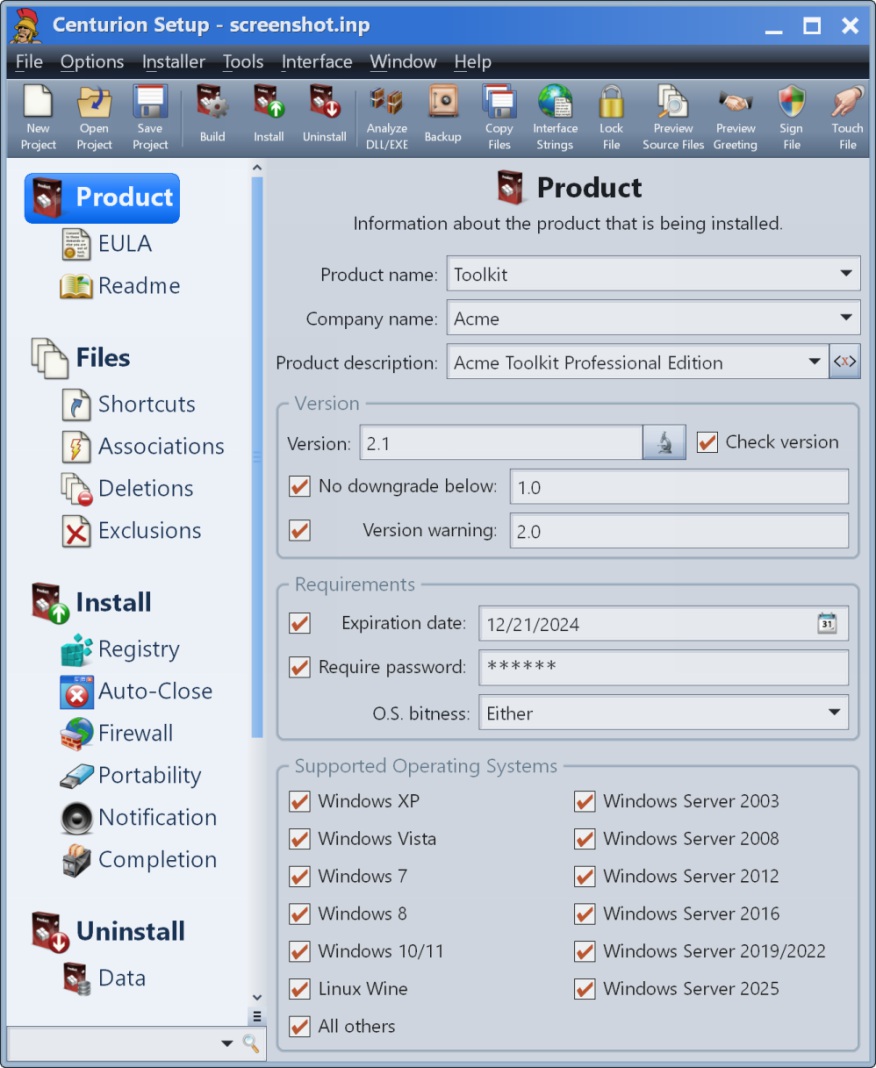
After putting a lot of effort into your software, it’s time to distribute it. Don’t spend weeks wrestling with a complicated installation builder when you are so close to being done. Centurion Setup is extremely easy to use, and you can have a professional installation program built in minutes. The installer is self-contained in a single compressed executable file, and runs on all versions of Windows. Centurion Setup is simple to learn, but also feature rich, with support for uninstallation, multiple languages, interface customization, license agreements, readme files, file associations, DOS batch operations, DLL installation, automated installations, patches, expiration dates, shared files, command line building, password protection, and much more. Don’t stumble over scripts – hit the finish line running!

Graphcat<

ACDSee Photo Studio Home 25.1.1.1946

Type: Shareware
Cost: $59.99
Size: 1.15 MB
Release date: Apr 13 2022
Platform: Win2000,WinXP,Win7 x32,Win7 x64,Windows 8,Windows 10,WinServer,WinOther,WinVista,WinVista x64
Publisher’s Site:  http://www.acdsee.com
Publisher’s Product Page:  https://www.acdsee.com/en/products/photo-studio-home
Country: Canada


ACDSee Photo Studio Home

An Arsenal of Digital Asset Management Tools
Clean and simple Digital Asset Management (DAM) should not be an enigma lost in the mists of Shangri-la. Home 2022 offers photographers of any skill level the best DAM tools on the market. Easy to use and robust enough to tackle any challenge, Home 2022 includes diverse new tools such as the time-saving Media Mode for interacting directly with the ACDSee photo database; and People Mode, an AI engine that seamlessly places a name to a face. A vibrant and colorful perspective awaits you with Home 2022s improvements to Tone Curves and support for higher ISOs.


Putting a Name to a Face just got Easier
People Mode is new to ACDSee Home 2022 and is born of a union between ACDSees industry-leading Face Detection & Recognition feature and a keen application of machine learning. Photographers from all walks of life will enjoy the dedicated space for distinguishing by client, family member, or person of interest, allowing for the management of people by merging, renaming, or deleting faces, or taking labelling suggestions from the AI assistant for grouping similar unnamed people.

Filter at Lightning Speed
Media Mode is ACDSees database-driven powerhouse for viewing and accessing the folders you have either browsed in Manage mode or cataloged into the ACDSee database. This streamlined, uncluttered view of the media assets managed by ACDSee offers sorting, grouping, and filtering in any combination.

Unrivalled Digital Asset Management
ACDSee has superior file management capabilities. Finding, sorting, moving, organizing, and sharing everything you need for complete mastery over your photography workflow is right here, at your fingertips. No uploading or importing your images. Add ratings, hierarchical keywords, tags, categories, location data and customizable color labels. And for 2022, we have added SVG file support to our already extensive list of supported file types.

Q2ID 2021.0

Type: Demo
Cost: $199
Size: 46.16 MB
Release date: Jan 01 2021
Platform: Win2000,WinXP,Win7 x32,Win7 x64,Windows 8,Windows 10,WinServer,WinOther,WinVista,WinVista x64
Publisher’s Site:  http://www.markzware.com
Publisher’s Product Page:  https://markzware.com/products/q2id/
Country: United States of America


Q2ID

Q2ID is an InDesign plugin to quickly convert QuarkXPress documents in Adobe InDesign. No more re-creating documents from scratch. The Q2ID InDesign plugin gives you a big head-start on QuarkXPress to InDesign data conversion.

Our Q2ID Bundle Subscription gives you access to all current Q2ID plugin versions. You will have access to Q2ID for InDesign CC, CS6, CS5.5 and CS5 both Macintosh and Windows platforms with a single purchase and License.

Currently running Adobe InDesign CS5 but thinking of upgrading? You’ll be covered when you decide to upgrade to CS6 or CC.
If Adobe releases a new CC version which breaks compatibility with our current CC plugin, you’ll get the upgraded plugin for free.
What’s that you say? Quark released a new version? You’ll have access to the upgraded plugins which can convert the new Quark documents.
Easy License Management: Never Remember an Activation Code again!

Markzware’s Q2ID data conversion software converts the intricate details of the original QuarkXPress document and instantly re-creates the document within Adobe InDesign. Q2ID works in InDesign CC, CS6, CS5.5 or CS5 on both Macintosh and Windows platforms.

Items that convert from QuarkXPress using the Q2ID QuarkXPress to InDesign plugin include: page positioning, color models, fonts and styles, images, and text attributes, as well as tables, layers, blends, runarounds, linked text boxes, anchored boxes, and pantone colors.

Q2ID converts Quark 4 through Quark 10 documents. That gives you the ability to convert over 15 years worth of documents.

Read more here: https://markzware.com/products/q2id/