Effie for Windows 1.14.3

Type: Freeware
Cost: $0
Size: 53.86 MB
Release date: Dec 30 2021
Platform: Win2000,WinXP,Win7 x32,Win7 x64,Windows 8,Windows 10,WinServer,WinOther,WinVista,WinVista x64
Publisher’s Site:  https://www.effie.pro/
Publisher’s Product Page:  https://www.effie.pro/
Country: Singapore

Effie for Windows

Effie is a note-taking, list-making, mind mapping and writing tool that works across multiple devices.


She’s flexible enough for you to write whatever you like, powerful enough to help you with your work and life, yet simple enough so you won’t be distracted by any bells and whistles when writing.

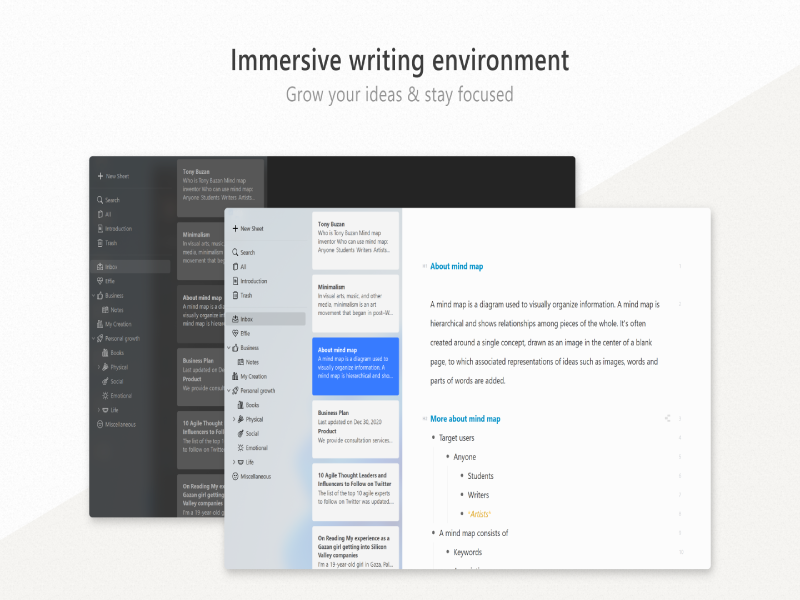
The combination of mind mapping and list-making is the belle of the ball, all edits sync on both the mindmap and the list.

Use Effie across your devices, so you can write anywhere, anytime. All your work syncs automatically. Let’s create something great together in Effie.

– All your work is in one place and within reach. So there’s no confusing file management.
– All your work is saved and synced in the cloud, so you can access anything from anywhere.
– An immersive writing environment to keep you away from distractions.
– One tap to convert an unordered list into a mind map, and vice versa.
– Edits on the unordered list will be synced with a mind map, saving you from jumping the hoops from one app to another.
– Flexible export to a PDF, DOCX, Markdown, EffieSheet, and JPEG file, which looks awesome when checked on the phone.
– Simplified markup language allows you to finish your writing without even lifting your fingers away from the keyboard.
– Markup Insight panel woken by a / makes it much easier to use the markup language.
– You can choose to write in the dark or light theme, whichever drives your creativity and productivity.
– Different styles are available for your mind maps: Fishbones, Logic Chart, Matrix, Timeline, and Org Chart.
– Built with native codes, so it occupies fewer system resources than you’d think.

Download and use Effie on all your devices, Windows, Mac, iPhone, iPad and Android coming soon, to enjoy the seamless writing, mind mapping, brainstorming and note-taking experience.

Graphcat<

PHPMaker 2021.0.10

Type: Shareware
Cost: $319.95
Size: 62.96 MB
Release date: Feb 22 2021
Platform: Win2000,WinXP,Win7 x32,Win7 x64,Windows 8,Windows 10,WinServer,WinOther,WinVista,WinVista x64
Publisher’s Site:  http://www.hkvstore.com
Publisher’s Product Page:  https://phpmaker.dev
Country: Hong Kong


PHPMaker

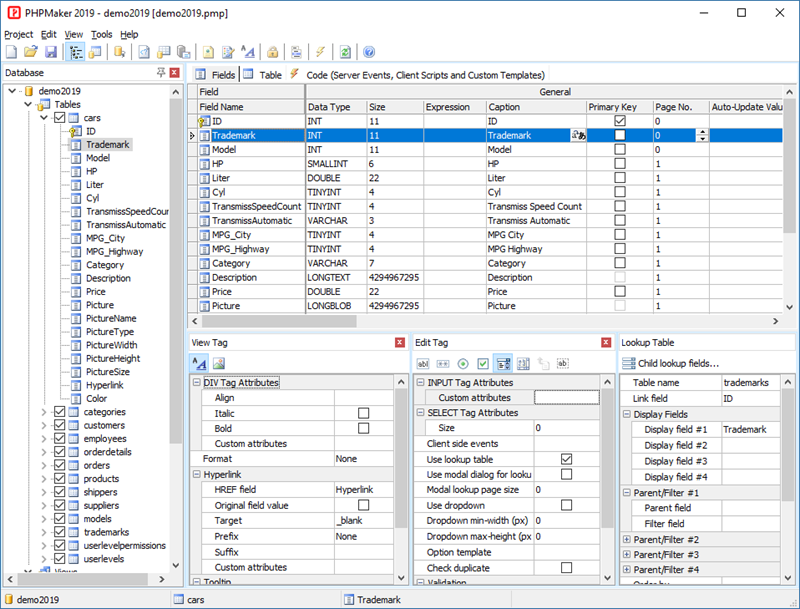
PHPMaker is a powerful automation tool that can generate a full set of PHP scripts quickly from MySQL, PostgreSQL, Microsoft SQL Server, Oracle and SQLite databases. Using PHPMaker you can instantly create web sites that allow users to view, edit, search, add and delete records on the web. PHPMaker can also create summary reports, crosstabs reports and dashboards with JavaScript (HTML5) charts (column, bar, line, pie, area, doughnut, multi-series and stacked chart) to summarize and visualize your data. PHPMaker is designed for high flexibility, numerous options enable you to generate PHP applications that best suits your needs.The generated code is clean, straightforward and easy-to-customize.The PHP scripts can be run on Windows servers or Linux servers.PHPMaker can save you tons of time and is suitable for both beginners and experienced develpers alike.

Tag That Photo 3.2.21309

Type: Shareware
Cost: $19
Size: 68.80 MB
Release date: Nov 05 2021
Platform: Win2000,WinXP,Win7 x32,Win7 x64,Windows 8,Windows 10,WinServer,WinOther,WinVista,WinVista x64
Publisher’s Site:  http://www.tagthatphoto.com
Publisher’s Product Page:  http://www.tagthatphoto.com
Country: Canada


Tag That Photo

Tag That Photo truly automates the task of photo organization with its patented face recognition technology that tags faces with fewer errors and faster than industry leaders, including Microsoft and Google. Automating the face tagging process saves tons of time.

Tag That Photo starts by scanning each photo to find every face. With some face recognition wizardry, a unique facecode is generated for each one. As you add face tags to each unique face, Tag That Photo quickly & accurately matches it to other photos of the same person. Finding favorite treasured photos is infinitely easier with Tag That Photo’s powerful search function. Choose to search by date, person’s name, keyword tags, file name, file type or a combination.

Concerned about the number of photos you have? Tag That Photo adds order to your super-sized photo library. Its processor is designed to scan hundreds, or hundreds of thousands of images with speed and accuracy. This is especially important upon the initial scan. Fewer photos take less time, more photos take a bit more. Either way, Tag That Photo is an industry leader, indexing your photos quickly and more accurately than others in the face recognition space.

For importing, you’ve probably discovered many photo management apps are unable to import existing tags. Tag That Photo values the countless hours you’ve spent tagging your favorite photos. It simply doesn’t make sense to us to lose such an investment of time and effort. Tag That Photo’s Personal and Family Plan subscriptions process and import existing Picasa, Windows Photo Gallery and Fotobounce tags accurately. Future releases will enable easy importing from other photo organization applications.

Your online privacy is our priority. Tag That Photo keeps everything local on your computer by default. This includes people, faces, keywords – you name it. We do not collect identifiable subscriber data, outside of your email address and we are not selling any data to third parties.