RationalPlan Single Project 5.8

Type: Shareware
Cost: $87
Size: 107.46 MB
Release date: Oct 18 2021
Platform: Win2000,WinXP,Win7 x32,Win7 x64,Windows 8,Windows 10,WinServer,WinOther,WinVista,WinVista x64
Publisher’s Site:  https://www.rationalplan.com/about/
Publisher’s Product Page:  http://www.theprojectalternative.com/single-project-management-software.php
Country: Romania


RationalPlan Single Project

RationalPlan Single Project is a powerful project management software designed to assist project managers in developing plans, allocating resources, tracking progress, managing budgets and analyzing workload. You can use RationalPlan in the area of construction, engineering, services and consulting, business or software development. It will help you to complete your project as scheduled, on time and within budget.


The application is an affordable alternative to Microsoft Project and it is covering project management area from WBS construction, project planning and scheduling to critical path management, overallocated resources detection, progress tracking, cost estimation, etc.

Here are some key reasons for using RationalPlan Single Project:

* provides a clean way to break down your project, build schedules, allocate resources, and manage budgets
* get resources and finances under control (realistic cost estimates mechanisms, screening cash-flow time distribution for tasks and resources)
* gives you a step by step project guide that walks you through the project management process so you can lay down a project plan immediately
* different scenarios capability via multiple undo and redo levels will allow you to make changes and safely get back
* track project evolution regarding task completion, time and costs
* brings project critical issues to your attention (critical activities with configurable slack, overallocated resources)

RationalPlan is a project management solution that follows the basic project management guidelines.

Graphcat<

LPAR2RRD 7.40

Type: Freeware
Cost: $0
Size: 11.88 MB
Release date: Apr 04 2022
Platform: Linux,Linux Console,Linux Gnome,Linux GPL,Linux Open Source
Publisher’s Site:  https://www.xorux.com/
Publisher’s Product Page:  https://www.lpar2rrd.com
Country: Czech Republic


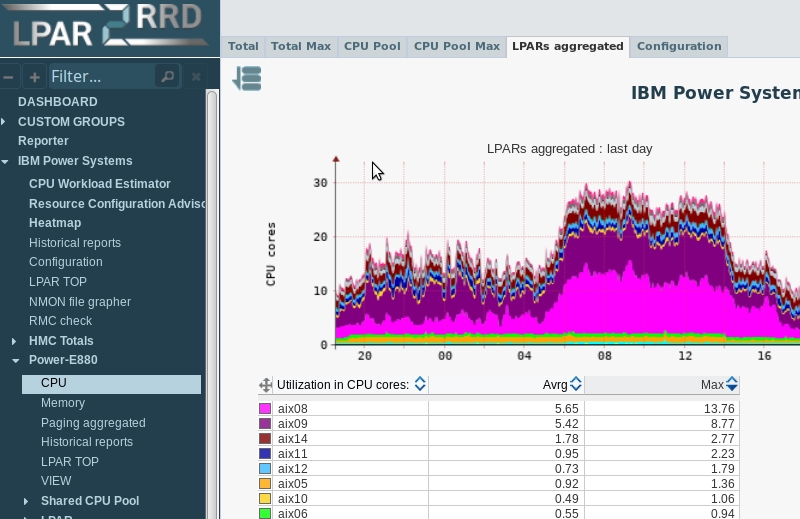
LPAR2RRD

Server and Database Performance Monitoring: IBM Power Systems, VMware, Nutanix, Oracle Database, Oracle VM, Oracle Solaris, oVirt, Red Hat Virtualization, Microsoft Windows Server and Hyper-V, XenServer, Citrix Hypervisor, Amazon Web Services, Google Cloud, Microsoft Azure, Kubernetes, Red Hat OpenShift, Linux, Proxmox, CloudStack, PostgreSQL Database, Huawei FusionCompute, Microsoft Storage Spaces Direct (S2D), Microsoft SQL Server

Take control and see all your physical and virtual servers from one point of view.
Prognosis for all your Infrastructure.
Monitor and troubleshoot pro-actively.
Optimize your mission-critical IT infrastructure.

DocuFreezer 4.0.2201

Type: Freeware
Cost: $0
Size: 153.58 MB
Release date: Dec 16 2021
Platform: Win2000,WinXP,Win7 x32,Win7 x64,Windows 8,Windows 10,WinServer,WinOther,WinVista,WinVista x64
Publisher’s Site:  https://www.fcoder.com
Publisher’s Product Page:  https://www.docufreezer.com
Country: Latvia


DocuFreezer

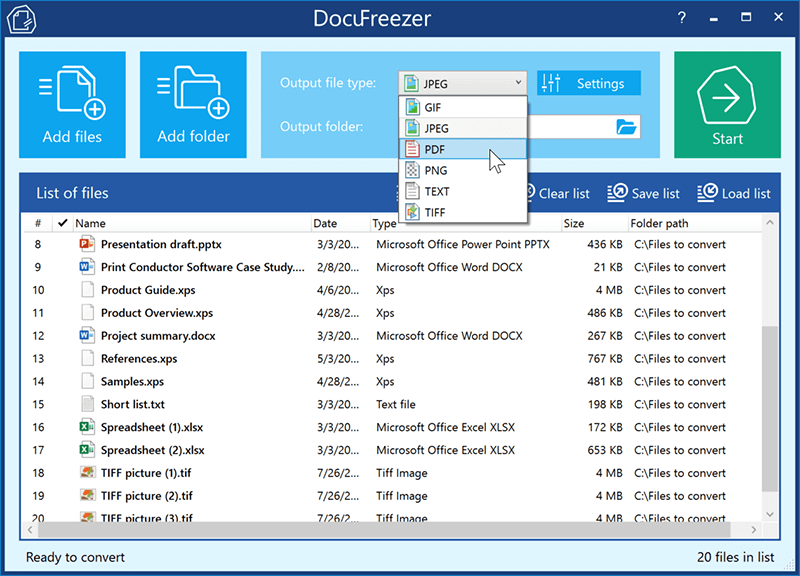
DocuFreezer is a batch file converter for Windows. DocuFreezer file conversion core processes different documents and images: Word, Excel, PowerPoint, Project documents, AutoCAD, SolidWorks, Solid Edge, Visio drawings, images, text files, and more. This simple software can batch convert multiple files at once. Popular scenarios & tasks: PDF to JPG, PDF to TIFF, DOC to PDF, XPS to PDF, XLS to PDF, JPG to PDF, Outlook emails to PDF, HTML to PDF, Text to PDF, OCR PDF to words, and more.

DocuFreezer automatically converts many files added to a list preserving the structure and color attributes of your original files. DocuFreezer output files are device independent and will be properly displayed on most PCs or other devices after conversion. The software can handle 80+ types of files and convert them to PDF, JPG, PNG, TIFF or TXT formats. It is also an OCR app – it can recognize text and save files to searchable PDF or TXT. You can find more information about DocuFreezer features at https://www.docufreezer.com

Users of Microsoft Office 2007 SP2, 2010 or 2013 (or newer versions) can benefit from the ability to convert Microsoft Office Word documents, Excel worksheets, PowerPoint presentations, Publisher, Visio files. Advanced options are also available for eDrawings, SolidWorks, AutoCAD, Solid Edge users – they can quickly save their DWG, DXF, DFT and other types of drawings to PDF or popular image formats.

What’s new in the latest version:
– New supported formats: iPhone HEIC images (.heic, .heif), vCard (.vcf)
– New rotation and auto-rotation operations
– Ability convert XLS, XLSX files without Microsoft Excel
– Ability to convert DOC, DOCX, RTF files without Microsoft Word
– Ability to convert MSG and EML files without Microsoft Outlook
– Added tooltips for each setting in the Advanced Settings
– Renewed Settings panel: Page range selection added to the Common tab
– Other improvements and fixes