RationalPlan Multi Project for Linux 5.9

Type: Shareware
Cost: $149
Size: 44.01 MB
Release date: Mar 09 2022
Platform: Linux,Linux Console,Linux Gnome,Linux GPL,Linux Open Source
Publisher’s Site:  https://www.rationalplan.com/about/
Publisher’s Product Page:  https://www.rationalplan.com/on-premise/
Country: Romania


RationalPlan Multi Project for Linux

RationalPlan Multi Project by Stand By Soft is a powerful project management software designed to assist project managers in developing plans, allocating resources, tracking progress, managing budgets and analyzing workload.


If you are working in the area of construction, engineering, services&consulting, business, software development or even working on a simple student project then you can use RationalPlan. It will help you to complete your project as scheduled, on time and within budget.

If you have projects that are interrelated that is certain tasks from one project depend on other tasks from the other projects then you should opt in for a Multi Project version. Even more… you should choose a Multi Project version if you have resources that are working in multiple projects. Otherwise the Single Project version is enough.

Here are some key reasons for using RationalPlan Multi Project:
* concurrent management for multiple users by connecting to RationalPlan Project Server
* manage your company’s projects and share resources between them
* provides a clean way to break down your project, build schedules, allocate resources, and manage budgets
* get resources and finances under control (realistic cost estimates mechanisms, screening cash-flow time distribution for tasks and resources)
* gives you a step by step project guide that walks you through the project management process so you can lay down a project plan immediately
* different scenarios capability via multiple undo/redo levels will allow you to make changes and safely get back
* track project evolution regarding task’s completion, time and costs
* brings project’s critical issues to your attention

The application is covering project management area from WBS construction, project planning and scheduling to critical path management, overallocated resources detection, progress tracking, cost estimation etc.

Graphcat<

MacSonik MBOX Converter 21.4

Type: Shareware
Cost: $39
Size: 133.89 MB
Release date: Aug 10 2021
Platform: Mac OS X,
Publisher’s Site:  http://www.macsonik.com
Publisher’s Product Page:  http://www.macsonik.com/mbox/converter/
Country: United States of America


MacSonik MBOX Converter

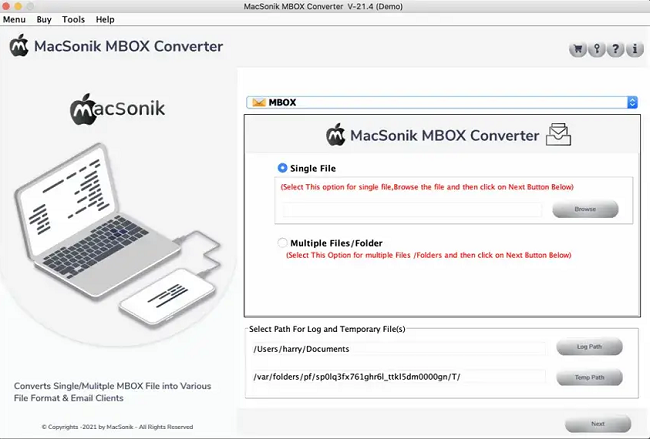
MacSonik MBOX Converter Tool is an exclusive solution for Mac that converts MBOX files to other file formats and exports mailboxes to various email clients. It performs conversion of MBOX emails to PST, EML, OST, MSG, CSV, HTML, EMLX, MHTML, PDF, TXT, DOC etc. Also, it transfers MBOX email files to Gmail, Thunderbird, Hotmail, Apple Mail, Yahoo Mail, Office 365, Live Exchange Server, AOL Mail, IMAP Server, AWS, iCloud, Yandex Mail, OperaMail, Zoho Mail, G-Suite, OneDrive, and other email clients on macOS. The apps supporting Mac versions are 10.15 Catalina, 10.14 Mojave, 10.13 High Sierra, 10.12 Sierra, OS X 10.11 El Capitan, 10.10 Yosemite, 10.9 Mavericks, and 10.8 Mountain Lion. Its demo version converts 50 MBOX emails free of cost.

WinNc 10.1.0.0

Type: Shareware
Cost: $34.28
Size: 9.88 MB
Release date: Jan 14 2022
Platform: Win2000,WinXP,Win7 x32,Win7 x64,Windows 8,Windows 10,WinServer,WinOther,WinVista,WinVista x64
Publisher’s Site:  https://ontwerpbureaudunes.nl
Publisher’s Product Page:  https://www.winnc.com/
Country: Netherlands


WinNc

Norton Commander Filemanager

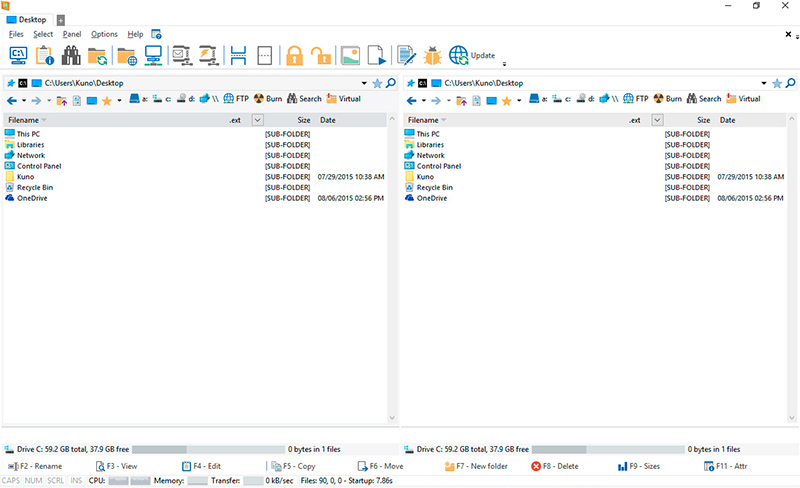
WinNc is a tabbed file manager especially developed for Windows 10 & 11. It also works on the older versions of Windows. This NC clone file manager is inspired on the dual panel concept of the old file manager Norton Commander. It has shortcuts to all the Windows special folders and the multiple tabbed interface allows you to organize your data by projects.

Projects can include files and folders from all over the disks that relate to the project tab and are stored virtually in the project folder as a link. With a new Windows 11 interface WinNc can do all the basic tasks you expect from a modern file manager like copy, move, delete, compress, uncompress and create links. WinNc uses logical colors for the file actions so you can quickly see if a file is being copied (green), being moved (orange) or being packed (yellow).

WinNc allows you to perform multiple tasks by setting the maximum parallel tasks to more than one task in the configuration panel. Otherwise WinNc will wait to start the new action until the previous action has finished. WinNc also converts audio, burns files on dvd and cd, creates and reads iso files, sets file attributes and you are able to keep you files synchronized using an internal sync module. From existing zip files it allows the creation of self extracting .exe files. It has a built in slideshow viewer, an audio preview player and a video player for quickly browsing and skipping through your media.

WinNc is available in the following languages:
English, German, Dutch, French, Spanish. (More languages available in beta version)