RationalPlan Project Viewer for Mac 5.7

Type: Freeware
Cost: $0.00
Size: 83.49 MB
Release date: Apr 06 2021
Platform: Mac OS X,
Publisher’s Site:  https://www.rationalplan.com/about/
Publisher’s Product Page:  https://www.rationalplan.com/on-premise/
Country: Romania


RationalPlan Project Viewer for Mac

RationalPlan Project Viewer by Stand By Soft is a free project scheduling software viewer, the perfect solution for anyone (from project stakeholders to team workers) to view your projects in detail. Although the project managers plan and control the projects from start to end and make all the necessary changes, there are some other people, the stakeholders that need to check and overview the projects evolution into their smallest detail.


RationalPlan Project Viewer is freely distributed as a viewer for our products. Besides it gives you the possibility to import MS Project files and to view them also for free. That makes RationalPlan Project Viewer a free project viewer for both RationalPlan and for MS Project.

Major features for RationalPlan Project Viewer are:

* all original views and data are available
* import MS Project files so you can view them for free
* export to other formats and printing are active
* it opens files created either with Single Project or Multi Project version
* view/hide critical path command is enabled
* last but not least you can have an unlimited number of free installations

This free project management software viewer can be used either as a desktop application or on line.

RationalPlan is an affordable Microsoft Project alternative that will save you time and money. RationalPlan Free Project Viewer lets you open and view MS Project files without having MS Project installed. If you just need to quickly see a plan this product is for you.

Graphcat<

RPM Remote Print Manager Select 32 Bit 6.2.0.526.1

Type: Shareware
Cost: $324
Size: 45.33 MB
Release date: Mar 22 2021
Platform: Win2000,WinXP,Win7 x32,Win7 x64,Windows 8,Windows 10,WinServer,WinOther,WinVista,WinVista x64
Publisher’s Site:  http://www.brooksnet.com/
Publisher’s Product Page:  https://www.brooksnet.com/lpd/comparing-rpm-elite-and-select
Country: United States of America


RPM Remote Print Manager Select 32 Bit

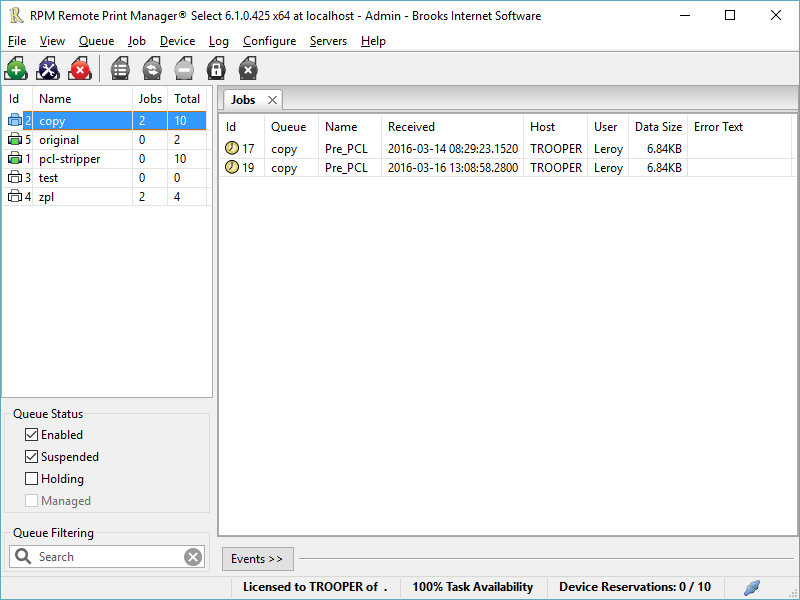
Printing should be one click away. but there are so many problems which make printing difficult if not impossible. RPM Remote Print Manager (RPM) has grown through the years from all the print problems our customers have brought to us. We are here to help you solve your printing problems.

RPM is our virtual printer product. Our customers have been using RPM for 20 years!
RPM as virtual printer

RPM does what you expect a virtual PDF printer to do, and more:

convert incoming print jobs to other formats, such as PDF, TIFF and PCL
save multiple documents into a single document
print the same job to multiple printers
in one pass, send to a printer and save to disk
print the same job multiple times, using separate paper trays

RPM as print server

RPM is implemented as a Windows print server. Its core capabilities include:

managing your print workflow
send print jobs to any Windows printer
send print jobs to any printer on your network using core Windows print protocols, or LPR, or direct with port 9100
archive print jobs to local folders, shared folders, or anywhere via FTP
run any local application on your print job
send your print job via email as an attachment or in the message body

RPM also provides extensive data editing, manipulation and translation.

Windows version support

RPM 6.1 supports these versions of Windows: Vista, 7, Server 2008 (including R2), Windows 8 and 8.1, Server 2012 (including R2), and Windows 10. Support for Windows XP and Server 2003 has been dropped, so we no longer test new RPM versions on these older versions of Windows.

Aiseesoft Mac Video Enhancer 9.2.26

Type: Shareware
Cost: $16
Size: 49.34 MB
Release date: Jan 18 2022
Platform: Mac OS X,
Publisher’s Site:  https://www.aiseesoft.com/
Publisher’s Product Page:  https://www.aiseesoft.com/mac-video-enhancer/
Country: China


Aiseesoft Mac Video Enhancer

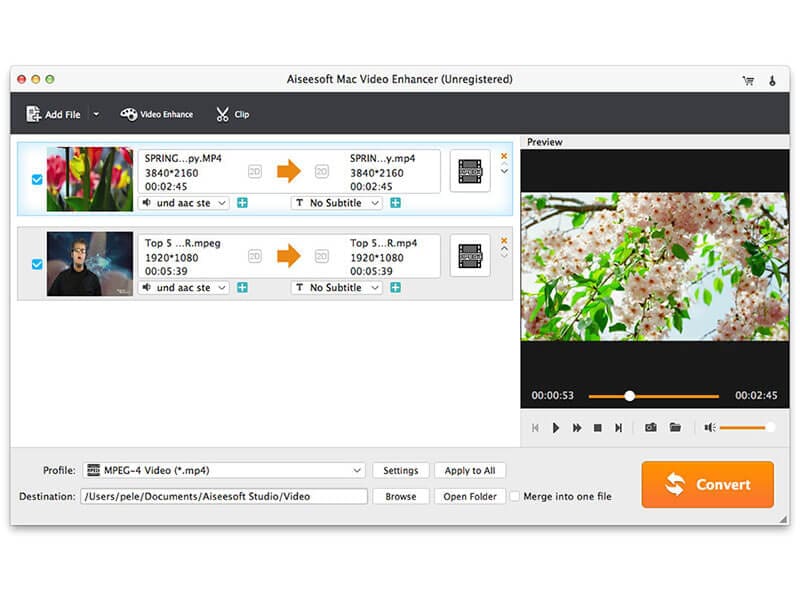
What can a Mac Video Enhancer do for you? You are able to improve video quality in many aspects. You can easily upscale video resolution from 720p to 1080p even 4K, or if you want to optimize the brightness and contrast of your video, this Mac Video Enhancer makes it easier. In addition, if your video has some annoying white noise, you can also remove it with only one click. The video deshaking functions also provides a good solution to stabilize your video.

Key Features

1. Upscale video resolution for Mac users
Worry about the low resolution of your video? Upscale the resolution now! With this software, you only need one click to upscale your video resolution from 720p or even lower resolution to 1080p or higher.

2. Optimize brightness and contrast
This basic function makes it easier to enjoy your video with a proper brightness and contrast. Adjust the brightness and contrast according to your needs.

3. Remove video noise
Is there some dirty video noise on your captured video? Aiseesoft Mac Video Enhancer provides you with a good solution to remove all white noise away from your video. Later, you are able to enjoy your video with clear images.

4. Stabilize video
Got a shaking video after recording with your phone or tablet? No worries. With the video deshaking function, you can easily stabilize your video to a normal one.

5. Rotate/flip video to the right angle
Why not try this function to turn your video to the right angle? With this software, you can rotate or flip video to the right angle with ease.

6. Other editing functions
Besides, there are many other basic editing functions for you to choose. Such as adding watermark, clipping, converting 2D to 3D effect and more. Edit your video as you like and then you are able to convert your video to any other video formats.