AnyMP4 MP3 Converter for Mac 8.2.16

Type: Shareware
Cost: $18.75
Size: 48.83 MB
Release date: May 10 2021
Platform: Mac OS X,
Publisher’s Site:  https://www.anymp4.com
Publisher’s Product Page:  https://www.anymp4.com/mp3-converter-for-mac/
Country: China

AnyMP4 MP3 Converter for Mac

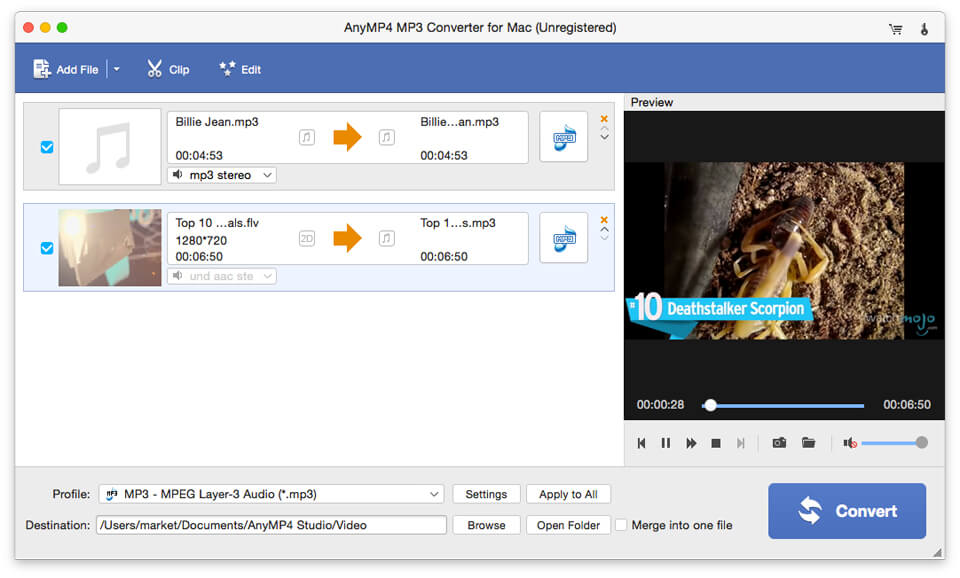
AnyMP4 MP3 Converter for Mac can not only convert any audio to MP3, AAC, AIFF, ALAC, WAV and M4A, but also extract audio from the video files and then convert them to MP3, AAC, ALAC and other audio formats your need on Mac. Besides, it owns powerful editing functions like trimming the audio to your needed length, merging audio segments into single one, adjusting audio settings and renaming your audio. So you are able to enjoy these audio on your portable devices like iPhone 12/11/11 Pro/11 Pro Max/XS/XS Max/XR/X/8, iPad Air, iPad mini, Samsung Galaxy serial and so on.


Key Functions:

1. Convert any audio to MP3, AAC, AIFF, etc. on Mac.
This MP3 Converter for Mac can convert any audio like FLAC, WAV, WMA, MP3, AAC, AC3, AIFF, etc. to MP3, AAC, AIFF, ALAC, WAV and M4A with good quality. You can play the output audio file on iPhone 12/11/11 Pro/11 Pro Max/XS/XS Max/XR/X/8, iPad 4, iPad Mini, iPod Touch, Samsung Galaxy serial, HTC, Kindle, Sony Ericsson Xperia, etc.

2. Extract audio file from video and convert them.
With MP3 Converter for Mac, you can extract audio files from various videos like MP4, MOV, M4V, MKV, AVI, WMV, TS, MTS and so on. Then you can convert them to MP3, AAC, AIFF, ALAC, WAV and M4A and enjoy your audio at any time and any place.

3. Customize the audio file.
With this software, you can trim the audio to your needed length by setting the start time and the end time, you can merge several audio clips into one file. Meanwhile, you can rename you audio with unique names, so that you can find your videos more easily.

4. Easy operations.
AnyMP4 MP3 Converter for Mac has a user-friendly interface, which can help you use it easily. Only a few clicks help you finish the whole processing. Besides, it supports batch conversion, so you can convert several files simultaneously.

Graphcat<

Aiseesoft iPhone Unlocker 1.0.60

Type: Shareware
Cost: $31.96
Size: 1.85 MB
Release date: Apr 11 2022
Platform: Win2000,WinXP,Win7 x32,Win7 x64,Windows 8,Windows 10,WinServer,WinOther,WinVista,WinVista x64
Publisher’s Site:  https://www.aiseesoft.com/
Publisher’s Product Page:  https://www.aiseesoft.com/iphone-unlocker/
Country: China


Aiseesoft iPhone Unlocker

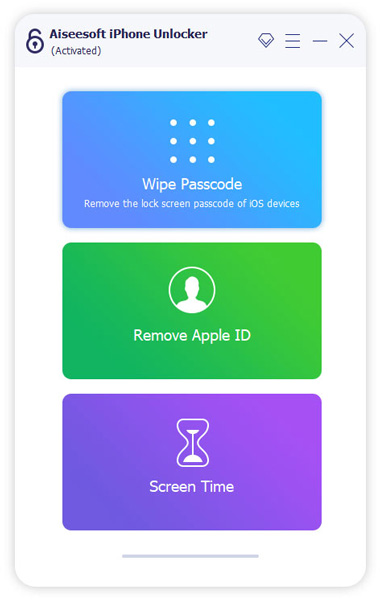
There are various reasons for which you lose control of the lock screen passcode. If you are bothered how to bypass the lock screen when you forgot the passcode of your iPhone screen, or if you forgot the password connected to your Apple ID, or you want to remove the restrictions in Screen Time, Aiseesoft iPhone Unlocker can do you a great favor.

Key features:

1. Wipe iPhone passcode

If you are locked out of your iPhone because you forgot the passcode, whether your passcode is 4-digit, 6-digit, Touch ID and Face ID, Aiseesoft iPhone Unlocker can help you remove the passcode and unlock the locked iPhone easily.

2. Remove Apple ID

If you forgot your Apple ID or password, you would lose access to many Apple services. If your iOS device is configured well, this iPhone Unlocker allows you to remove the forgotten Apple ID and let you change a new Apple ID account to activate your iPhone.

3. Recover/Remove Screen Time Passcode

If you received a pop-up message saying that you have reached your limit on XX on your iPhone, you should enter the Screen Time passcode to change the settings. But what to do if you forgot the restriction passcode? iPhone Unlocker enables you to recover the passcode and remove passcode without data loss on iPhone or iPad.

Studio Controls COM 6.0.0.1

Type: Demo
Cost: $899
Size: 72.46 MB
Release date: Feb 02 2021
Platform: Win2000,WinXP,Win7 x32,Win7 x64,Windows 8,Windows 10,WinServer,WinOther,WinVista,WinVista x64
Publisher’s Site:  https://www.dbi-tech.com
Publisher’s Product Page:  https://www.dbi-tech.com/StudioControls
Country: Canada


Studio Controls COM

Studio Controls COM includes the following 32-bit Calendaring, Scheduler, Grid, Reporting, Data Presentation, Data Entry, UI and UX design controls. NOTE: the controls prefaced with ‘ctx’ also have 64-bit counter parts found in Studio Controls COM 64.

Enhanced 32-Bit Unicode (ctx)

ctxCalendar ctxFile ctxMEdit ctxToolbar
ctxColor ctxFrame ctxMeter ctxTree
ctxCombo ctxFont ctxNEdit ctxYear
ctxContact ctxGauge ctxPrint
ctxDate ctxHTML ctxSlide
ctxDEdit ctxImage ctxSplit
ctxDropDate ctxListbar ctxText
ctxDropMenu ctxListView ctxTips

========== ========== ========== ==========
ctAlarm ctDigit ctMEdit ctTabs
ctBanner ctDropDate ctMenu ctText
ctButton ctDropMenu ctMeter ctTips
ctCalc ctExplorer ctMonth ctToolbar
ctCalendar ctExplorerBar ctNavBar ctTray
ctCheck ctFile ctNEdit ctTree
ctClip ctFill ctPanel ctWave
ctClock ctFold ctPaper ctWeek
ctColor ctFont ctPrint ctYear
ctColorButton ctFrame ctPush
ctColorCombo ctGauge ctRadio
ctColorPicker ctGrid ctRuler
ctCombo ctGroup ctScroll
ctContact ctHTML ctSlide
ctDate ctHyperlink ctSList
ctDayView ctImage ctSpin
ctDEdit ctList ctSpiral
ctDial ctListbar ctSplit

For a details description of each product and the controls contained in each product please see – dbi-tech.com