RationalPlan Multi Project for Mac 5.8

Type: Shareware
Cost: $149
Size: 83.45 MB
Release date: Oct 18 2021
Platform: Mac OS X,
Publisher’s Site:  https://www.rationalplan.com/about/
Publisher’s Product Page:  https://www.rationalplan.com/on-premise/
Country: Romania


RationalPlan Multi Project for Mac

RationalPlan Multi Project by Stand By Soft is a powerful project management software designed to assist project managers in developing plans, allocating resources, tracking progress, managing budgets and analyzing workload.


If you are working in the area of construction, engineering, services&consulting, business, software development or even working on a simple student project then you can use RationalPlan. It will help you to complete your project as scheduled, on time and within budget.

If you have projects that are interrelated that is certain tasks from one project depend on other tasks from the other projects then you should opt in for a Multi Project version. Even more… you should choose a Multi Project version if you have resources that are working in multiple projects. Otherwise the Single Project version is enough.

Here are some key reasons for using RationalPlan Multi Project:

* manage your company projects as a multiproject tree structure and share resources between them
* provides a clean way to break down your project, build schedules, allocate resources, and manage budgets
* get resources and finances under control (realistic cost estimates mechanisms, screening cash-flow time distribution for tasks and resources)
* gives you a step by step project guide that walks you through the project management process so you can lay down a project plan immediately
* different scenarios capability via multiple undo and redo levels will allow you to make changes and safely get back
* track project evolution regarding task completion, time and costs
* brings project critical issues to your attention (critical activities with configurable slack, overallocated resources)

The application is covering project management area from WBS construction, project planning and scheduling to critical path management, overallocated resources detection, progress tracking, cost estimation etc.

Graphcat<

JRiver Media Center 29.0.28

Type: Shareware
Cost: $59.98
Size: 38.81 MB
Release date: Apr 14 2022
Platform: Win2000,WinXP,Win7 x32,Win7 x64,Windows 8,Windows 10,WinServer,WinOther,WinVista,WinVista x64
Publisher’s Site:  https://www.jriver.com
Publisher’s Product Page:  https://www.jriver.com
Country: United States of America


JRiver Media Center

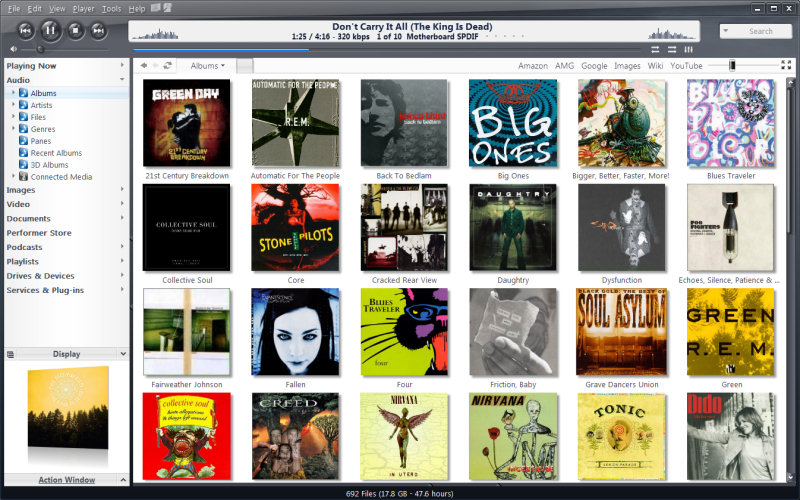
High quality media solution for large libraries. Organize, play, tag all types of media files. Rip, Burn, serve to Xbox, PS3, UPnP, DLNA, TiVo. Audiophile quality, DSD, madVR, Ten foot mode, remote control, HD TV recording in real time. Customizable media views. 3D views. Supports iPods, cameras, 90+ media file formats. Integration with Facebook, Flickr, Audible, Amazon MP3, Google, Youtube, Wikipedia, Hulu, Last.FM, Twitter. Cover art lookup.

Three skinned interfaces. A Visualization Studio feature lets you create your own visualizations, and a DSP Studio allows personalization of the listening environment. Media Scheduler for sleep, alarm and recording functions, Media Editor for editing sound files. Smartlists based on rules. Drag-and-drop for easy Playlist creation. Unique media browsing views for faster, easier and more powerful file search and play. Tagging studio. Integrated CD labeler. Support for CD and DVD database and support for popular handheld players, Sony PSP and PlaysForSure devices.

DiagTransfer 4.0

Type: Freeware
Cost: $0
Size: 2.75 MB
Release date: Oct 18 2021
Platform: Win2000,WinXP,Win7 x32,Win7 x64,Windows 8,Windows 10,WinServer,WinOther,WinVista,WinVista x64
Publisher’s Site:  http://alain.blaisot.free.fr/DiagTransfer/English/blaisot.htm
Publisher’s Product Page:  http://alain.blaisot.free.fr/DiagTransfer/English/home.htm
Country: France


DiagTransfer

The simplest way to copy chess diagrams from one program or web page to another quickly and easily.

Copying chess diagrams with a classic position-editor is hard work : you must have both your position-editor and your document/web page application open, and must constantly go back and forth between the two. It becomes a tennis match of sorts: Looking at the diagram you wish to copy in application A, switching over to application B to place the piece, and going back to application A to verify the accuracy of the layout,…etc.
With DiagTransfer you transfer the diagram by setting the DiagTransfer window in semi-transparent mode and resizing a board on the diagram to be copied. At this point, you have only to trace the pieces – no need to remember piece locations .

Other possibilities of DiagTransfer:

Diagram editor.
Copy, create, delete, add, insert diagrams, correct diagrams.
Import diagrams from a PGN file
Set diagrams to any size.
Save in FEN, EPD or DTR formats.
Save diagram image as PNG, JPG, BMP.
Send a FEN by email.
Use DiagTransfer as a diagram reader. (hide/show solution).
Print diagrams (one or more per page).
Add comments to diagrams in an EPD file.
Check the validity of diagrams (chess rules).
Edit parameters (castling, color, etc.).
Copy in FEN mode (to paste for analysis in chess software).
Copy in diagram mode (RTF-Rich Text Format) to paste into a word processor.
Copy in bitmap mode for pasting into a word processor or drawing program.
Add arrows and colored boxes.
Draw crosses and circles in the boxes.
Add numbers to squares.
Possibility to create fairy chess diagrams