JYL TimeClock 2.04

Type: Demo
Cost: $19
Size: 6.56 MB
Release date: Sep 09 2021
Platform: Win2000,WinXP,Win7 x32,Win7 x64,Windows 8,Windows 10,WinServer,WinOther,WinVista,WinVista x64
Publisher’s Site:  https://jyl-software.com/en/
Publisher’s Product Page:  https://jyl-software.com/en/Timeclock/
Country: France

JYL TimeClock

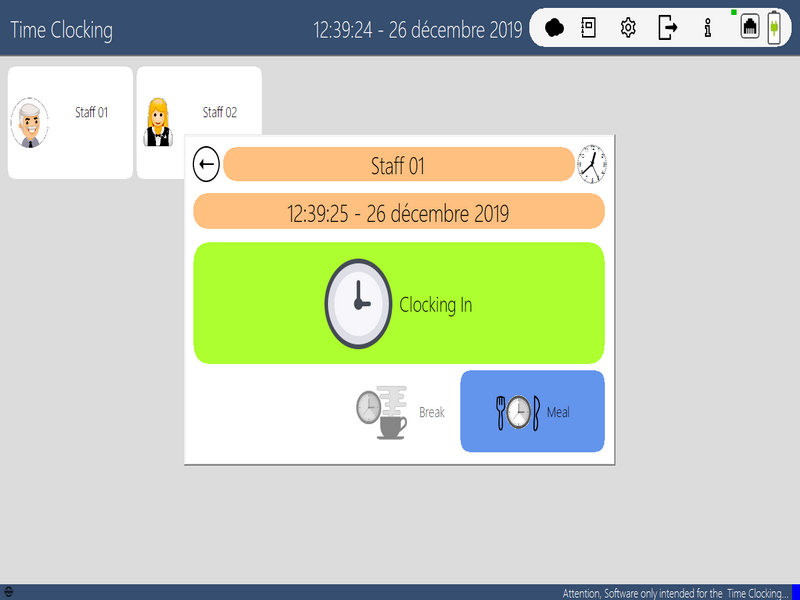
Software intended for the recording of the arrivals and departures of employees …
Simple Temp Management in your business …
Local Network mode, allows you to have multiple points in the company.
In the statistics, you can send reports by email, to your accountant for example …


You can create as many employees as you want.
You can set the software with or without a password for pointing.
Create time for meals, activate breaks, absences, sick leave, etc …
Set in Local Network Mode …

The Software is optimized to run on Windows Computers or Tablets in Touch mode.

List of functions :

Number of Employees / Unlimited Users.
Counting Hours of Work.
Counting Breaks.
Added Meal Time (Adjustable).
Addition of Extra Time: Holidays, Absences, Diseases.
Report generation by period, week and month.
Sending of Reports by Mail with PDF and CSV.
Possibility to block the clocking before a time set by user or Global.
Possibility of adding a comment to the Score.
Multilanguage Software.
Color theme.
Network Mode. (Now you can share the pointing data on a local network. You have the opportunity to have several points in your company. All data are accessible and accumulated on each item …)
Standby.
Sync with Google Calendar.
Visualization of the Work Agenda.
Barcode Clock in
Automatique Reports.
Automatique Backup.
Generate Card of User with Barcode.

Graphcat<

Screenrec 1.0.89.1

Type: Freeware
Cost: $0
Size: 185.00 kB
Release date: Nov 18 2020
Platform: Win2000,WinXP,Win7 x32,Win7 x64,Windows 8,Windows 10,WinServer,WinOther,WinVista,WinVista x64
Publisher’s Site:  https://screenrec.com/
Publisher’s Product Page:  https://screenrec.com
Country: Bulgaria


Screenrec

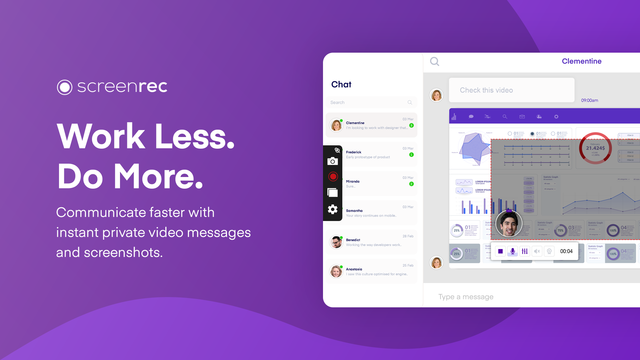
ScreenRec is a free, lightweight screen capture software that allows you to record your screen or take a screenshot in a click. It’s great for productivity as you can use it to send video messages instead of writing lengthy emails. Best of all, it’s insanely easy to use and there is NO learning curve. Just select screen capture area, press a button and you are done!

You can take a screenshot of your entire screen or a specific screen area and edit it with the annotation tools. You can also record your computer screen with the sound coming from your speakers or your microphone.

Thanks to the Cloud Recording technology, there is no upload time and no need to connect to DropBox, Google Drive, Youtube or Facebook etc. When you are done recording or taking a screenshot, you will immediately get a private and secure sharing link copied to your clipboard. Just press Ctrl + V to paste the link in an email, in a private chat or even publish it to your website if you like.

ScreenRec is powered by the all-in-one business video platform StreamingVideoProvider and comes with 2Gb of free private cloud storage. This makes it extremely powerful under the hood. Besides business video hosting, you also get a number of advanced features like enterprise-grade security, deep analytics and a content management system (CMS).

ScreenRec prevents any unauthorized downloads of your screenshots and screencasts using the 128-bit AES encryption algorithm. You can also set passwords and restrict access by location or IP address.

The Deep Analytics let you see who watched your screen recording, which parts they skipped, how many times they viewed, and more.

Using the CMS, you can organize your captures with tags and playlists.

From task assignment to bug reporting and internal training, ScreenRec is trusted by 90,000+ users to reduce the need for meetings, cut down on emails and communicate more effectively across locations and time zones.

AnyMP4 Android Data Recovery for Mac 2.0.28

Type: Shareware
Cost: $29.96
Size: 35.67 MB
Release date: Apr 28 2022
Platform: Mac OS X,
Publisher’s Site:  https://www.anymp4.com/
Publisher’s Product Page:  https://www.anymp4.com/android-data-recovery-for-mac/
Country: China


AnyMP4 Android Data Recovery for Mac

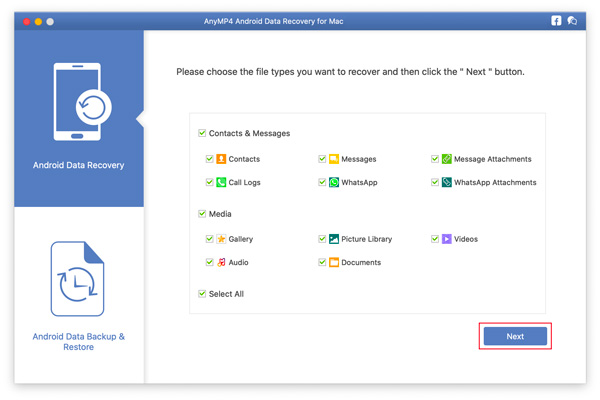
AnyMP4 Android Data Recovery for Mac can restore deleted photos, text massages, contacts, videos, music and more files from almost all Android phones. And you can preview the data that you want to recover before you restore them on your Mac. It supports Samsung GALAXY Serial, HTC, LG, HUAWEI, Xiaomi, Sony and so on.

Key Functions:

1. Recover photos, text messages and more from Android phone to Mac.
AnyMP4 Android Data Recovery for Mac can recover your photos, text massages, contacts, video, music and more files from your Android digital devices to Mac. When you delete your important files accidentally, this software will help you restore them. So you never worry that your loved files will lose.

2. Selectively recover your needed file.
AnyMP4 Android Data Recovery for Mac can selectively recover your needed files on Mac. For example, you need to recover some important photos, you can just choose the photos that you want, and your unwanted photos will not appear in your output folder.

3. Supported almost all Android devices.
AnyMP4 Android Data Recovery for Mac can support Samsung GALAXY Note, Samsung GALAXY S10/9/8/7, HTC One (M8), HTC One (E8), LG G3, LG G2, HUAWEI Ascend Mate7, Ascend G7, Ascend P7, Xperia Z3, Xperia Z2 and so on.

4. Easy to use and fast recovery speed.
AnyMP4 Android Data Recovery for Mac owns user-friendly design and concise interface. You can recover your data easily.

5. Back up and restore data.
With AnyMP4 Android Data Recovery for Mac, you can safely and easily back up data from your Android device. And then you can restore the data.