Aiseesoft Mac Video Converter Ultimate 10.3.8

Type: Shareware
Cost: $23.20
Size: 125.94 MB
Release date: May 12 2022
Platform: Mac OS X,
Publisher’s Site:  https://www.aiseesoft.com/
Publisher’s Product Page:  https://www.aiseesoft.com/mac-video-converter-ultimate/
Country: China

Aiseesoft Mac Video Converter Ultimate

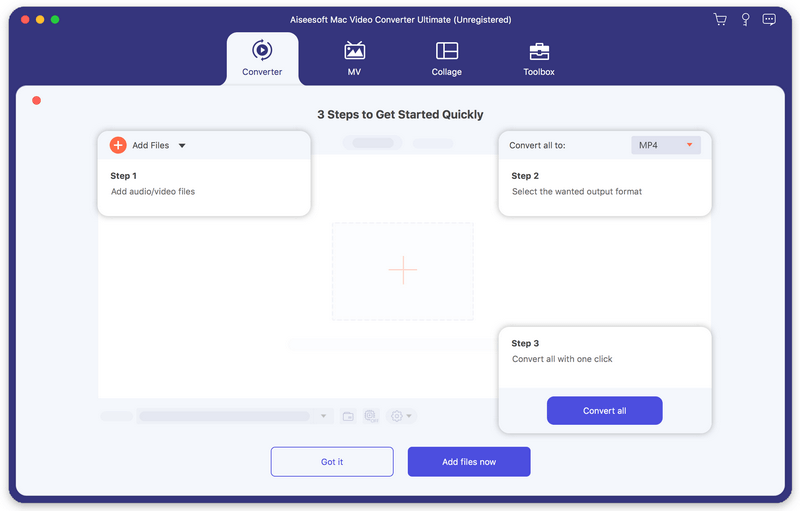
Aiseesoft Mac Video Converter Ultimate allows Mac users to convert and edit videos in fast speed and high quality. It provides various video processing tools for beginners and experts to convert and edit video.


Key features:

1. Convert video/audio to almost all popular formats on Mac
Aiseesoft Mac Video Converter Ultimate can convert video and audio files to all popular formats like MOV, AVI, MP4, MPG, FLV, VOB, MKV, HD MP4, HD MOV, MP3, AAC, AC3, AIFF, FLAC, OGG, WAV, etc. Even 8K/5K/4V converting is supported.

2. Various video editing features
Aiseesoft Mac Video Converter Ultimate is more than a video converter. It can also work as a powerful video editor, which allows you to rotate/crop video, add video effects and filters, clip/merge video, add audio track and subtitles, remove video noise and reduce video shaking, add watermark, etc.

3. Make MV
This video converting tool can help you turn plain photos or videos into stunning film. Just import the videos and photos to Aiseesoft Mac Video Converter Ultimate, choose a suitable theme from dozens of free themes and add your favorite music as the background music. You can also crop, rotate, apply effects, add your own logo, and add subtitle for your movie.

4. Create video collage
Aiseesoft Mac Video Converter Ultimate is also equipped with a light-weight video collage maker. There are a bunch of layouts for you to choose from, you can make a choice according to the way that you want to show your photos and videos on the screen. More ever, you can filter, resize and add music to the video collage to make it more attractive.

5. Built-in Toolbox with full features.
In the Toolbox, there are lots of tools that enable you to compress video/audio, merge video files, make GIFs, edit ID3 tags, add watermark, adjust volume, control video speed, trim video, and more. Explore this video tool now, it will bring more surprise to you!

Graphcat<

mysys 4.7

Type: Shareware
Cost: $29.95
Size: 103.45 MB
Release date: Apr 22 2021
Platform: Win2000,WinXP,Win7 x32,Win7 x64,Windows 8,Windows 10,WinServer,WinOther,WinVista,WinVista x64
Publisher’s Site:  http://www.integritech.ca
Publisher’s Product Page:  https://www.integritech.ca/index.php/products/mysys
Country: Canada


mysys

A Window into your System!

Do you have alot of files?
Do you spend too much time navigating hundreds of folders?
Do you sometimes forget where a file is?

mysys will be your new home away from all the pesky folders!

News Flash: Version 2 now reads the file tables directly dramatically improving DB creation speed!

If you have mapped network or encrypted drives a popup will ask which ones to include in the
database. Those drives will take longer to index depending on the network connection speed.

CD/DVD/Flash drives will not be indexed, only Fixed drives and optionally Network/encrypted drives.

Use the Schedule button to create a Windows Task Schedule so the indexing happens at
a time which is most convenient. To delete the task just click Cancel.

Once the database is created you are ready to find files, fast!

In the top left text box, type any filename and hit enter or click Search.

Wild cards are supported such as read*.txt.

You can use AND/OR/- like: this OR that
the – is to exclude like: this -notthat

Use double quotes to find whole phrases.

Use brackets like: (afoldername or anotherfolder) and (*.c or *.rc or *.h)
For that example you would check on the ‘Include folder names’ option and probably the ‘Exact match’ option also otherwise will find *.cs, *.css, *.hpp, etc…

You can use the Containing text box to search within the files found. Contents are never
indexed but uses a fast highly multi-threaded algorithm.

File sizes, Dates and Attributes are all read live off the disk, these are not stored in the database.

MailsDaddy Outlook PST to MBOX Converter 1.0

Type: Shareware
Cost: $49
Size: 3.93 MB
Release date: Feb 09 2021
Platform: Win2000,WinXP,Win7 x32,Win7 x64,Windows 8,Windows 10,WinServer,WinOther,WinVista,WinVista x64
Publisher’s Site:  https://www.mailsdaddy.com/
Publisher’s Product Page:  https://www.mailsdaddy.com/outlook-pst-to-mbox-converter/
Country: India


MailsDaddy Outlook PST to MBOX Converter

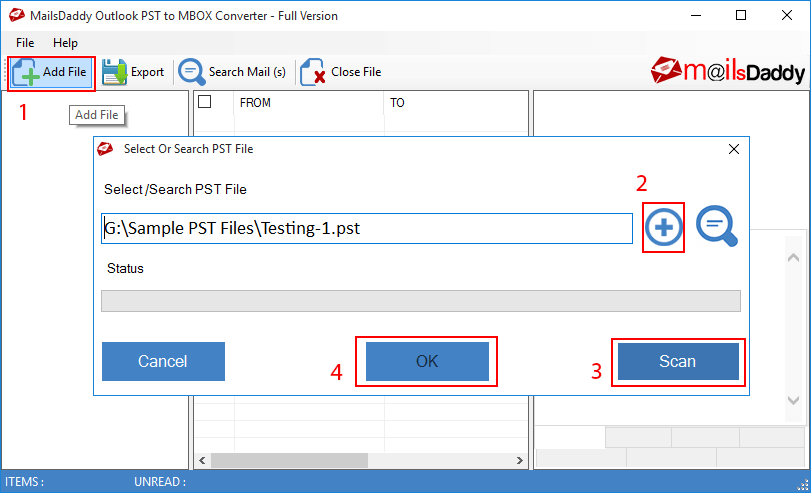
If you are struggling to move PST data files to MBOX file format then you need a professional MailsDaddy Outlook PST to MBOX converter tool. It is helpful to maintain the original folder structure and migrate data without taking any damage. If you have multiple or bulk mail folder then you can upload it to the software and transfer every single detail to MBOX after that import into Thunderbird, Apple Mail, Postbox, Entourage & various other email clients. This PST converter tool also provides a preview window to check the data before exporting PST to MBOX. Also, it has an email filter option that allows the user to open a filter or select an email from Outlook PST to MBOX. User can also export PST file into EML, MSG, HTML, MHTML & RTF format.
The software comes with a trial version so that users can test the software by converting 20 emails per mailbox. The PST to MBOX software runs on all Windows OSes and provides a compatible MBOX data file. After using the free version, the user can upgrade it to the full version and convert unlimited data into an MBOX file in a few easy clicks. The software comes in three variations: personal, business and enterprise. The user can choose anyone who is better for him/her and can convert PST to MBOX without any restrictions.