FaxTalk FaxCenter Pro 10.0.1634

Type: Demo
Cost: $59.95
Size: 23.86 MB
Release date: Oct 15 2021
Platform: Win2000,WinXP,Win7 x32,Win7 x64,Windows 8,Windows 10,WinServer,WinOther,WinVista,WinVista x64
Publisher’s Site:  https://www.faxtalk.com
Publisher’s Product Page:  https://www.faxtalk.com/faxtalk-faxcenter-pro-fax-software/
Country: United States of America

FaxTalk FaxCenter Pro

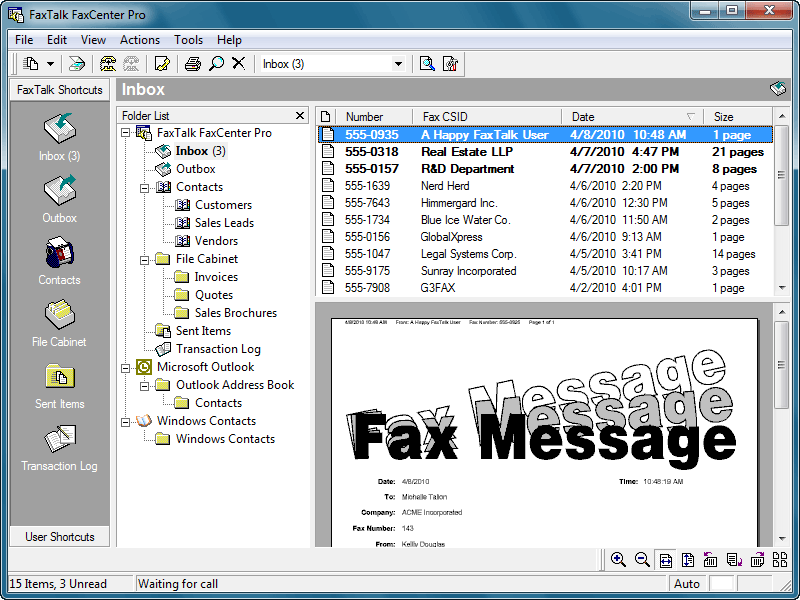
Easy to use send and receive fax software for Windows. FaxTalk FaxCenter Pro manages your incoming and outgoing fax communications quickly, efficiently, and reliably. Whether you’re a small business or an individual, FaxTalk FaxCenter Pro’s advanced send and receive fax features turn your computer into sophisticated fax machine and eliminates the need for a stand-alone fax machine. From a single application you can send, receive, view and print faxes, organize fax documents, create and manage contacts and phonebooks and control all fax operations.


Whether you are sending a fax to a single recipient or broadcasting faxes to multiple recipients the FaxTalk FaxCenter Pro fax software provides the features you need. Produce professional looking faxes, even combine multiple documents into a single fax, and broadcast faxes to multiple recipients with just a few mouse clicks. With the FaxTalk FaxCenter Pro fax software you can fax directly from Windows applications and utilize powerful features such as broadcast faxing, delayed scheduling, fax to email, access to contacts stored in Microsoft Outlook, Windows Address Book and Windows Contacts, fax markup and annotation tools, custom designed cover pages, scanner support, resend previously sent faxes and complete Distinctive ring and Caller ID support.

Receive faxes on your computer with features that save you time and money. Avoid printing unwanted faxes and view received faxes on screen, print a copy, or save the fax for future review. Automatically forward received faxes to an email address or another fax number. You can even have received faxes automatically forwarded to your Microsoft Outlook Inbox to create a unified messaging solution. You can also block the reception of unwanted, unsolicited "junk faxes".

Graphcat<

Apeaksoft Screen Recorder 1.3.28

Type: Shareware
Cost: $19.96
Size: 1.84 MB
Release date: Mar 22 2021
Platform: Win2000,WinXP,Win7 x32,Win7 x64,Windows 8,Windows 10,WinServer,WinOther,WinVista,WinVista x64
Publisher’s Site:  https://www.apeaksoft.com/
Publisher’s Product Page:  https://www.apeaksoft.com/screen-recorder/
Country: China


Apeaksoft Screen Recorder

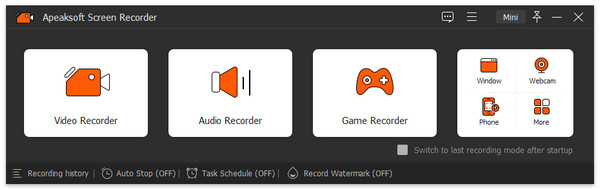
Apeaksoft Screen Recorder could capture almost any video played on your computer, including 4K videos. You can use it to record various kinds of videos, like online movies, video conference, video tutorials, game play and other videos you want to save.

Key functions:

1. Record videos on your computer
Apeaksoft Screen Recorder is professional video recording software. With it, you could record various media files, including game play process, video meetings and online streaming videos, etc. If you are a game lover, it could record your game play smoothly with high frame rate, then you could share it on Twitter, YouTube or Facebook. In addition, you could also record your webcam with it conveniently.

2. Record any audio source as you like
When you record a video, you can choose to record the voice of the video itself by using the system audio, or record your own voice by enabling microphone voice. The former one fits for recording movies while the latter one is fit for making video presentations. If you want to record a video meeting, you should turn both of them on.

3. Take snapshot quickly
Apeaksoft Screen Recorder could not only record media files, but also take snapshot. You could edit the snapshot or add watermark to your screenshot.

4. Various settings and highlight the mouse cursor as you want
With Apeaksoft Screen Recorder, you could customize recording area, set scheduled task, make audio settings, etc. Moreover, you could preview the recorded files before saving. It also allows you to highlight the mouse cursor to make your action easier to be tracked on screen. Also you can define the color and the shape of the highlight.

ACDSee Photo Studio Home 25.0.0.1871

Type: Shareware
Cost: $59.99
Size: 1.15 MB
Release date: Sep 22 2021
Platform: Win2000,WinXP,Win7 x32,Win7 x64,Windows 8,Windows 10,WinServer,WinOther,WinVista,WinVista x64
Publisher’s Site:  http://www.acdsee.com
Publisher’s Product Page:  https://www.acdsee.com/en/products/photo-studio-home
Country: Canada


ACDSee Photo Studio Home

An Arsenal of Digital Asset Management Tools
Clean and simple Digital Asset Management (DAM) should not be an enigma lost in the mists of Shangri-la. Home 2022 offers photographers of any skill level the best DAM tools on the market. Easy to use and robust enough to tackle any challenge, Home 2022 includes diverse new tools such as the time-saving Media Mode for interacting directly with the ACDSee photo database; and People Mode, an AI engine that seamlessly places a name to a face. A vibrant and colorful perspective awaits you with Home 2022s improvements to Tone Curves and support for higher ISOs.

Putting a Name to a Face just got Easier
People Mode is new to ACDSee Home 2022 and is born of a union between ACDSees industry-leading Face Detection & Recognition feature and a keen application of machine learning. Photographers from all walks of life will enjoy the dedicated space for distinguishing by client, family member, or person of interest, allowing for the management of people by merging, renaming, or deleting faces, or taking labelling suggestions from the AI assistant for grouping similar unnamed people.

Filter at Lightning Speed
Media Mode is ACDSees database-driven powerhouse for viewing and accessing the folders you have either browsed in Manage mode or cataloged into the ACDSee database. This streamlined, uncluttered view of the media assets managed by ACDSee offers sorting, grouping, and filtering in any combination.

Unrivalled Digital Asset Management
ACDSee has superior file management capabilities. Finding, sorting, moving, organizing, and sharing everything you need for complete mastery over your photography workflow is right here, at your fingertips. No uploading or importing your images. Add ratings, hierarchical keywords, tags, categories, location data and customizable color labels. And for 2022, we have added SVG file support to our already extensive list of supported file types.