Aiseesoft FoneLab iPhone Data Recovery 10.3.30

Type: Shareware
Cost: $31.96
Size: 1.99 MB
Release date: Dec 14 2021
Platform: Win2000,WinXP,Win7 x32,Win7 x64,Windows 8,Windows 10,WinServer,WinOther,WinVista,WinVista x64
Publisher’s Site:  https://www.aiseesoft.com/
Publisher’s Product Page:  https://www.aiseesoft.com/iphone-data-recovery/
Country: China

Aiseesoft FoneLab iPhone Data Recovery

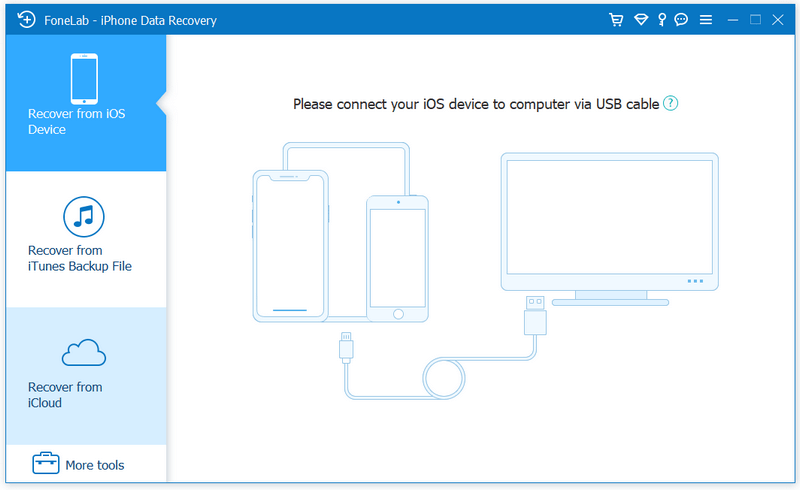
Aiseesoft FoneLab can recover lost/deleted messages, contacts, call history, calendar, notes, WhatsApp/Kik/Line/WeChat/QQ etc. data from iPhone/iPad/iPod directly or from iTunes/iCloud backup files. It supports all iOS portable devices like iPhone (the latest iPhone 13 series included), iPad, iPod touch, etc. And you can preview your lost data before recovering it.


Main functions:

1. Recover lost or deleted data from iOS device directly or iTunes/iCloud backup.
Aiseesoft iPhone Data Recovery enables you to recover Contacts, Messages, Call History, Calendar, Notes, Reminder, Safari bookmark, Camera Roll, Photo Library, Photo Stream, Message attachments, Voice memos, WhatsApp data, Kik/Line/WeChat/QQ messages and photos, etc. from iOS device directly or iTunes/iCloud backup.

2. Preview files before recovery.
This data recovery software for iPhone/iPad/iPod allows you to preview deleted data before recovery. It also allows you to rotate photos when previewing.

3. iOS System Recovery.
It can help you fix your iOS device from DFU mode, recovery mode, Apple logo, headphone mode, etc. to normal state. Moreover, now it also enables you to upgrade or downgrade iOS system according to your demand.

4. iOS Data Backup & Restore.
This software also enables you to back up your iOS data to computer. What’s more, you can also restore data from backup files to iOS device.

5. WhatsApp Transfer
The new WhatsApp Transfer function enables you to transfer WhatsApp files between iOS devices directly, back up WhatsApp messages, photos, videos, attachments, and restore WhatsApp from backup history or local iTunes backup.

Graphcat<

JYL Visitor 1.91

Type: Demo
Cost: $19
Size: 7.46 MB
Release date: Jan 12 2022
Platform: Win2000,WinXP,Win7 x32,Win7 x64,Windows 8,Windows 10,WinServer,WinOther,WinVista,WinVista x64
Publisher’s Site:  https://jyl-software.com/en/
Publisher’s Product Page:  https://jyl-software.com/en/Visitor/
Country: France


JYL Visitor

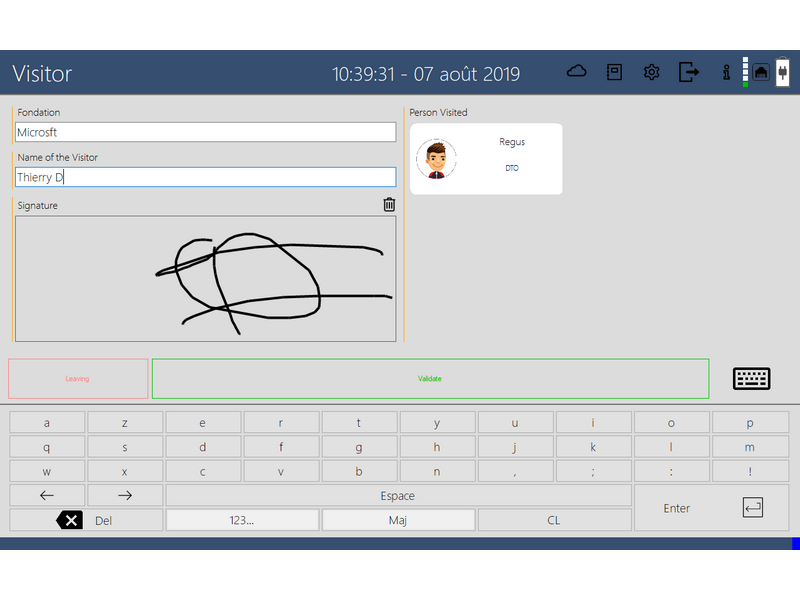
Software intended for the registration of visitors in your company.

Place a PC or tablet PC at the reception, an email will be sent to the person waiting for the visitor to prevent it.

In the statistics, you will find all the visits and you can generate PDFs …

By downloading the software, you have a trial period of 2 months.

Another advantage, once the visit is made, unlike a paper folder, the visit is not visible to other visitors.

You can change the way visitors register. Company, Contact, Request a Signature, Comment, Select the person visited, You can add photos to Company Contact and Service (Commercial, Marketing, Technical…)

The Software is optimized to run on Windows Computers or Tablets in Touch mode.

Attention Windows 7, 8, 8.1, 10 only.

VideoSolo Screen Recorder 1.2.36

Type: Shareware
Cost: $59.95
Size: 35.74 MB
Release date: Jun 17 2019
Platform: Win2000,WinXP,Win7 x32,Win7 x64,Windows 8,Windows 10,WinServer,WinOther,WinVista,WinVista x64
Publisher’s Site:  https://www.videosolo.com/
Publisher’s Product Page:  https://www.videosolo.com/screen-recorder/
Country: United States of America


VideoSolo Screen Recorder

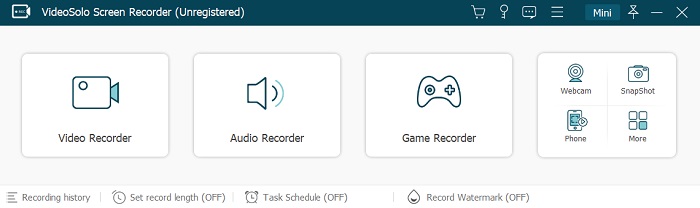
Recording the computer screen is a useful solution for video tutorials, for a webinar recording, for an important presentation. A good screen recording software that fits your needs will help you save a lot of time. VideoSolo Screen Recorder is a program, that helps you capture any activities on your computer along with sound from the microphone/system. Of course, the webcam content can be also captured by this powerful tool.

1.Record Any Videos on Your Computer You can use VideoSolo Screen Recorder to record various kinds of videos, like streaming movies, online conferences, video tutorials, gameplay, and any other videos that happen on your computer screen. It can capture the entire screen, a single window, or any selected portion, screen, and webcam at the same time.

2.Record Sound from Microphone/System When you record the screen, you can choose to record the sound of the video itself or record your own voice through the microphone. The former one fits for recording movies while the latter one is fit for making video presentations. If you want to record a video meeting, you should turn both of them on. And, this program allows you to adjust the volume of the microphone and system before recording or during recording.

3. Draw, Make Annotation and Highlight the Mouse You can draw, add text, add arrows, making annotations while you’re recording the computer screen. And you can highlight the mouse cursor to make your act easier to track on the screen. The color and the shape of the highlight can be defined according to your likes. These features are very useful when you need to make video presentations.

4.Hotkeys Control VideoSolo Screen Recorder allows you to use shortcut keys to start, pause, stop recording video, take the screenshot. And to make this program more user-friendly, it also allows you to customize the hotkeys via the preference setting. It’s really a good tool for capturing computer screens as HD video files. Download it to try.