BDGYsearches 5.8.0.5.1

Type: Freeware
Cost: $0
Size: 772.00 kB
Release date: May 01 2022
Platform: Win2000,WinXP,Win7 x32,Win7 x64,Windows 8,Windows 10,WinServer,WinOther,WinVista,WinVista x64
Publisher’s Site:  https://www.bdgysearches.com/abcguzis/ddpaulguzis.html
Publisher’s Product Page:  https://www.bdgysearches.com
Country: United States of America


BDGYsearches

BDGYsearches is a computer program that searches Bing, Duckduckgo, Google, or Yahoo for precise searches. It has the capability to search approximately forty search categories to obtain the desired result. It makes searching easy and effortless. It has the capability to search engines using the same criteria without any reentering of the search terms. It has a SUGGESTIONS feature to search if needed. BDGYsearches is the ultimate in searching the internet. It makes searching the internet so very, very easy. Some of the categories are, Site, search within a given domain, file type, IP address, site domain, definitions from pages, in the title, location, Bing near, source for the search, exact term, Google wild card, Google word in URL, BDG stocks, blogs for a given term, and many more categories. The programs has a Zoom Control, Spell Checker, and a special Address Search Bar. Pin BDGYsearches to the Windows desktop or task bar for easy searching over and over again.

Graphcat<

FolderMill 4.9.2109

Type: Freeware
Cost: $0
Size: 165.10 MB
Release date: Sep 22 2021
Platform: Win2000,WinXP,Win7 x32,Win7 x64,Windows 8,Windows 10,WinServer,WinOther,WinVista,WinVista x64
Publisher’s Site:  https://www.fcoder.com
Publisher’s Product Page:  https://www.foldermill.com
Country: Latvia


FolderMill

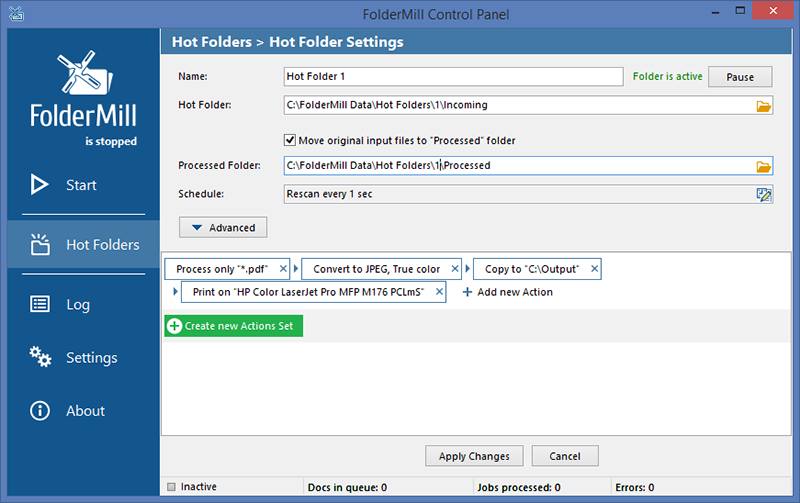
FolderMill monitors a folder and automatically prints or converts all new documents and image files to PDF, JPG, PNG, or TIFF. The system administrator defines special ‘Hot folders’ for monitoring and sets Actions to be performed. After this, all employees in the office can print documents or create PDFs as simple as copying files!


FolderMill supports all popular types of office documents including Microsoft Office Word files, RTF and plain text documents, Excel files, PowerPoint presentations, Visio drawings and charts, Microsoft Office Publisher and Adobe PDF files, XPS, JPG, PNG, PCX, DCX, Bitmap, GIF, TGA, TIFF images, and other documents.

FolderMill streamlines the conversion of all incoming files to PDF, JPG, PNG, or TIFF with very few efforts – simply place the files into one folder and take them out from another one!

To print or convert the documents all the company employees need to do is to place them into one of the ‘Hot Folders’. There is no need to open every file individually, just select the desired Action and configure its parameters.

What’s new in FolderMill 4.9:

– Processing of Word DOC, DOCX, RTF, SVG, and MHT files without Microsoft Word or OpenOffice
– New Zoom scaling mode for Print document Action
– New ways to print or convert emails with attachments
– Ability to save TIFF and JPEG images in grayscale mode
– Ability to change watermark position by Z-axis (Z-Order)
– Italian language localization
– New supported format: PRN (Microsoft Windows Print File)
– Improved Auto Crop feature for Convert to Image Action
– Improved HTML to PDF conversion
– Improved printing of Outlook MSG and EML files
– Improved component for processing AutoCAD DWG and DXF drawings
– The new version of eDrawings Viewer 2021 supported to process SolidWorks drawings
– Filter by filename Action now works faster
– Fixed ability to preserve native CMYK color space of input images
– Other fixes and improvements

mysys 4.9.0

Type: Shareware
Cost: $29.95
Size: 103.39 MB
Release date: Apr 04 2022
Platform: Win2000,WinXP,Win7 x32,Win7 x64,Windows 8,Windows 10,WinServer,WinOther,WinVista,WinVista x64
Publisher’s Site:  http://www.integritech.ca
Publisher’s Product Page:  https://www.integritech.ca/index.php/products/mysys
Country: Canada


mysys

A Window into your System!

Do you have alot of files?
Do you spend too much time navigating hundreds of folders?
Do you sometimes forget where a file is?

mysys will be your new home away from all the pesky folders!

News Flash: Version 2 now reads the file tables directly dramatically improving DB creation speed!

If you have mapped network or encrypted drives a popup will ask which ones to include in the
database. Those drives will take longer to index depending on the network connection speed.

CD/DVD/Flash drives will not be indexed, only Fixed drives and optionally Network/encrypted drives.

Use the Schedule button to create a Windows Task Schedule so the indexing happens at
a time which is most convenient. To delete the task just click Cancel.

Once the database is created you are ready to find files, fast!

In the top left text box, type any filename and hit enter or click Search.

Wild cards are supported such as read*.txt.

You can use AND/OR/- like: this OR that
the – is to exclude like: this -notthat

Use double quotes to find whole phrases.

Use brackets like: (afoldername or anotherfolder) and (*.c or *.rc or *.h)
For that example you would check on the ‘Include folder names’ option and probably the ‘Exact match’ option also otherwise will find *.cs, *.css, *.hpp, etc…

You can use the Containing text box to search within the files found. Contents are never
indexed but uses a fast highly multi-threaded algorithm.

File sizes, Dates and Attributes are all read live off the disk, these are not stored in the database.