X-NetStat 6.0.0.23

Type: Shareware
Cost: $49.95
Size: 75.56 MB
Release date: Jul 07 2021
Platform: Win2000,WinXP,Win7 x32,Win7 x64,Windows 8,Windows 10,WinServer,WinOther,WinVista,WinVista x64
Publisher’s Site:  http://www.freshsoftware.com/
Publisher’s Product Page:  https://www.freshsoftware.com/xnetstat-home
Country: United States of America

X-NetStat

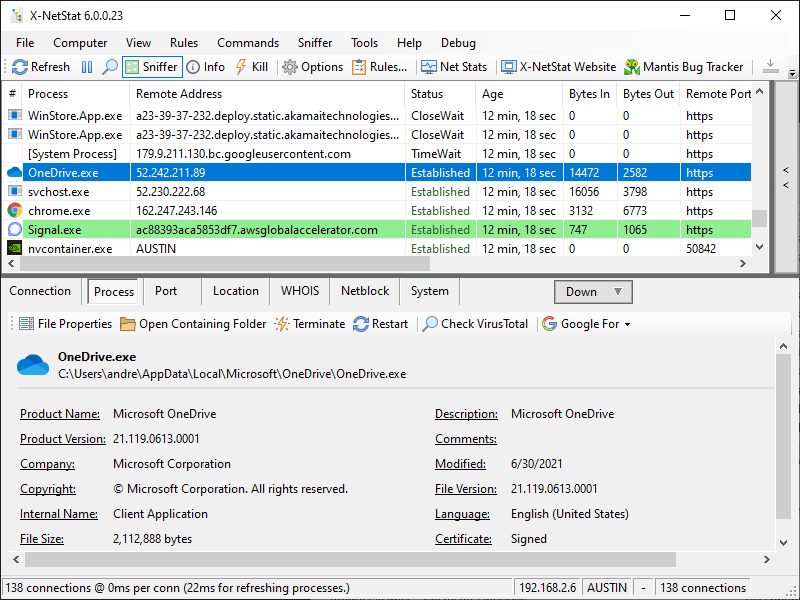
X-NetStat shows your current Internet and network connections in realtime. These connections are established each time you visit a web page, send an instant message, check your email, or anytime you do network activity that requires you to connect to another computer. They also appear when outside computers attempt to connect to your machine, authorized or not.


Information shown includes local and remote addresses, local and remote ports, the status, the age of the connection, how much bandwidth/traffic the connection is using, the program EXE behind it, geographical information, and more. It’s kind of like Internet/network radar, and you can even kill unwanted connections.

There are additional features geared toward network administrations, like Windows Firewall integration, a Rules system to set up actions based on network conditions, line-speed and hop detection, a Network Statistics window displaying information on network interfaces and protocols, a Port Database, WHOIS client, local network scanner, and more.

Graphcat<

WinGPG 1.0.1.1.0

Type: Freeware
Cost: $0
Size: 9.39 MB
Release date: May 21 2018
Platform: Win2000,WinXP,Win7 x32,Win7 x64,Windows 8,Windows 10,WinServer,WinOther,WinVista,WinVista x64
Publisher’s Site:  https://scand.com/
Publisher’s Product Page:  https://scand.com/products/wingpg/
Country: Belarus


WinGPG

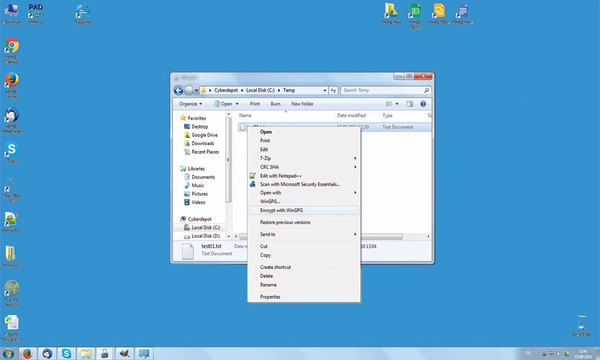
WinGPG developed by Scand Ltd. is a tray-based classical Windows application and a classic GPGv2 distribution (we use the cryptography from the official site without making any modifications).

It supports the following operations:
Encryption/Decryption (we offer automatic zipping at encryption time, so your files are ready to be transmitted via email or any instant messenger immediately)
Signature/Verification
Key management (create, import, export, revoke)

WinGPG main operational features are:
WinNT Explorer support via context menus
Global shortcuts working from the active explorer window or clipboard
Clipboard support for both texts and files
No complicated setup, you only run a batch file
WinGPG is a fully functional tool, which offers the user an opportunity to manage keys and files easily. Password protected keys, default keys, and other useful tricks are available with WinGPG.

Video Converter Ultimate for Mac 2.2.8

Type: Shareware
Cost: $55.20
Size: 113.72 MB
Release date: Dec 09 2021
Platform: Mac OS X,
Publisher’s Site:  https://www.apeaksoft.com/
Publisher’s Product Page:  https://www.apeaksoft.com/video-converter-ultimate/
Country: China


Video Converter Ultimate for Mac

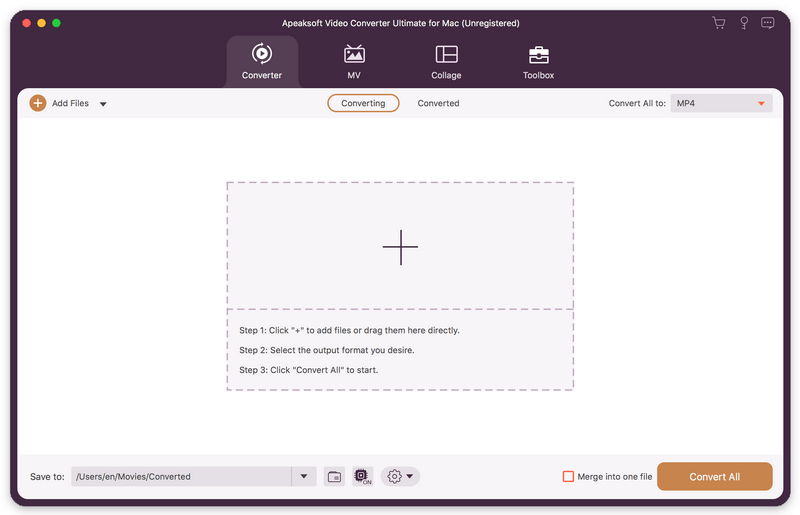
Apeaksoft Video Converter Ultimate for Mac is able to convert media files to other popular formats like MP4, MOV, AVI, MP3, so that you can enjoy your videos on portable devices. Before conversion, you could edit video effects as you like.

Key functions:

1. Convert various media files and home-made DVD movies
Apeaksoft Video Converter Ultimate for Mac could convert all kinds of media files to other formats such as MP4, AVI, MKV, MOV, MXF, AAC, FLAC, M4A, WAV, etc. Moreover, it supports many portable devices, like Samsung, iPhone, etc. In addition, it could convert your home-made DVD disc/folder/ISO files to videos so that you could view them easily.

2. Make MV and Collage
The MV function in Apeaksoft Video Converter Ultimate for Mac enables you to make customized MV with various themes and edit the MV before exporting. The Collage function allows you to create collage with at most 13 videos and images.

3. Edit your videos before conversion
Apeaksoft Video Converter Ultimate for Mac is not only a video converter but also a video editor. With the powerful video editing function, you could rotate/crop/merge/trim your videos, adjust brightness, contrast, saturation and hue, select suitable filter, add watermark, choose audio track, add/edit subtitles, etc.

4. Edit media metadata, compress file, enhance video, make GIFs and 3D files
Apeaksoft Video Converter Ultimate for Mac also provides some useful tools for users. You are able to edit the ID3 tag, compress large files to smaller size, enhance your videos. In addition, you could also make wonderful GIFs and create your own 3D files.