Sheet Lightning Pro 6.21-D

Type: Demo
Cost: $150
Size: 7.42 MB
Release date: Jun 06 2015
Platform: Win2000,WinXP,Win7 x32,Win7 x64,Windows 8,Windows 10,WinServer,WinOther,WinVista,WinVista x64
Publisher’s Site:  http://www.revcad.com
Publisher’s Product Page:  http://www.revcad.com/index.html
Country: United Kingdom


Sheet Lightning Pro

Sheet Lightning is a specialised engineering 2D/3D CAD System for creating and unfolding sheet metal designs for fabrication or manufacture. It handles everything from simple cylinders, cones, rectangular ducts and ovals, to adapters, adapting any of these section types, interections between any of these types and multi-intersections of any of these types. This enables it to handle breeches, lobster-back or segmented bend and very unusual or complex one-off designs. All pieces can have centre line offset and oblique or skewed sections. Simple designs are handled with ease through a second ‘parametric’ environment that requires only the typing of key dimension values to modify the design. A library of standard designs is included. Futhermore all designs created using the full 3D system can be automatically analysed and converted to a parameteric form, then saved as extensions to the existing library. The software integrates to general CAD systems via seamless DXF transfer, exporting both 2D patterns and 3D models. The product has been provensince the earlienst version in the worldwide market place since 1990, offering truly unique design capability.

Graphcat<

Apeaksoft Data Recovery for Mac 1.2.22

Type: Shareware
Cost: $31.96
Size: 19.69 MB
Release date: Apr 19 2022
Platform: Mac OS X,
Publisher’s Site:  https://www.apeaksoft.com/
Publisher’s Product Page:  https://www.apeaksoft.com/data-recovery/
Country: China


Apeaksoft Data Recovery for Mac

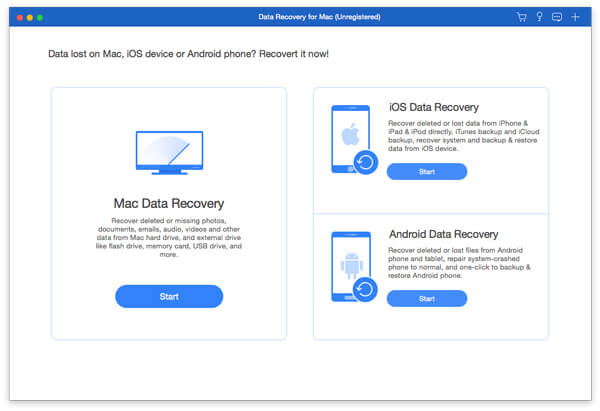
Apeaksoft Data Recovery for Mac can recover files from Mac, recycle bin, hard drive, flash drive, memory card, digital camera, mobile phones, etc. It supports various types of data such as images, documents, e-mails, videos, audio files, etc.


Key functions:

1. Support all kinds of recoverable data
Apeaksoft Data Recovery for Mac could support various types of data. Any frequently-used types of data can be recovered by this powerful data recovery software, such as pictures, songs, videos, documents, e-mails and other files.

2. Fast scanning speed and reliable data recovery
Apeaksoft Data Recovery for Mac provides fast speed to scan the files, so you dont need to wait long time. Before recovery, you could preview the scanned out data and have a check first. In addition, it will not store any of your private data and guarantee your privacy safety greatly.

3. Support various storage devices
It can help you recover all types of data from Mac, recycle bin, hard/flash drive, memory card, digital camera, etc. It can also recover data from storage devices with the file system of NTFS, FAT16, FAT32, exFAT, EXT, and more.

4. Easy data recovery for all situations
Apeaksoft Data Recovery for Mac can recover lost data due to damaged memory card, unexpected operations, partition deleted, software unexpected crashes, inaccessible drive, virus attack and any other situations. With it, you do not need to feel nervous any more when you lose your data.

QnE Companion 1.09

Type: Shareware
Cost: $18.64
Size: 37.15 MB
Release date: Feb 28 2022
Platform: Win2000,WinXP,Win7 x32,Win7 x64,Windows 8,Windows 10,WinServer,WinOther,WinVista,WinVista x64
Publisher’s Site:  http://www.terabyteunlimited.com
Publisher’s Product Page:  https://www.terabyteunlimited.com/qnecompanion/
Country: United States of America


QnE Companion

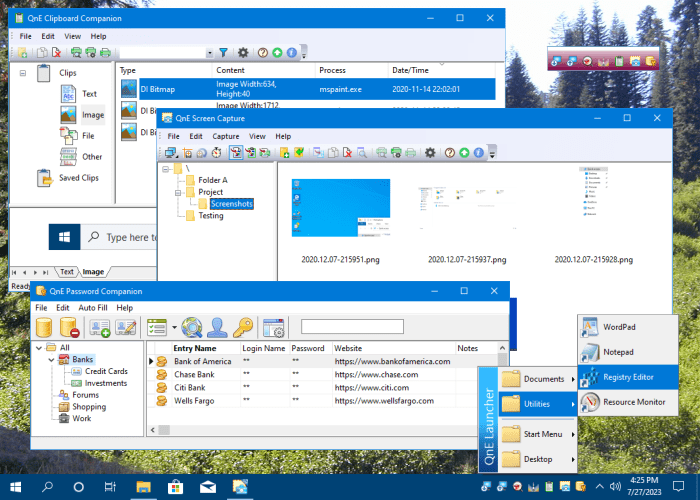
QnE Companion, by TeraByte, Inc., is a set of quick and easy to use utilities for your PC. Boost your productivity with a clipboard manager, screen capture utility, launcher, and desktop icon utility. These utilities can be conveniently and quickly accessed from the Windows taskbar, a small floating window or through traditional shortcuts.

The QnE Clipboard Companion gives you easy access to all your clips and makes the standard Windows clipboard much more powerful. You can search your clips, sort them, and even save them for repeated use.

The QnE Screen Capture utility makes it easy for you to capture a picture of your screen. Capture the entire screen or just a specific area with ease. Multiple monitor support is included.

The QnE Launcher provides a handy popup menu that you can populate with the programs, folders, and documents that you use the most. You can organize the menu with cascading submenus and get quick access to the things you use the most.

The QnE Desktop Companion is available as both a floating window and a taskbar toolbar. Whichever form you use it, it provides access to the QnE Icon Companion and a single location to quickly launch the other utilities included in the package.

The QnE Icon Companion, which is accessed through the QnE Desktop Companion, provides you with all the functionality you need to work with the location of icons on your desktop. Save and restore locations easily, search on a wide range of criteria, and more.

QnE Companion is an excellent package that you owe it to yourself to try.