VideoSolo Screen Recorder (Mac) 2.0.52

Type: Shareware
Cost: $59.95
Size: 24.35 MB
Release date: Aug 27 2018
Platform: Mac OS X,
Publisher’s Site:  https://www.videosolo.com/
Publisher’s Product Page:  https://www.videosolo.com/screen-recorder/
Country: United States of America


VideoSolo Screen Recorder (Mac)

VideoSolo Screen Recorder for Mac has a multitude of uses, ranging from creating tutorial demonstrations to downloading streaming videos and capture gameplays. This Mac screen recorder can capture what you see on screen and what you hear/say simultaneously, and then saves them as a compressed video file in real-time. The intuitive and easy-to-use software offers a complete suite of tools and options for professional screen capture.


Key Features:

1.Record All Activities of Your Mac Screen VideoSolo Screen Recorder allows you to record your entire screen, a custom portion of it, or a specific window or application. You also have the option to record your own voice via a microphone. Of course, you can do both at the same time. The multiple options allow you to record exactly what you want on your Mac computer.

2.Record from 2 Places This program has the ability to record simultaneously from your screen as well as the webcam. You might have come across various YouTube picture-in-picture videos you can create such videos easily with VideoSolo Screen Recorder now!

3.Draw and Annotate on Recording VideoSolo Screen Recorder also lets you take advantage of its changeable cursors to make your recorded videos more appealing. With annotations, you can connect with your views more effectively and convey your message with ease.

4.Control All the Recording Easily You can control what you’re recording either through the floating bar or with hotkeys, which are keyboard shortcuts that allow you to quickly start, stop and pause recordings with a simple keystroke. Hotkeys are quicker than using your mouse, plus you don’t capture unnecessary cursor movement. And the hotkeys can be set according to your like in the preference window. To sum up, VideoSolo Screen Recorder for Mac is really a good screen recording software for both professional and novice users. Download its trial version to know more.

Graphcat<

Screen Watermark 3.9.0.1.0

Type: Shareware
Cost: $49
Size: 38.32 MB
Release date: Feb 21 2021
Platform: Win2000,WinXP,Win7 x32,Win7 x64,Windows 8,Windows 10,WinServer,WinOther,WinVista,WinVista x64
Publisher’s Site:  https://www.xSecuritas.com
Publisher’s Product Page:  https://www.xsecuritas.com/screen-watermark/
Country: United States of America


Screen Watermark

Screen Watermark Control

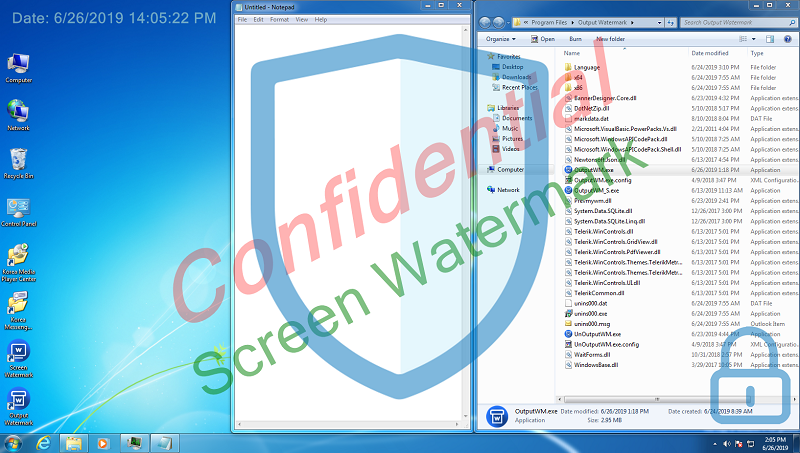
You can print the desired watermark on the screen. This screen watermark does not affect the running of other programs. Also, Up to 4 texts and images can be used as watermark.

Features

* Displays watermark on the monitor.
* Dual monitor support
* The watermark displayed on the monitor has no effect on existing programs, ie there is no restriction on operations such as mouse clicks.
* Supports watermark font, size, color, transparency, location, etc.
* Support
1) Up to 4 text watermarks
2) Up to 4 image watermarks

Related Videos

* Quick Guide: https://youtu.be/tUrtvpx46I0
* See more videos: https://www.youtube.com/channel/UCW9UHqHn07a5Tk_L2bmsXyw

Operating System

* Windows 7 / 8 / 8.1 / 10
* Windows Server 2008 R2 / 2012 / 2016 / 2019

UFS Explorer Network RAID 9.7

Type: Shareware
Cost: $239.95
Size: 17.96 MB
Release date: May 12 2022
Platform: Win2000,WinXP,Win7 x32,Win7 x64,Windows 8,Windows 10,WinServer,WinOther,WinVista,WinVista x64
Publisher’s Site:  https://www.sysdevlabs.com
Publisher’s Product Page:  https://www.ufsexplorer.com/ufs-explorer-network-raid.php
Country: Ukraine


UFS Explorer Network RAID

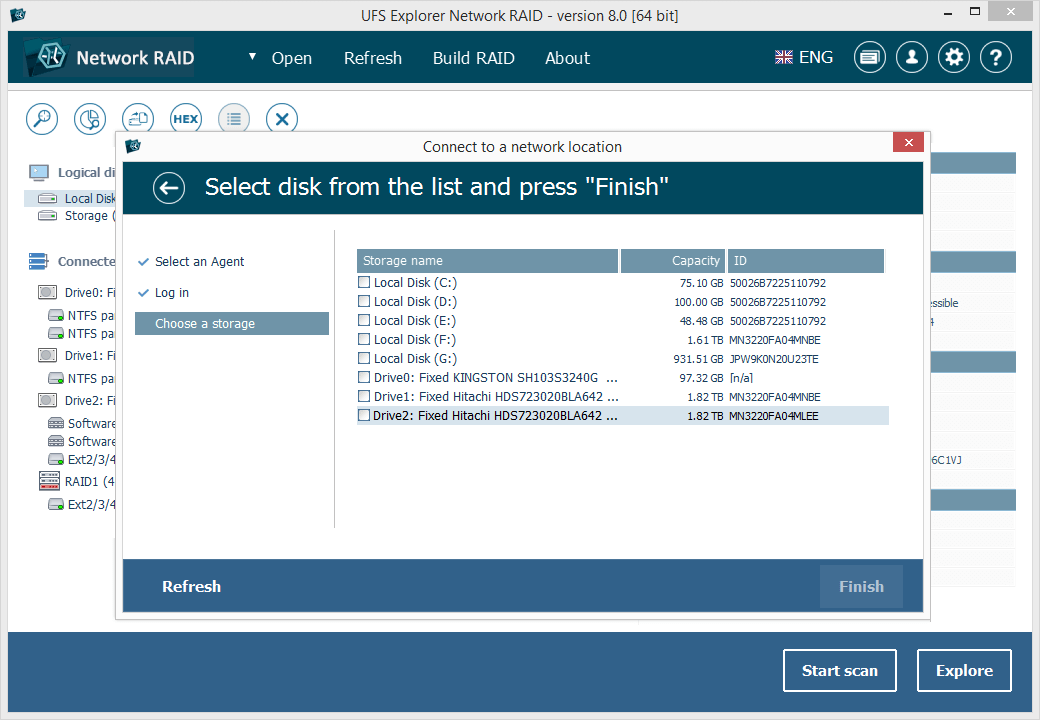
UFS Explorer Network RAID is an advantageous software product suitable for both local and distributed data recovery over LAN from a linear storage medium or complex RAID system. The program allows restoring files from any storage attached to another remote computer, even if it is running a different operating system, and makes it possible to assemble RAID from drives connected to two or more PCs. RAID sets of various complexity are supported, including standard RAID patterns, nested/hybrid RAID levels and custom RAID configurations. A flexible RAID builder with an embedded script handler makes it easy to define and modify RAID configurations, while a hexadecimal viewer allows analyzing raw data of partitions and drives. In addition to RAID, the application works with PCs, laptops, USB flash drives, memory cards, external hard drives, virtual disks of VMware, Hyper-V, VirtualBox, QEMU, XEN, Parallels and disk image files of various formats. The software supports a wide range of file systems of Windows (NTFS, FAT, FAT32, exFAT), macOS (HFS+, APFS), Linux (Ext2, Ext3, Ext4, XFS, JFS, ReiserFS, UFS/UFS2, Btrfs), BSD/Solaris (ZFS) and is capable of handling a variety of modern storage technologies, like mdadm and LVM, Windows dynamic disks and MS Storage Spaces, Apple Software RAID and Fusion Drive, Drobo BeyondRAID, Synology Hybrid RAID and Btrfs-RAID, BitLocker and APFS encryption, etc. UFS Explorer Network RAID provides direct access via LAN and allows recovering data from drives containing bad sectors connected via a DeepSpar Disk Imager device. In addition to that, the software features various options for work with damaged drives. It allows configuring parameters for access and usage of a storage device, creating a full or partial disk image with various settings and rules for processing bad blocks. Drives and arrays with bad blocks can be handled using bad sector maps generated during imaging, through recognition of a given pattern or created by third-party tools.