Aiseesoft 4K Converter 9.2.36

Type: Shareware
Cost: $31.20
Size: 40.62 MB
Release date: Nov 30 2020
Platform: Win2000,WinXP,Win7 x32,Win7 x64,Windows 8,Windows 10,WinServer,WinOther,WinVista,WinVista x64
Publisher’s Site:  https://www.aiseesoft.com/
Publisher’s Product Page:  https://www.aiseesoft.com/4k-converter/
Country: China

Aiseesoft 4K Converter

Aiseesoft 4K Converter blazes a path for 4K converting. It helps 4K users to convert the downloaded or recorded 4K video to other 4K formats for higher compatibility, or compress 4K to 1080p HD, 720p HD and SD video for playback on more devices. It also enables you to upscale HD or SD videos to 4K.


Key features:

1. Convert 4K videos to HD/SD
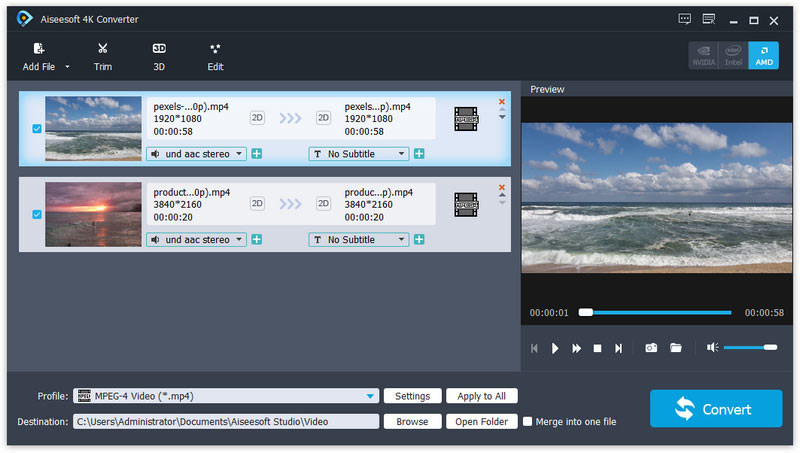
Import your 4K video to 4K Converter, choose HD or SD format as profile and click Convert, you can convert your 4K video to any HD or SD video/audio formats as you like. So if you have some 4K video files which occupy much space on your hard disc, now you have a solution. After resizing, you will have more free space to save more files.

2. Convert 4K video to popular formats
With the development of 4K technology, you will find more 4K resources. For example, you may get a 4K camcorder and record some 4K videos, or download some 4K videos from YouTube, but the format is not what you want. Under such circumstances, you need second consideration and comparison before choosing a 4K converter to convert your valuable 4K video. Aiseesoft 4K Converter is the most professional one in the market for now. As it adopts the latest kernal, supporting all popular 4K encoding technologies, including HEVC/H.265, MPEG, XviD, VP8, VP9.

3. Upscale video to 4K
Apart from down scaling, you can also upscale any of your video to 4K. By doing so, you will have one more way to get 4K content. The supported output 4K formats include MP4, TS, MKV, AVI, FLV, WebM, MOV, MXF, AVI, etc.

4. Edit 4K videos as you like
4K Converter also features the 4K editing function. You can use the built-in editor to adjust the brightness, contrast, saturation, hue and volume of the video, you can also add your own watermark to make it your own. Also, the trimming function enables you to get certain part(s) of the 4K video. It is also possible if you want to turn the 2D video to 3D.

Graphcat<

Apeaksoft iPhone Transfer for Mac 2.0.50

Type: Shareware
Cost: $19.96
Size: 51.40 MB
Release date: Mar 22 2022
Platform: Mac OS X,
Publisher’s Site:  https://www.apeaksoft.com/
Publisher’s Product Page:  https://www.apeaksoft.com/iphone-transfer/
Country: China


Apeaksoft iPhone Transfer for Mac

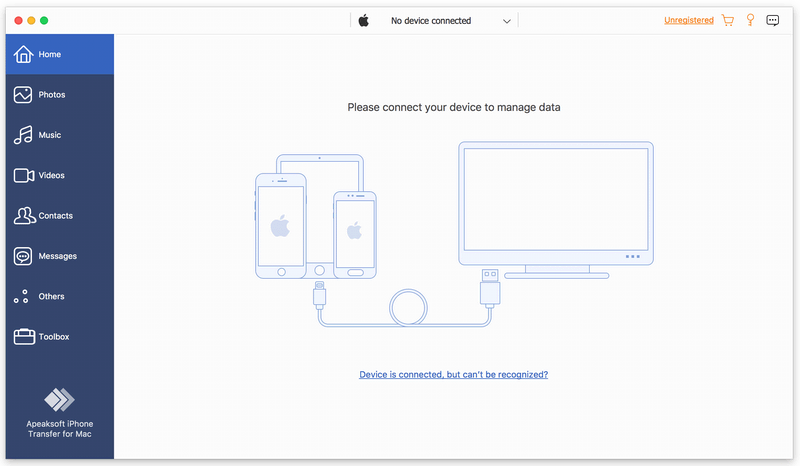
Apeaksoft iPhone Transfer for Mac is able to back up messages, contacts, pictures, music, videos, books, PDF and more between iOS device and Mac or between any two iOS devices. It supports all kinds of portable iOS devices, including iPhone/iPad/iPod touch, etc.

Key functions:

1. Transfer files flexibly
Apeaksoft iPhone Transfer for Mac is the most powerful file transfer software. It not only transfers data from iOS device to Mac, but also transfers files from iOS to iOS. What’s more, it lets you copy iOS data to iTunes easily.

2. Break iTunes limits
Apeaksoft iPhone Transfer for Mac can help you remove the restrictions caused by iTunes, for example, erase data while syncing, limited one-way transfer, copy all data without selection, various iTunes errors, no way of viewing data, etc. With Apeaksoft iPhone Transfer for Mac, you could transfer your data more quickly and conveniently without any limitation mentioned above.

3. Customize your iTunes library
Apeaksoft iPhone Transfer for Mac is the best iTunes replacement, which enables you to organize your iTunes library in clicks. You can manage your media files separately on Music, Movies, TV Shows, Podcasts, iTunesU, Ringtones, Audio Books and Voice Memos.

4. Make ringtone and convert HEIC pictures
With Apeaksoft iPhone Transfer for Mac, you could also make the ringtone according to your need. In addition, you could convert the photos in HEIC format to other common formats, so that you could view them on your portable devices.

FolderMill 4.8.2010

Type: Freeware
Cost: $0
Size: 160.18 MB
Release date: Nov 23 2020
Platform: Win2000,WinXP,Win7 x32,Win7 x64,Windows 8,Windows 10,WinServer,WinOther,WinVista,WinVista x64
Publisher’s Site:  https://www.fcoder.com
Publisher’s Product Page:  https://www.foldermill.com
Country: Latvia


FolderMill

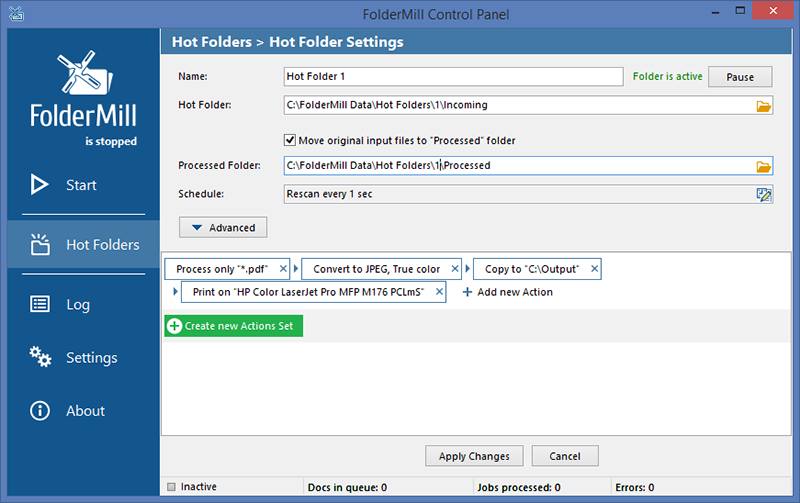
FolderMill monitors a folder and automatically prints or converts all new documents and image files to PDF, JPG, PNG, or TIFF. The system administrator defines special ‘Hot folders’ for monitoring and sets Actions to be performed. After this, all employees in the office can print documents or create PDFs as simple as copying files!

FolderMill supports all popular types of office documents including Microsoft Office Word files, RTF and plain text documents, Excel files, PowerPoint presentations, Visio drawings and charts, Microsoft Office Publisher and Adobe PDF files, XPS, JPG, PNG, PCX, DCX, Bitmap, GIF, TGA, TIFF images, and other documents.

FolderMill streamlines the conversion of all incoming files to PDF, JPG, PNG, or TIFF with very few efforts – simply place the files into one folder and take them out from another one!

To print or convert the documents all the company employees need to do is to place them into one of the ‘Hot Folders’. There is no need to open every file individually, just select the desired Action and configure its parameters.

What’s new in FolderMill 4.8:

– Ability to preserve native CMYK color space of input images;
– Using external ICC profiles for files in CMYK color space;
– Improved processing of Outlook email message files;
– Ability to block unwanted email attachments with Extract Exclude Mask (for Print Action);
– Ability to create bookmarks when merging files to a multi-page PDF;
– Auto-crop ability when converting raster images;
– New custom page zoom feature for HTML files;
– New supported format: Adobe InDesign INDD;
– Keeping original JPEG resolution for JPEG to PDF conversion;
– Compatibility with eDrawings Viewer 2021;
– Other fixes and improvements