
SQL DataTool 1.1.0.0

Type: Shareware
Cost: $179
Size: 3.65 MB
Release date: Dec 30 2020
Platform: Win2000,WinXP,Win7 x32,Win7 x64,Windows 8,Windows 10,WinServer,WinOther,WinVista,WinVista x64
Publisher’s Site:  https://www.sqldatatool.com/
Publisher’s Product Page:  https://www.sqldatatool.com
Country: Netherlands


SQL DataTool

PC410, Computer Services in Carroll County Maryland
SQL DataTool is developed to help you be more effective and productive. With our experience with database management and data analytics, we develop software that help you as data and database professional to get your work done. SQL DataTool helps you with a few of the most tedious tasks when working with databases:
– Comparing databases
– Migrating changes to databases to production
– Deploying databases on multiple servers and keeping them in sync
– Importing data into databases

Compare and generate scripts
With SQL DataTool you can easily compare databases between different servers and clients. One scan gives you the differences, and an easy way to sync or deploy the databases.

Errors are breaking your work
We work with different kinds of databases, however our main environment is MS SQL server. Some interesting functionalities exist within the main MS SQL server tools (e.g. SQL server management studio). However, it does not completely fits our purpose.
When working with large datasets, delivered to you in a text or comma separated file format, chances are that you run into issues. Issues that makes your import break.
We developed SQL DataTool to solve the case of MS SQL imports break because of unexpected data or separators.

Rework is time consuming
Our experience is that data analytics is repetitive, meaning that good analysis are requested time and time again. When you have to set the import parameters right every time, it might get annoying. But at least it is time consuming.
We developed SQL DataTool to make the rework of importing of importing data less time consuming.

Graphcat

Different file types are delivered
We experience that data is delivered in different formats from time to time. Sometimes it is delivered in spreadsheets, other times it is delivered to us in plain text. However, in the end, we want the data in the same format in the database.
We developed SQL DataTool to be able to handle multiple file formats.
Mac FoneLab iPhone Data Recovery 10.2.80

Type: Shareware
Cost: $63.96
Size: 55.19 MB
Release date: Apr 14 2022
Platform: Mac OS X,
Publisher’s Site:  https://www.aiseesoft.com/
Publisher’s Product Page:  https://www.aiseesoft.com/mac-iphone-data-recovery/
Country: China


Mac FoneLab iPhone Data Recovery

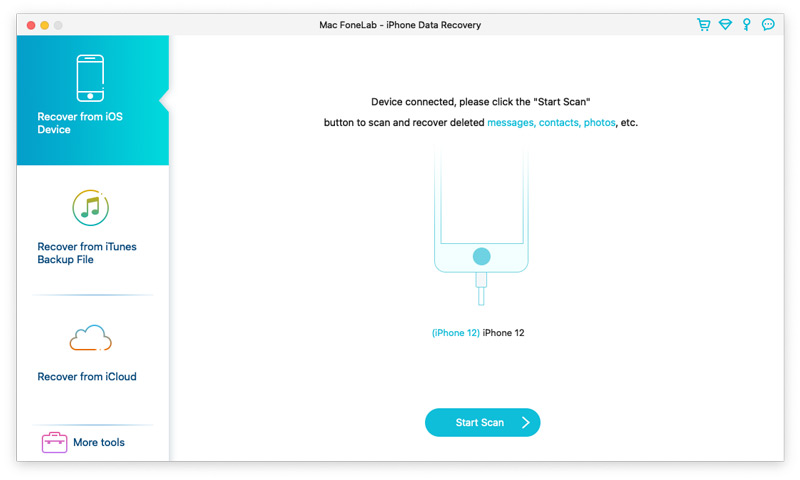
Aiseesoft Mac FoneLab is the best and easy-to-use software which can help users recover and back up various data to Mac from iPhone(iPhone 13 included), iPad Air, iPad mini 5, iPad 4, iPod touch 5, etc. It can also help users recover data from iTunes backup files. Besides, it supports various data such as Contacts, Messages, Call history, WhatsApp/Kik/Line/WeChat/QQ data, Calendar, Notes, Camera Roll, and Photo Stream, etc.
Key Functions:
1. Recover lost or deleted data from iOS devices directly
Recoverable data includes Contacts, Messages, Call history, Calendar, Notes, Reminder, Safari bookmark, Camera Roll, Photo Library, Photo Stream, Message attachments, Voice memos, WhatsApp data, Kik/Line/WeChat/QQ messages and photos, etc.

2. Regain data from iTunes/iCloud backup files
This Mac recovery software also enables you to recover lost data from iTunes/iCloud Backup for all Apple devices. Besides, it supports 11 types of files such as Contacts, Messages, Message attachments, Call history, Calendar and Notes, etc.

3. iOS System Recovery
This software also enables you to fix your iOS device from DFU mode, recovery mode, Apple logo, headphone mode, etc. to normal state. It also enables you to upgrade or downgrade iOS version.

4. iOS Data Backup & Restore
This software enables you to back up your iOS data to Mac and restore backup files (contacts and notes) to iOS device according to your need.

5. WhatsApp Transfer
The newly added WhatsApp Transfer feature can help users transfer WhatsApp data between iOS devices, back up WhatsApp messages, photos, videos, attachments, and restore WhatsApp from backup history or local iTunes backup. You can export WhatsApp backups in HTML and CSV formats.

Vivaldi for Windows 32 5.0

Type: Freeware
Cost: $0
Size: 72.80 MB
Release date: Dec 02 2021
Platform: Win2000,WinXP,Win7 x32,Win7 x64,Windows 8,Windows 10,WinServer,WinOther,WinVista,WinVista x64
Publisher’s Site:  http://vivaldi.com
Publisher’s Product Page:  http://vivaldi.com
Country: Norway


Vivaldi for Windows 32

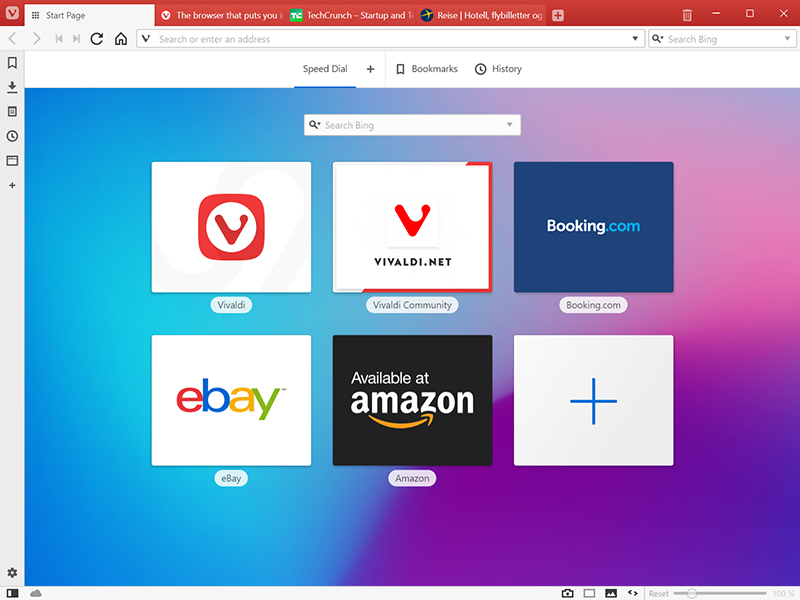
The Vivaldi browser does not track its users and offers more features than any other modern browser. Steered by Jon von Tetzchner (co-founder of Opera browser), Vivaldi is driven by the real needs of users today and ensures that they have the best tool to browse and do the job.

Users can tailor Vivaldi to suit their browsing needs with no limit to customization options. Vivaldi takes browsing to the next level with its numerous features that give users a more dynamic experience of the web. Vivaldi demonstrates that a browser can be the most useful tool to enhance time spent online and not just a means of accessing web pages.

Some of the highlight features that make Vivaldi a personal, do-it-your-way browser include:

Advanced tab management ability to group, tile, move and pin tabs.
Private and Secure Syncing across computers with end to end encrypted Synchronization.
Side Panel with easy access to bookmarks, downloads, tree-style tab manager, notes, browsing history and websites of users choice.
Built-in functionality such as the screenshot Capture tool, Notes and Image Properties.
Powerful History overview that lets users explore their browsing patterns.
Unique and customizable look and feel of the browser interface with custom Themes and more.
Keyboard Shortcuts and Mouse Gestures for quick browser commands.
Built in e-mail client and calendar.
Built in ad-blocker

For more details, visit https://vivaldi.com
