ACDSee Photo Studio Home 25.0.0.1871.0

Type: Shareware
Cost: $59.99
Size: 1.15 MB
Release date: Sep 22 2021
Platform: Win2000,WinXP,Win7 x32,Win7 x64,Windows 8,Windows 10,WinServer,WinOther,WinVista,WinVista x64
Publisher’s Site:  http://www.acdsee.com
Publisher’s Product Page:  https://www.acdsee.com/en/products/photo-studio-home
Country: Canada

ACDSee Photo Studio Home

PC410, Computer Services in Carroll County Maryland
An Arsenal of Digital Asset Management Tools
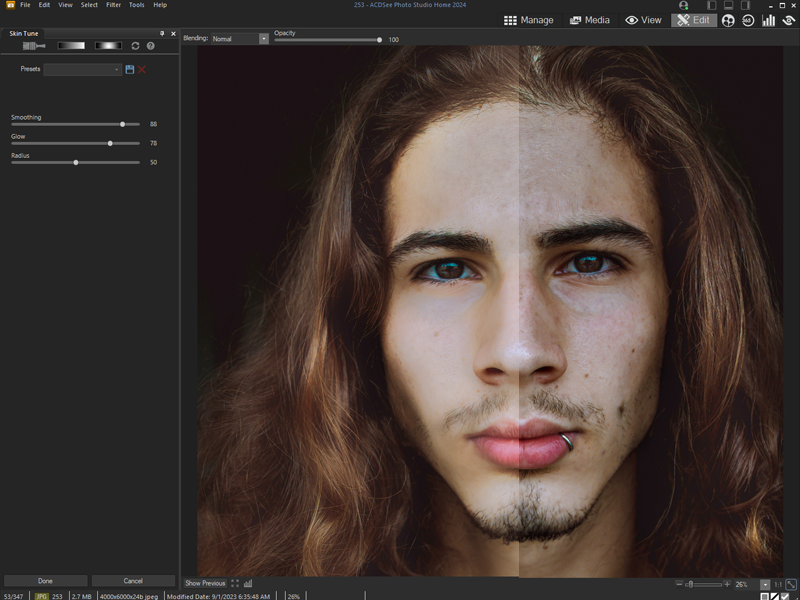
Clean and simple Digital Asset Management (DAM) should not be an enigma lost in the mists of Shangri-la. Home 2022 offers photographers of any skill level the best DAM tools on the market. Easy to use and robust enough to tackle any challenge, Home 2022 includes diverse new tools such as the time-saving Media Mode for interacting directly with the ACDSee photo database; and People Mode, an AI engine that seamlessly places a name to a face. A vibrant and colorful perspective awaits you with Home 2022s improvements to Tone Curves and support for higher ISOs.

Putting a Name to a Face just got Easier
People Mode is new to ACDSee Home 2022 and is born of a union between ACDSees industry-leading Face Detection & Recognition feature and a keen application of machine learning. Photographers from all walks of life will enjoy the dedicated space for distinguishing by client, family member, or person of interest, allowing for the management of people by merging, renaming, or deleting faces, or taking labelling suggestions from the AI assistant for grouping similar unnamed people.

Filter at Lightning Speed
Media Mode is ACDSees database-driven powerhouse for viewing and accessing the folders you have either browsed in Manage mode or cataloged into the ACDSee database. This streamlined, uncluttered view of the media assets managed by ACDSee offers sorting, grouping, and filtering in any combination.

Unrivalled Digital Asset Management
ACDSee has superior file management capabilities. Finding, sorting, moving, organizing, and sharing everything you need for complete mastery over your photography workflow is right here, at your fingertips. No uploading or importing your images. Add ratings, hierarchical keywords, tags, categories, location data and customizable color labels. And for 2022, we have added SVG file support to our already extensive list of supported file types.

Graphcat

Privacy Eraser Free 5.19

Type: Freeware
Cost: $0
Size: 9.06 MB
Release date: Jan 02 2022
Platform: Win2000,WinXP,Win7 x32,Win7 x64,Windows 8,Windows 10,WinServer,WinOther,WinVista,WinVista x64
Publisher’s Site:  http://www.cybertronsoft.com
Publisher’s Product Page:  http://www.cybertronsoft.com/products/privacy-eraser/
Country: China


Privacy Eraser Free

Privacy Eraser is an all-in-one privacy suite that protects your privacy by cleaning up all your Internet history tracks and past computer activities. It supports popular web browsers such as Internet Explorer, Microsoft Edge, Mozilla Firefox, Google Chrome, Safari and Opera.

With simply one click, Privacy Eraser can quickly erase the Internet cache, cookies, browsing history, address bar history, typed urls, autocomplete form history, saved password and index.dat files of your browser, and Windows run history, search history, open/save history, recent documents, temporary files, recycle bin, clipboard, taskbar jump lists, dns cache, log files, memory dumps, error reporting and much more.

Furthermore, Privacy Eraser supports plug-ins to extend cleaning features, you can easily delete the tracks left by any applications by making your own plug-ins. Privacy Eraser embedded more than 250 FREE plug-ins which supports the most popular programs such as ACDSee, Adobe Reader, Microsoft Office, WinZip, WinRAR, Windows Media Player, VLC Player, eMule, BitTorrent, Google Toolbar and many others. With the flexible, highly customizable and open plug-in architecture, you can even customize your own exclusive Privacy Eraser!

Privacy Eraser works on Microsoft Windows 10/8.x/7/Vista/2012/2008 (32/64-bit) and supports Microsoft Windows FAT16/FAT32/exFAT/NTFS file systems, completely implements and exceeds the US Department of Defense and NSA clearing and sanitizing standard, to gives you confidence that once erased, your file data is gone forever and can not be recovered.

Aiseesoft Mac Video Converter Ultimate 10.1.6

Type: Shareware
Cost: $25
Size: 107.10 MB
Release date: Jun 08 2021
Platform: Mac OS X,
Publisher’s Site:  https://www.aiseesoft.com
Publisher’s Product Page:  https://www.aiseesoft.com/mac-video-converter-ultimate/
Country: China


Aiseesoft Mac Video Converter Ultimate

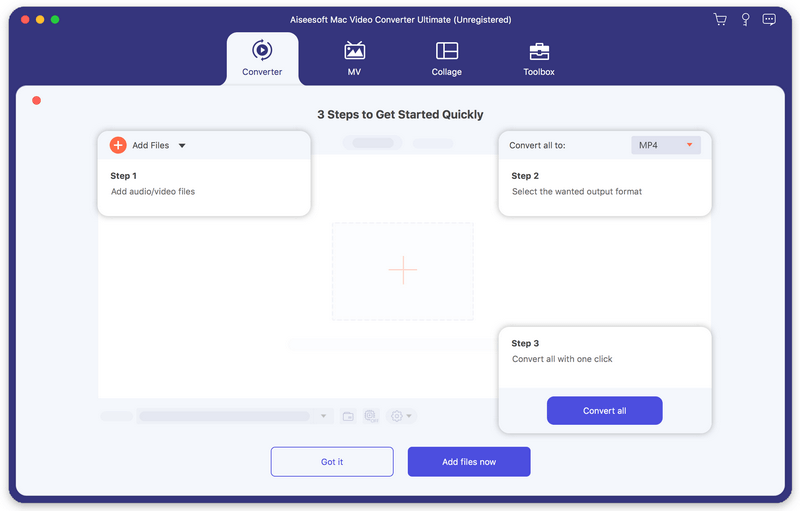
Aiseesoft Mac Video Converter Ultimate helps convert any video to other formats like MP4, MOV, AVI and more, so that you can enjoy your videos on more devices. Before conversion, you could edit video effects. And the enhancement function enables you to enhance video quality. In addition, you could use the fast split function to clip your file equally.

Key features:

1. Convert video/home-made DVD to popular formats on Mac
It is designed to convert home-made DVD and any other video to MP4, AVI, MOV, MKV, etc. You are also allowed to convert music video to any audio formats such as MP3, AAC, AC3 and OGG.

2. Various video editing features
Aiseesoft Mac Video Converter Ultimate is more than a video converter. It can also work as a powerful video editor, which allows you to rotate/crop video, add video effects and filters, clip/merge video, add audio track and subtitles, remove video noise and reduce video shaking, etc. What’s more, the newly-added MV feature enables you to produce a cool music video in minutes with various built-in themes and BGM. If you need to upload videos to social platforms like YouTube, Instagram, etc., you can compress video size at first. Moreover, it could keep your original id3 information after conversion.

3. Support external audio track and multi-audio track
You are allowed to add external audio track to your video, and you could import more than one audio file for one video to create your own video effects. You can also add your own subtitle if there is an unsynchronized subtitle to a movie.

4. Support various devices
This software works well with the latest iPhone, iPad, iPod, Samsung, HTC, and more mobile devices, so that you can play the converted videos with the supported formats and enjoy them anytime.