
Internet Cafe Software 10.1.0.3

Type: Shareware
Cost: $49
Size: 60.02 MB
Release date: Jul 02 2021
Platform: Win2000,WinXP,Win7 x32,Win7 x64,Windows 8,Windows 10,WinServer,WinOther,WinVista,WinVista x64
Publisher’s Site:  http://www.antamedia.com
Publisher’s Product Page:  http://www.antamedia.com/cafe/
Country: Serbia

Internet Cafe Software

PC410, Computer Services in Carroll County Maryland
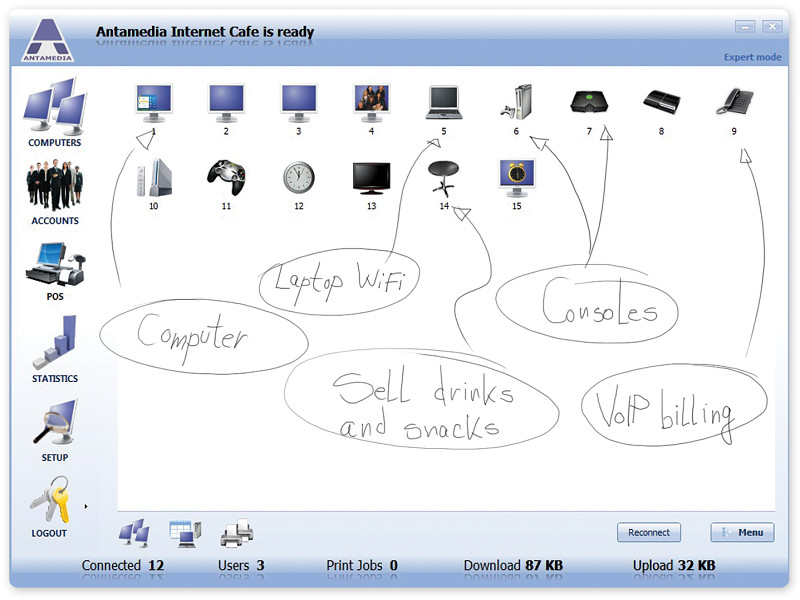
Antamedia Internet Cafe controls, secures, and enhances the running of your Internet cafe, gaming center, library, school or hotel public computers.

The software helps you bill your customers for limited browsing, playing games, using Office applications, WiFi HotSpot usage, VOIP calling, printing, point of sale products. It restricts access to the system, desktop, drivers, folders and programs, protects your client PCs from customer misuse, blocking access to the sensitive files, OS, Registry tools, Run and Find command, Windows control panel, Printers and Faxes, network neighbour, minimizing maintenance time.

Internet Cafe software is an integration of all Antamedia products: Internet Cafe, HotSpot, Print Manager, Bandwidth Manager and the Point of Sale. It is the next-generation software that can control desktop computers, WiFi laptops and devices, mobile phones, PS3, Nintendo Wii, Xbox and other consoles. Customer usage and statistics is tracked for user logins, tickets, free usage, refills, self-service signups.

Advanced POS helps you bill your customers while keeping track of your inventory and reminding you on low stock. Loyalty features with smart cards support brings promotions and rewards, increasing profit from existing customers.

Graphcat

HotSpot module limits download and upload rate, bandwidth data transfer, maintains URL log of the pages visited by customers.

Printed pages are tracked and the cost can be deducted from account balance, customer time, or added to the customer bill. VoIP billing brings cheap calls for your customers and additional revenue.

Some of the many features are logo and receipt customization, skins, detailed application setup, API integration, remote client computers on different networks behind firewalls, user account sharing between multiple Internet Cafes.

That’s why Antamedia is the most popular software for Internet or cyber cafes, in 170 countries across the world. Download the fully-functional demo now!
AnyRec Screen Recorder 1.0.6

Type: Shareware
Cost: $14.50
Size: 2.32 MB
Release date: Aug 16 2021
Platform: Win2000,WinXP,Win7 x32,Win7 x64,Windows 8,Windows 10,WinServer,WinOther,WinVista,WinVista x64
Publisher’s Site:  https://www.anyrec.io/
Publisher’s Product Page:  https://www.anyrec.io/screen-recorder/
Country: Hong Kong


AnyRec Screen Recorder

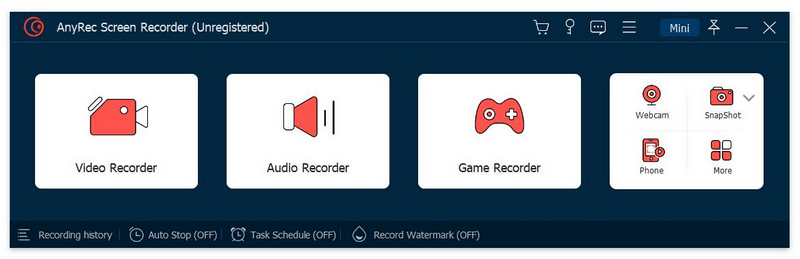
AnyRec Screen Recorder is professional in recording the activities on your computer and you are able to record online videos and audio, meetings, gameplay and webcam simply. The Snapshot tool allows you to take screenshots and edit the captured screenshots.

Key functions:

1. Record online videos and take screenshots
AnyRec Screen Recorder is easy-to-use to record videos played on your computer with high quality. You could also record meetings, Skype calls on your computer. It supports various formats like MP4, MOV, WMV, AVI, F4V, TS. In addition, you could use it to take screenshots. The recorded videos and captured screenshots could be saved as interesting GIFs.

2. Record audio
With AnyRec Screen Recorder, you are able to save the audio files you want to keep to other formats, such as MP3, M4A, AAC, WMA. Moreover, it allows you to record both system sound and Microphone sound, you could choose the one according to your need. You could also reduce audio noise while recording.

3. Record gameplay and webcam
AnyRec Screen Recorder benefits game lovers a lot. It has the ability to record gameplay which you cannot download. It could also record the webcam. After recording, you could preview the recorded file and trim the recorded clips.

4. Mouse recording and task schedule function
With the mouse recording function, you could show mouse cursor, record mouse clicks and record mouse area in custom colors. Furthermore, this tool could record any on-screen activity on your computer automatically, you just need to set the start/stop time, record length. It also lets users to add real-time drawings on recording video or screenshots.

Vidmore DVD Creator 1.0.28

Type: Shareware
Cost: $29.95
Size: 1.78 MB
Release date: Apr 15 2021
Platform: Win2000,WinXP,Win7 x32,Win7 x64,Windows 8,Windows 10,WinServer,WinOther,WinVista,WinVista x64
Publisher’s Site:  https://www.vidmore.com/
Publisher’s Product Page:  https://www.vidmore.com/dvd-creator/
Country: China


Vidmore DVD Creator

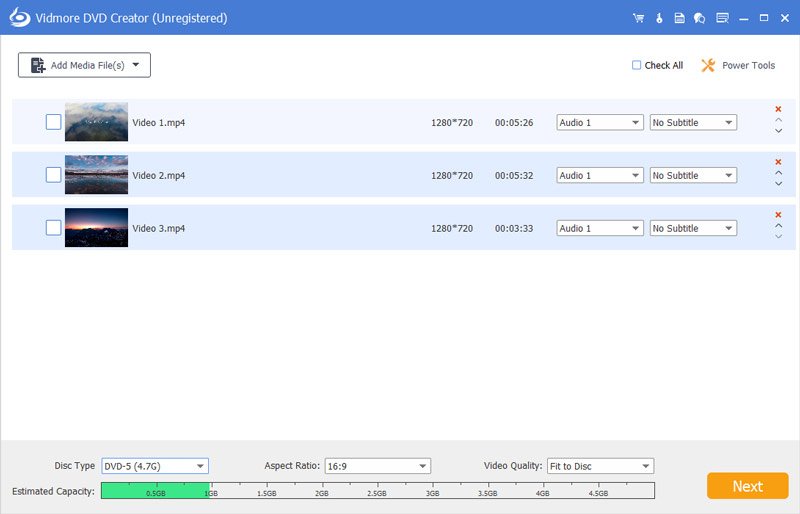
Vidmore DVD Creator enables you to make all kinds of popular videos to DVD or Blu-ray disc/folder/ISO file, such as MP4, AVI, MOV, WMV, MKV, FLV, TS, MTS, M2TS and so on. You could adjust the brightness and saturation of your videos and add watermark/audio track/subtitle to your videos before burning.

Key functions:

1. Make DVD or Blu-ray with any video
If you want to create your own DVD or Blu-ray, Vidmore DVD Creator is your top choice. It could burn any videos to DVD or Blu-ray disc/folder/ISO file. It supports all popular video formats like MP4, AVI, MOV, WMV and more. It also supports many disc types such as DVD-R/RW, DVD+R/RW, DVD+R DL, etc.

2. Edit your videos before burning
If you want to edit your videos before burning, Vidmore DVD Creator could also do you a favor. With it, you could trim/crop/rotate your videos. Enhancing your videos by adjusting the brightness, saturation, contrast is also possible. In addition, you could add audio track, watermark and subtitles to your videos. It is also able to insert chapters to long video automatically or manually.

3. Customize DVD menu
Vidmore DVD Creator provides various DVD menu templates, you could choose one according to your need. Moreover, you could customize the DVD menu by changing the content/font/color/size, etc. And you could also add background music or picture from your local files.

4. Preview your movies and fast burning speed
Vidmore DVD Creator enables you to preview videos before burning. And with the advanced technology of Intel, CUDA and AMD acceleration, it could provide fast burning speed for you, so you do not need to wait for long before enjoying your movies.
