
Apeaksoft Slideshow Maker 1.0.28

Type: Shareware
Cost: $53.32
Size: 1.90 MB
Release date: Feb 22 2022
Platform: Win2000,WinXP,Win7 x32,Win7 x64,Windows 8,Windows 10,WinServer,WinOther,WinVista,WinVista x64
Publisher’s Site:  https://www.apeaksoft.com/
Publisher’s Product Page:  https://www.apeaksoft.com/slideshow-maker/
Country: China
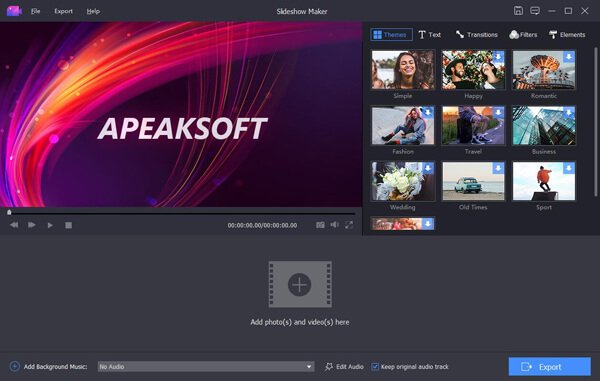

Apeaksoft Slideshow Maker

PC410, Computer Services in Carroll County Maryland
If you want to change your videos, photos and audio files into slideshow, absolutely, Apeaksoft Slideshow Maker is your best choice. With it, you can load your files from videos (MP4, MOV, AVI, FLV, WMV, MTS, M2TS, TS, M4V, RMVB, ASF, VOB, etc.), photos (JPG, JPEG, PNG, TIF, TIFF, BMP, GIF, etc.), and audio (MP3, AIFF, FLAC, AAC, WAV, WMA, M4A, etc.) and make your own slideshow videos without any hassle.

Key functions:

1. Make slideshow easily
With Apeaksoft Slideshow Maker, you only need to load your own videos, photos, audio files, and you could also add the background music if you want. Then click the Export button, you will get your wonderful slideshow videos.

2. Support all kinds of media formats
Apeaksoft Slideshow Maker supports various video formats, such as M4V, RMVB, ASF, VOB, DAT, 3GP, MOD, TOD, WebM, etc. For the photo formats, it supports JPG, JPEG, PNG, TIF, TIFF, BMP, GIF, etc. It also supports various audio formats, such as FLAC, AAC, WAV, WMA, M4A, OGG and so on.

Graphcat

3. Provide various themes
All kinds of slideshow themes such as Romantic, Fashion, Business, etc. are provided to create slideshow. You can choose the theme according to your demand. Besides the built-in slideshow themes, Apeaksoft Slideshow Maker has many text effects, transitions modes, filters and other elements to help you customize existing themes or make new themes.

4. Powerful editing functions
Apeaksoft Slideshow Maker also helps you to edit your videos and you can rotate/crop/clip videos, adjust contrast/saturation/hue/brightness, speed up or slow down videos, adjust audio volume, etc.
Vidmore DVD Monster for Mac 1.0.12

Type: Shareware
Cost: $29.95
Size: 103.30 MB
Release date: May 27 2021
Platform: Mac OS X,
Publisher’s Site:  https://www.vidmore.com/
Publisher’s Product Page:  https://www.vidmore.com/dvd-ripper/
Country: China


Vidmore DVD Monster for Mac

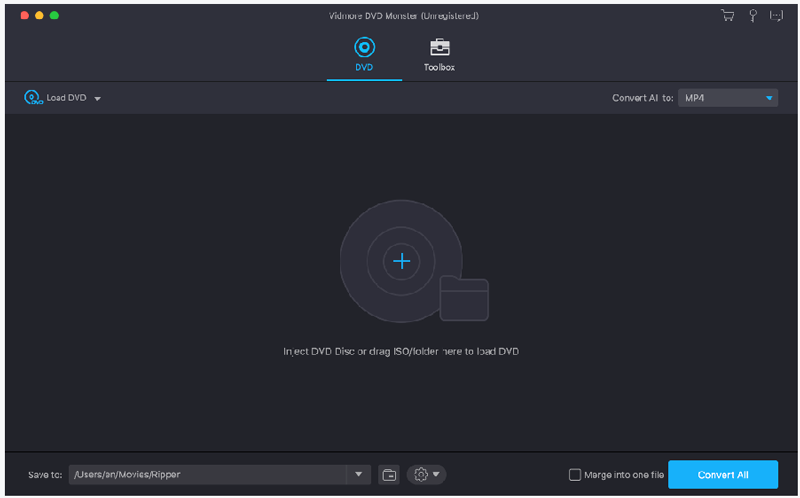
Do you want to convert your DVD disc/folder/ISO files to other formats so that you could play them later on portable devices? If so, you could have a look at Vidmore DVD Monster for Mac. It could not only convert DVD disc/folder/ISO files to other formats, but also edit your videos as you like.

Key functions:

1. Convert DVD to other popular formats and support various portable devices
With Vidmore DVD Monster for Mac, you could convert your DVD disc/folder/ISO files to video formats including MP4/MKV/AVI/MOV, etc. You are also able to extract the audio from your DVD videos and save them as MP3/M4A/AAC, etc. In addition, it supports many popular devices, such as iPhone/iPad/Samsung/Huawei/LG/Xiaomi/Sony and more.

2. Edit your videos before conversion
With Vidmore DVD Monster for Mac, you are able to edit your DVD before conversion, such as trim your videos, merge multiple DVD tiles into one file, adjust brightness/contrast/saturation/hue of your files, add an external subtitle file or watermark to your DVD, etc.

3. Compress files, make GIFs and 3D files, enhance videos
Vidmore DVD Monster for Mac could not only compress large files to a proper size you want, but also create 3D files for you. With it, you could make interesting GIFs with your media files, too. In addition, you could use it as a video enhancer, it could enhance your video quality in several aspects.

4. Convert DVD without any quality loss, fast conversion speed
Vidmore DVD Monster for Mac enables you to keep the original quality of your DVD movies and it could also keep the original media metadata information. Moreover, it supports batch conversion which could provide fast conversion speed for you.

AnyMP4 iPhone Unlocker for Mac 1.0.16

Type: Shareware
Cost: $37.46
Size: 29.01 MB
Release date: Aug 04 2021
Platform: Mac OS X,
Publisher’s Site:  https://www.anymp4.com
Publisher’s Product Page:  https://www.anymp4.com/iphone-unlocker/
Country: China


AnyMP4 iPhone Unlocker for Mac

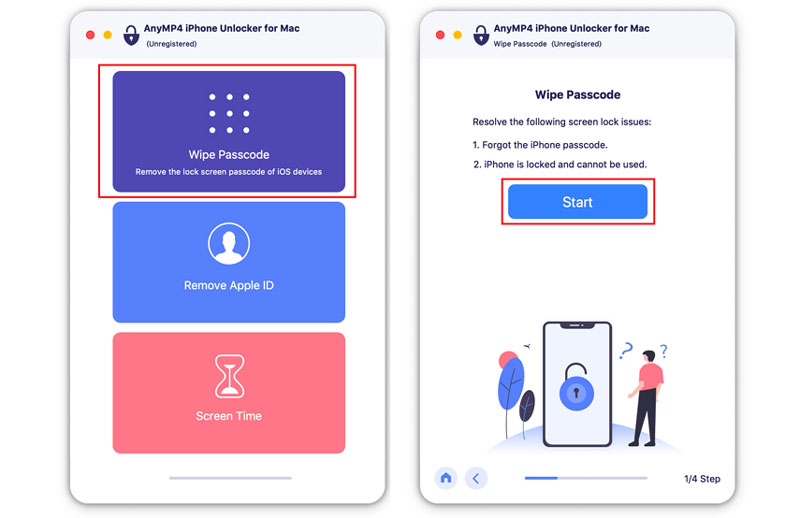
When you forgot the passcode of your iPhone/iPad after several months or you get a second-hand iOS device without lock screen password, it is annoying. Under such situation, AnyMP4 iPhone Unlocker for Mac can do you a great favor. What is more, if you forgot the password connected to your Apple ID, or you want to remove the restrictions/passcode in Screen Time, AnyMP4 iPhone Unlocker for Mac can also help you a lot.

Key features:

1. Wipe iPhone passcode.

If your iOS devices are locked because you forgot the 4-digit/ 6-digit password, Touch ID and Face ID, AnyMP4 iPhone Unlocker for Mac enables you to remove the passcode and unlock iOS devices easily.

2. Remove Apple ID.

As is known to all, Apple ID is important for you to access many Apple services. When you forgot the Apple ID passcode, it is rather embarrassing. Do not worry about that. AnyMP4 iPhone Unlocker for Mac software allows you to remove the forgotten Apple ID and help you change a new Apple ID account to activate your iPhone if your iOS device is configured well.

3. Remove Screen Time passcode.

When you received a pop-up message that you have reached your limit on your iPhone, you should enter the Screen Time passcode to change the settings. If you forgot the passcode, you could use AnyMP4 iPhone Unlocker for Mac to recover the passcode and remove passcode without data loss on iPhone or iPad.
