BDGYsearches 4.4.0.2

Type: Shareware
Cost: $10
Size: 784.00 kB
Release date: Apr 01 2021
Platform: Win2000,WinXP,Win7 x32,Win7 x64,Windows 8,Windows 10,WinServer,WinOther,WinVista,WinVista x64
Publisher’s Site:  https://www.bdgysearches.com/abcguzis/ddpaulguzis.html
Publisher’s Product Page:  https://www.bdgysearches.com
Country: United States of America


BDGYsearches

PC410, Computer Services in Carroll County Maryland
BDGYsearches is a computer program that searches Bing, Duckduckgo, Google, or Yahoo for precise searches. It has the capability to search approximately forty search categories to obtain the desired result. It makes searching easy and effortless. It has the capability to search engines using the same criteria without any reentering of the search terms. It has a SUGGESTIONS feature to search if needed. BDGYsearches is the ultimate in searching the internet. It makes searching the internet so very, very easy. Some of the categories are, Site, search within a given domain, file type, IP address, site domain, definitions from pages, in the title, location, Bing near, source for the search, exact term, Google wild card, Google word in URL, BDG stocks, blogs for a given term, and many more categories. The programs has a Zoom Control, Spell Checker, and a special Address Search Bar. Pin BDGYsearches to the Windows desktop or task bar for easy searching over and over again.

QXPMarkz 2.0.1

Type: Demo
Cost: $199
Size: 14.75 MB
Release date: Feb 28 2022
Platform: Mac OS X,
Publisher’s Site:  http://www.markzware.com
Publisher’s Product Page:  https://markzware.com/products/qxpmarkz/
Country: United States of America


QXPMarkz

QXPMarkz is a standalone software to preview, convert, and open QuarkXPress documents in Adobe InDesign, Affinity Publisher, Adobe Acrobat, Adobe Illustrator, older QuarkXPress versions, and many other applications. You no longer need to recreate documents from scratch – QXPMarkz gives you a big head-start on QuarkXPress to InDesign data conversion.

QXPMarkz gives you the ability to open and then convert native QuarkXPress files (.qxp, .qxd files) to different formats – all without QuarkXPress being loaded on your computer. It allows you to export QuarkXPress files to IDML, PDF, TIFF, PNG, JPEG, GIF, and other non-proprietary file types. Also, you’ll be able to open .QXP files in previous versions of QuarkXPress.

Main features:

Open an IDML version of your Quark file in InDesign, or Affinity Publisher 1.8 or greater

Graphcat

Export your QuarkXPress document as IDML. PDF, TIFF, PNG, JPEG or GIF

Extract the text out of your Quark file as TXT (plain text), RTF (Rich Text Format) or HTML

Open multiple files at one time

Select an application to open your converted file, either manually or as a more permanent workflow feature.

Vidmore Video Editor 1.0.6

Type: Shareware
Cost: $19.95
Size: 36.69 MB
Release date: Jul 22 2021
Platform: Win2000,WinXP,Win7 x32,Win7 x64,Windows 8,Windows 10,WinServer,WinOther,WinVista,WinVista x64
Publisher’s Site:  https://www.vidmore.com/
Publisher’s Product Page:  https://www.vidmore.com/video-editor/
Country: China


Vidmore Video Editor

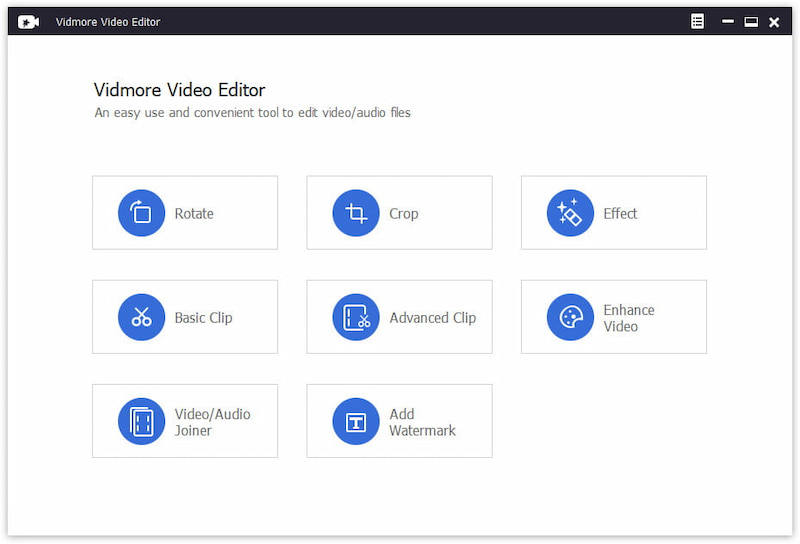
Vidmore Video Editor is a powerful video editing program which lets you rotate and crop your videos according to your need. You could also add watermark to your vides or enhance your video quality. And it supports almost all popular video formats like MP4, MOV, MKV, AVI, WMV, FLV and so on.

Key functions:

1. Rotate and crop videos
Vidmore Video Editor could rotate a video in 90 counterclockwise or clockwise. And it is also able to crop the videos and get rid of black edges simply.

2. Clip videos
It provides two clip methods for users: Basic Clip and Advanced Clip. With this function, you could divide one video into several parts or remove the unwanted parts and keep the parts you want.

3. Conbine video and audio files
If you have some video/audio clips and want to combine them together, the Video/Audio Joiner function could help you accomplish this. It could join some media files into one long movie or music file.

4. Adjust video effects and enhance videos
Vidmore Video Editor is not only a video editing tool but also a video enhancement tool. It could enhance video quality by removing video noise, upscaling video resolution, reduce video shaking. You could also adjust video effetcs, such as contrast, hue, saturation, and brightness manually to create your own videos. Moreover, you are able to add watermarks to your videos according to your preference.