
Apeaksoft iPhone Transfer 2.0.36

Type: Shareware
Cost: $39.96
Size: 1.69 MB
Release date: Aug 23 2021
Platform: Win2000,WinXP,Win7 x32,Win7 x64,Windows 8,Windows 10,WinServer,WinOther,WinVista,WinVista x64
Publisher’s Site:  https://www.apeaksoft.com/
Publisher’s Product Page:  https://www.apeaksoft.com/iphone-transfer/
Country: China
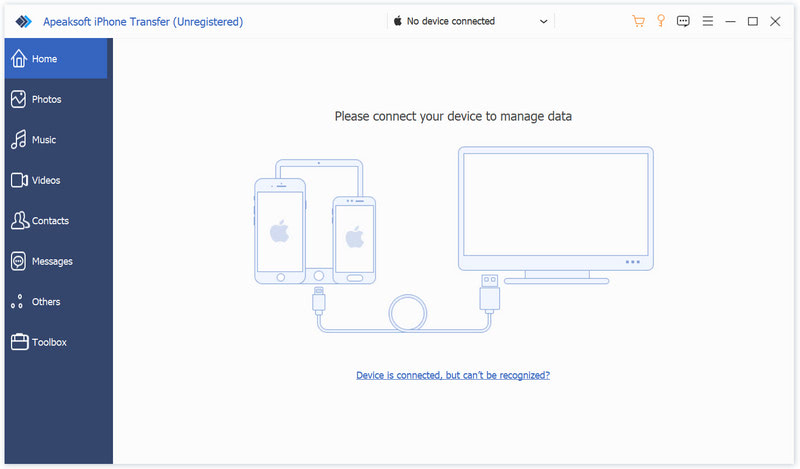

Apeaksoft iPhone Transfer

PC410, Computer Services in Carroll County Maryland
Apeaksoft iPhone Transfer is the first-granted data transfer software which does well in file transfer between iOS devices and computer. It can transfer videos, music, photos and any other multimedia files from computer to iOS device, including iPhone/iPad/iPod, etc. Even if the video/audio files are incompatible with your devices, it can convert these video/audio files automatically before transferring. In addition, it enables you to back up contacts and SMS to your computer and transfer files between any two iOS devices.

Key functions:

1. Transfer files
It is flexible file transfer software which not only transfers files from iOS to computer, but also transfers data between two iOS devices. Moreover, it lets you manage data between iTunes and iOS devices.

2. Best iTunes alternative
Apeaksoft iPhone Transfer is the best iTunes replacement, which enables you to organize your iTunes library in clicks. You can manage your media files separately on Music, Movies, TV Shows, Podcasts, iTunesU, Ringtones, Audio Books and Voice Memos.

Graphcat

3. Manage iOS files
This powerful iOS data transfer software is superior to iTunes, because it does more than iTunes do for you. You can manage your iOS music, videos, ringtones, single contact or group contacts, etc. You can also edit media files like deleting, renaming, creating playlists, etc.

4. Make ringtone and convert HEIC pictures
Apeaksoft iPhone Transfer could not only transfer various data but also make ringtones easily. You could make your own ringtones and add the created ringtone to device directly. In addition, it is able to convert the HEIC pictures to other common formats.
Vidmore Video Editor for Mac 1.0.6

Type: Shareware
Cost: $19.95
Size: 43.16 MB
Release date: Jul 27 2021
Platform: Mac OS X,
Publisher’s Site:  https://www.vidmore.com/
Publisher’s Product Page:  https://www.vidmore.com/video-editor/
Country: China


Vidmore Video Editor for Mac

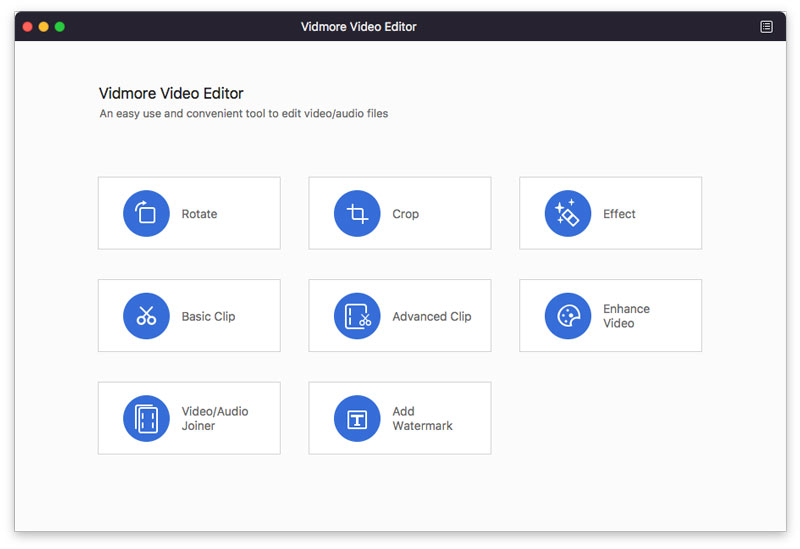
As one of the most powerful video editing tools, Vidmore Video Editor for Mac could make your video editing task much easier. It could help you rotate, crop, clip video, adjust video effects and so on. It supports almost all popular formats like MP4, MOV, MKV, AVI, WMV, FLV, WebM, MXF, and more.

Key functions:

1. Rotate and crop videos
With Vidmore Video Editor for Mac, you could rotate your videos freely. And you could also crop it and remove the unwanted black edges.

2. Clip videos and combine video clips
It provides Basic Clip and Advanced Clip functions for users, with this, you could split one media file into several parts and keep the parts you want. Moreover, it could combine several media files into one file.

3. Adjust video effects and enhance videos
You are able to adjust video contrast, hue, saturation, and brightness as you like. It also allows you to add a watermark with text or image to your videos. If you want to enhance video quality, it could remove video noise, upscale video resolution, reduce video shaking to improve video quality.

4. Fast conversion speed and easy to use
Equipped with advanced technology, Vidmore Video Editor for Mac can convert videos with fast speed, so you do not need to wait long. And it has a user-friendly interface, so you can start editing videos simply without any guides.

Tag That Photo 3.0.21103

Type: Shareware
Cost: $49
Size: 46.48 MB
Release date: Apr 13 2021
Platform: Win2000,WinXP,Win7 x32,Win7 x64,Windows 8,Windows 10,WinServer,WinOther,WinVista,WinVista x64
Publisher’s Site:  http://www.tagthatphoto.com
Publisher’s Product Page:  http://www.tagthatphoto.com
Country: Canada


Tag That Photo

Tag That Photo truly automates the task of photo organization with its patented face recognition technology that tags faces with fewer errors and faster than industry leaders, including Microsoft and Google. Automating the face tagging process saves tons of time.

Tag That Photo starts by scanning each photo to find every face. With some face recognition wizardry, a unique facecode is generated for each one. As you add face tags to each unique face, Tag That Photo quickly & accurately matches it to other photos of the same person. Finding favorite treasured photos is infinitely easier with Tag That Photo’s powerful search function. Choose to search by date, person’s name, keyword tags, file name, file type or a combination.

Concerned about the number of photos you have? Tag That Photo adds order to your super-sized photo library. Its processor is designed to scan hundreds, or hundreds of thousands of images with speed and accuracy. This is especially important upon the initial scan. Fewer photos take less time, more photos take a bit more. Either way, Tag That Photo is an industry leader, indexing your photos quickly and more accurately than others in the face recognition space.

For importing, you’ve probably discovered many photo management apps are unable to import existing tags. Tag That Photo values the countless hours you’ve spent tagging your favorite photos. It simply doesn’t make sense to us to lose such an investment of time and effort. Tag That Photo’s Personal and Family Plan subscriptions process and import existing Picasa, Windows Photo Gallery and Fotobounce tags accurately. Future releases will enable easy importing from other photo organization applications.

Your online privacy is our priority. Tag That Photo keeps everything local on your computer by default. This includes people, faces, keywords – you name it. We do not collect identifiable subscriber data, outside of your email address and we are not selling any data to third parties.
