Type: Shareware
Cost: $399
Size: 75.00 kB
Release date: Nov 02 2021
Platform: WinXP,Win7 x32,Win7 x64,Windows 8,Windows 10,WinServer,WinOther,WinVista,WinVista x64,Linux,Linux Console,Linux Gnome,Linux GPL,Linux Open Source,Mac OS X,,Android,iPhone,iPad,iOS
Publisher’s Site: https://balkan.app
Publisher’s Product Page: https://balkan.app/
Country: Bulgaria

Cost: $399
Size: 75.00 kB
Release date: Nov 02 2021
Platform: WinXP,Win7 x32,Win7 x64,Windows 8,Windows 10,WinServer,WinOther,WinVista,WinVista x64,Linux,Linux Console,Linux Gnome,Linux GPL,Linux Open Source,Mac OS X,,Android,iPhone,iPad,iOS
Publisher’s Site: https://balkan.app
Publisher’s Product Page: https://balkan.app/
Country: Bulgaria
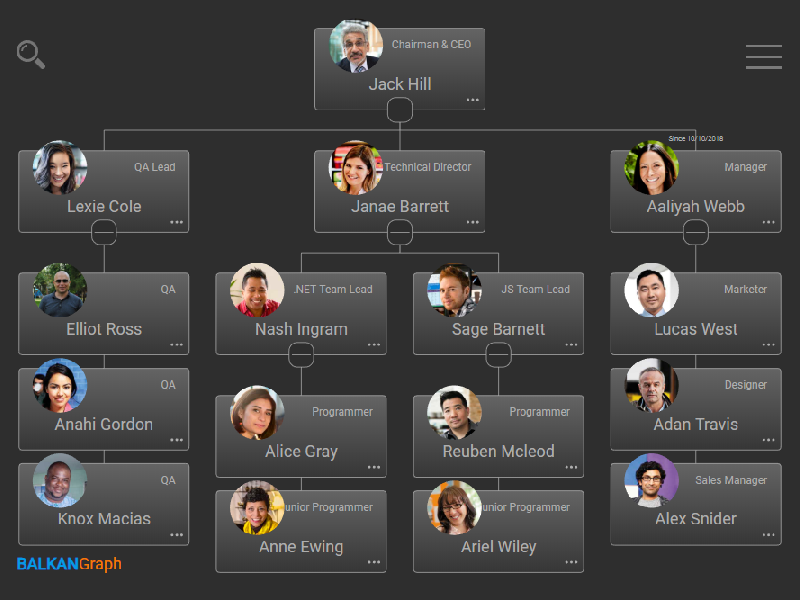

OrgChart JS is designed for making neat flowcharts using HTML5, CSS, and JavaScript. Using server-side components, developers can implement a specially crafted editing interface. To create unique appearance for your app, you can make use of a set of default skins and color palettes or make your own set. If your users work with big diagrams, a search field which allows finding a particular item will serve as a handful tool.
The edit mode makes it easy to create and edit diagram items. All you have to do is type a name, title, some additional info, and OrgChart JS will create or edit the item and rebuild your diagram automatically. If you work with a big data set, you can collapse your diagram leaving only the part you are working with. OrgChart JS has a zooming and scrolling features One of the best things about OrgChart JS is that it does not require any special programming skills due to simple configuration syntax.
OrgChart JS features the ability to build organization charts of any complexity. An organizational chart represents the most natural way of displaying the hierarchical structure of an organization. You can use it to show the structure of a company, business, or project team.
OrgChart JS allows you to export your chart/diagram to PDF, PNG, CSV or SVG using our export service. You could also install your own export service.
OrgChart JS component consists of nodes and connectors. You can use nodes of some particular type: just textual, with an image or any other custom HTML and SVG elements, or create your own. Creation of a unique style for your diagram will be easy. The look and behavior are fully customizable, so you can set up any appearance you need via CSS or object properties.
You can easily integrate this OrgChart JS library in any web app. It supports the data loading in the JSON format, and can be used with any server-side back-end.
OrgChart JS supports unlimited number of sub trees in one chart object and two states of a node.
The edit mode makes it easy to create and edit diagram items. All you have to do is type a name, title, some additional info, and OrgChart JS will create or edit the item and rebuild your diagram automatically. If you work with a big data set, you can collapse your diagram leaving only the part you are working with. OrgChart JS has a zooming and scrolling features One of the best things about OrgChart JS is that it does not require any special programming skills due to simple configuration syntax.
OrgChart JS features the ability to build organization charts of any complexity. An organizational chart represents the most natural way of displaying the hierarchical structure of an organization. You can use it to show the structure of a company, business, or project team.
OrgChart JS allows you to export your chart/diagram to PDF, PNG, CSV or SVG using our export service. You could also install your own export service.
OrgChart JS component consists of nodes and connectors. You can use nodes of some particular type: just textual, with an image or any other custom HTML and SVG elements, or create your own. Creation of a unique style for your diagram will be easy. The look and behavior are fully customizable, so you can set up any appearance you need via CSS or object properties.
You can easily integrate this OrgChart JS library in any web app. It supports the data loading in the JSON format, and can be used with any server-side back-end.
OrgChart JS supports unlimited number of sub trees in one chart object and two states of a node.