Privacy Eraser Free 5.12

Type: Freeware
Cost: $0
Size: 8.64 MB
Release date: Jun 01 2021
Platform: Win2000,WinXP,Win7 x32,Win7 x64,Windows 8,Windows 10,WinServer,WinOther,WinVista,WinVista x64
Publisher’s Site:  http://www.cybertronsoft.com
Publisher’s Product Page:  http://www.cybertronsoft.com/products/privacy-eraser/
Country: China


Privacy Eraser Free

PC410, Computer Services in Carroll County Maryland
Privacy Eraser is an all-in-one privacy suite that protects your privacy by cleaning up all your Internet history tracks and past computer activities. It supports popular web browsers such as Internet Explorer, Microsoft Edge, Mozilla Firefox, Google Chrome, Safari and Opera.

With simply one click, Privacy Eraser can quickly erase the Internet cache, cookies, browsing history, address bar history, typed urls, autocomplete form history, saved password and index.dat files of your browser, and Windows run history, search history, open/save history, recent documents, temporary files, recycle bin, clipboard, taskbar jump lists, dns cache, log files, memory dumps, error reporting and much more.

Furthermore, Privacy Eraser supports plug-ins to extend cleaning features, you can easily delete the tracks left by any applications by making your own plug-ins. Privacy Eraser embedded more than 250 FREE plug-ins which supports the most popular programs such as ACDSee, Adobe Reader, Microsoft Office, WinZip, WinRAR, Windows Media Player, VLC Player, eMule, BitTorrent, Google Toolbar and many others. With the flexible, highly customizable and open plug-in architecture, you can even customize your own exclusive Privacy Eraser!

Privacy Eraser works on Microsoft Windows 10/8.x/7/Vista/2012/2008 (32/64-bit) and supports Microsoft Windows FAT16/FAT32/exFAT/NTFS file systems, completely implements and exceeds the US Department of Defense and NSA clearing and sanitizing standard, to gives you confidence that once erased, your file data is gone forever and can not be recovered.

Graphcat

Apeaksoft PDF Converter Ultimate 1.0.10

Type: Shareware
Cost: $36
Size: 1.54 MB
Release date: Jan 25 2021
Platform: Win2000,WinXP,Win7 x32,Win7 x64,Windows 8,Windows 10,WinServer,WinOther,WinVista,WinVista x64
Publisher’s Site:  https://www.apeaksoft.com/
Publisher’s Product Page:  https://www.apeaksoft.com/pdf-converter-ultimate/
Country: China


Apeaksoft PDF Converter Ultimate

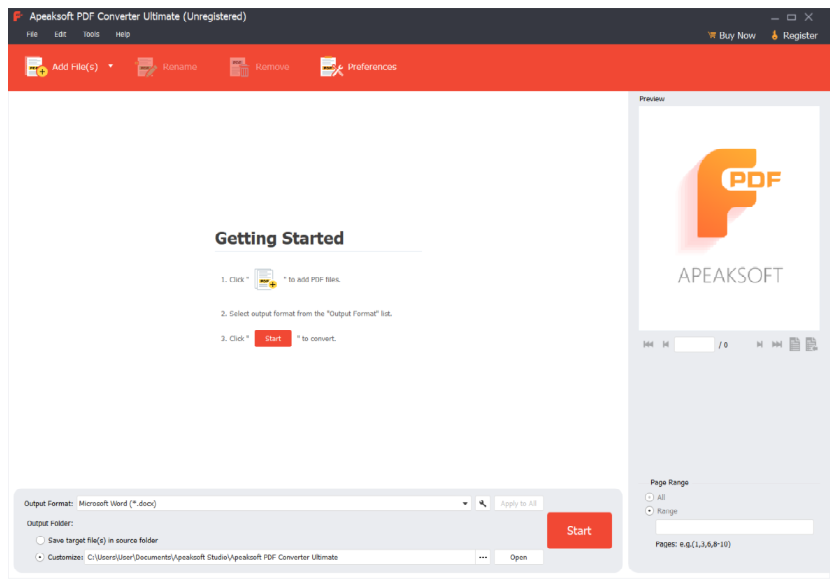
Do you have problem in converting your PDF files to other formats? If so, Apeaksoft PDF Converter Ultimate could do you a favor. It could help you convert PDF files to various other formats.

Key functions:

1. Convert PDF files to other formats
Apeaksoft PDF Converter Ultimate is powerful in converting PDF files to other formats such as Word/Text/Excel/PowerPoint/ePub/HTML/Image, etc. With it, you could convert your PDF files to other file formats for further editing or preservation

2. Customize and edit PDF files
With Apeaksoft PDF Converter Ultimate, you could set the layout, text encoding and image format/resolution when you convert PDF files to other formats. If you convert PDF files to images, it allows you to set the size and color of output images.

3. Convert selected PDF pages and convert in batch
Apeaksoft PDF Converter Ultimate allows you to convert selected PDF pages of one PDF files. Moreover, you are able to convert multiple PDF file in batch to save time.

4. Advanced OCR technology and fast conversion speed
The advanced OCR technology of Apeaksoft PDF Converter Ultimate is able to recognize up to 190 languages accurately. And with the powerful acceleration technology, Apeaksoft PDF Converter Ultimate could convert PDF files at fast speed.

Vidmore Video Converter for Mac 2.3.6

Type: Shareware
Cost: $19.95
Size: 114.98 MB
Release date: Dec 01 2021
Platform: Mac OS X,
Publisher’s Site:  https://www.vidmore.com/
Publisher’s Product Page:  https://www.vidmore.com/video-converter/
Country: China


Vidmore Video Converter for Mac

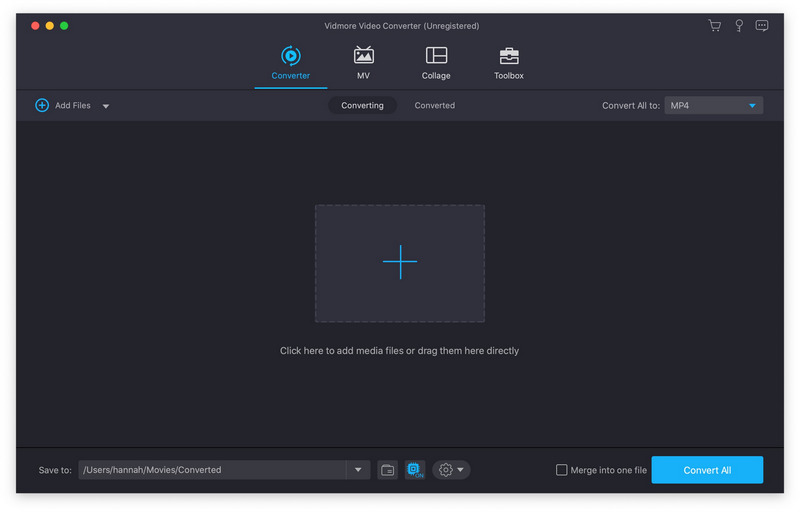
Vidmore Video Converter for Mac is powerful software which could help you convert your video and audio files to any other formats. You can easily choose an output format and convert your videos without hassle. In addition, you could also rotate, crop, clip your videos freely.

Key functions:

1. Convert video/audio files to any other formats
Vidmore Video Converter for Mac is powerful in converting your video/audio files to other formats such as AVI/MKV/MOV/MP4, etc. Moreover, it is able to convert 4K videos to other formats or convert videos to 1080p. In addition, it supports many kinds of devices, including iPhone/iPad/Samsung/Huawei/Sony and so on. Moreover, it could keep the original media metadata and quality of your videos.

2. Various video editing functions
If you want to edit your videos before conversion, with Vidmore Video Converter for Mac, you could trim/rotate/crop/merge your videos, add watermark to videos or change the brightness/contrast/saturation and hue of your files.

3. Make MV and collage
Vidmore Video Converter for Mac allows you to make your own customized MV with video clips and photos. You could also edit your MV as you like. The Collage function makes it easy to create video collage with various templates.

4. Compress large files, make GIFs and 3D files, enhance your videos
With the built-in Video Compressor function, you could compress your large files to a smaller size. In addition, you could make your own GIFs with the GIF Maker. And you could also convert common files to 3D format with the 3D Maker. With the Video Enhancer function, you could enhance your video quality simply.