
ACDSee Photo Studio Ultimate 15.0.0.2795

Type: Shareware
Cost: $149.99
Size: 1.18 MB
Release date: Sep 22 2021
Platform: Win2000,WinXP,Win7 x32,Win7 x64,Windows 8,Windows 10,WinServer,WinOther,WinVista,WinVista x64
Publisher’s Site:  http://www.acdsee.com
Publisher’s Product Page:  https://www.acdsee.com/en/products/photo-studio-ultimate
Country: Canada


ACDSee Photo Studio Ultimate

PC410, Computer Services in Carroll County Maryland
The Photographers Secret Weapon
With the explosion of digital photography, doesn’t everyone need a secret weapon? Compact and efficient by design for both the novice and skilled photographer! ACDSee Ultimate 2022 breaks the shackles of repetition and combats the agents of bland by unleashing a world of creative control and endless possibilities.

Ultimate 2022 offers incredible time-saving tools such as the all-new Media mode for interacting with the ACDSee photo database; and People mode, an AI engine that seamlessly places a name to a face. Add a bevy of new selection tools to an already robust Layering Editor, and you have a secret weapon for building your photography empire in an overcrowded digital world.

PEOPLE MODE
Putting a Name to a Face just got Easier
People Mode is new to ACDSee Ultimate 2022 and is born of a union between ACDSee’s industry-leading Face Detection & Recognition feature and a keen application of machine learning. Photographers from all walks of life will enjoy the dedicated space for distinguishing by client, family member, or person of interest, allowing for the management of people by merging, renaming, or deleting faces, or taking labelling suggestions from the AI assistant for grouping similar unnamed people.

MEDIA MODE
Filter at Lightning Speed
Media Mode is ACDSee’s database-driven powerhouse for viewing and accessing the folders you have either browsed in Manage mode or cataloged into the ACDSee database. This streamlined, uncluttered view of the media assets managed by ACDSee offers sorting, grouping, and filtering in any combination.

Graphcat

EDIT MODE
Channel Your Creativity
New for ACDSee 2022 is the paradigm-altering power to fine-tune a variety of selections that were previously impossible. Use Channel Selection and Channel Filtering in conjunction with a new Selection Basket to craft subtle or majestic selections that can be stored and unleashed with any whim.

SeekFast for Mac 3.2

Type: Shareware
Cost: $47
Size: 49.66 MB
Release date: Mar 20 2021
Platform: Mac OS X,
Publisher’s Site:  https://slaviana.com
Publisher’s Product Page:  https://seekfast.org
Country: Bulgaria


SeekFast for Mac

SeekFast is a software tool for quick and easy text search on your computer. SeekFast can search in all Microsoft Word documents, PDF, Excel, PowerPoint, OpenOffice, RTF and text files in a folder and its subfolders on your computer.

With SeekFast the search is easy, fast and convenient. Select a folder, enter search words and get search results in a second. SeekFast is compatible with all modern versions of Windows – (Windows 7, Windows 8, Windows 10), and with all commonly used macOS versions.

Like Google, SeekFast shows you the most relevant results on the top. SeekFast uses powerful technology for sorting, that produces results similar to what you would get from Google on the net. The SeekFast technology is unique and has no analogue in the world.

You get the file names and sentences containing your search words immediately. For greater convenience, search terms are highlighted in red. You can open the corresponding file with one click. If you want to view only the text, you can click on the phrase and see the text surrounding it.

SeekFast is integrated in File Explorer – just right-click a folder and choose "SeekFast…". The application starts and you can immediately search the selected folder.

SeekFast is extremely useful for searching in large software projects. When thousands of files are available, it is extremely difficult to find a function, variable or text throughout them. With SeekFast this happens in a second, which can save you many hours of digging and searching in the code.

SeekFast supports searching files of nearly all popular programming languages: PHP (php), C and C + + (c, cpp, h), Java (java, jsp), Perl (pl, plx), HTML (html, htm), XML (xml), properties, log files.

SeekFast is available in two versions – Free and Full version. The only difference between them is the number of files you can search at once – in the free version you can search up to 50 files, while in the paid version – up to 20,000 files.

Apeaksoft iPhone Eraser 1.1.6

Type: Shareware
Cost: $36
Size: 43.07 MB
Release date: May 25 2021
Platform: Win2000,WinXP,Win7 x32,Win7 x64,Windows 8,Windows 10,WinServer,WinOther,WinVista,WinVista x64
Publisher’s Site:  https://www.apeaksoft.com/
Publisher’s Product Page:  https://www.apeaksoft.com/iphone-eraser/
Country: China


Apeaksoft iPhone Eraser

As one of the most professional iOS data erasing tools, Apeaksoft iPhone Eraser could help you get more free space in your iOS devices. With it, you could remove large files, uninstall apps you do not want or wipe all the data in your devices.

Key functions:

1. Erase junk files and large files
Apeaksoft iPhone Eraser allows you to erase junk files like image cache, iTunes cache, invalid files, crash log files, etc. And you could also see which files occupy large space in your devices, then you are able to delete them.

2. Uninstall applications
As it is known to us, installing too many applications will slow down our devices. So if you want to uninstall the applications you no longer use, Apeaksoft iPhone Eraser is your best choice. With it, you could see all the application you have installed and choose which one you want to uninstall.

3. Clean up photos
The photos clean-up function enables you to manage all the photos in your devices simply. You could back up and compress these photos to your computer. Or you could choose to export these photos to your computer then delete them from your iOS devices.

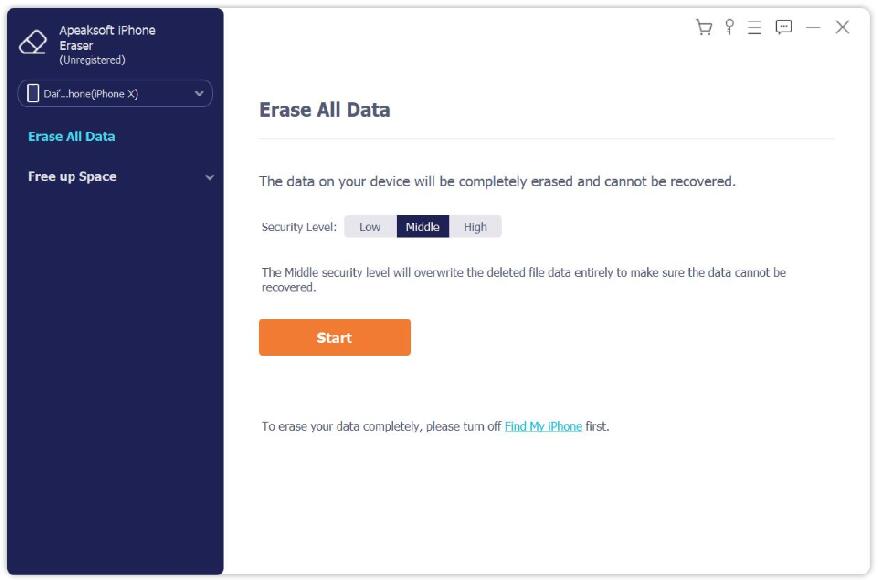
4. Wipe all the data in your devices safely
If you want to wipe all the data in your iOS devices completely and permanently, you should choose Apeaksoft iPhone Eraser. You could erase all the data in your iOS devices permanently just in one click. And it provides three security levels, users could choose the one according to their need. And it has fast erasing speed, so you do not need to wait long for the erasing process.
