Cryptainer USB Encryption Software 15.5.3.0

Type: Shareware
Cost: $29.95
Size: 31.02 MB
Release date: Aug 25 2021
Platform: Win2000,WinXP,Win7 x32,Win7 x64,Windows 8,Windows 10,WinServer,WinOther,WinVista,WinVista x64
Publisher’s Site:  https://www.cypherix.com
Publisher’s Product Page:  https://cypherix.com/usb-encryption-software/
Country: United States of America

Cryptainer USB Encryption Software

PC410, Computer Services in Carroll County Maryland
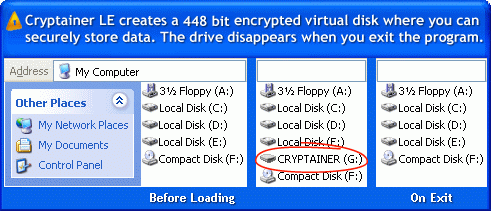
Encrypt USB flash drive on any Windows PC with Cryptainer USB Encryption Software. Cryptainer USB allows to create a ‘stand-alone’ or a ‘portable’ install on External Drive such as USB Flash Drive. Cryptainer USB can be run directly from the device without having to be installed on the host computer. No matter where you are, you can easily carry your important data (stored within an encrypted usb drive) with you. Cryptainer USB prevents data leakage from theft and lost of USB drive or any portable drive. password Protect your sensitive information from unauthorized access. Encrypt USB drive on any Windows PC with Cryptainer USB Encryption Software. Password protect your files and folders on any portable drives. Send secure e-mail. Simple, Secure, Easy to use, drag and drop operation.

Cryptainer USB Encryption Software prevents data leakage from theft and lost of USB drive or any portable drive. You can protect USB, your files or folders against unauthorized access by encrypting your confidential data stored on external drives or removable drives. Any kind of data can be stored into this encrypted drive, rendering it totally inaccessible by anyone but you. Thus, even if your USB drive or external drive is stolen or lost, no one can access your data.

Cryptainer USB includes virtual keyboard and privilege mode option that can help to prevent a keylogger from capturing keystrokes. Cryptainer USB ensures complete security for your data making sure that only you and nobody else can access your data. Cryptainer USB creates an encrypted volume that can be accessed only with a password. Once mounted, the volume behaves as a standard windows drive. The files can be read, viewed, modified, as well as moved from one place to another. Hide any type of data on any media. Any kind of file – from word and excel documents to movies and pictures, can be encrypted. It runs on all versions of Windows. No Nags, No reminders, Not Adware. A must have for every desktop.

Aiseesoft DVD Creator for Mac 5.2.20

Type: Shareware
Cost: $20
Size: 42.02 MB
Release date: Nov 23 2021
Platform: Mac OS X,
Publisher’s Site:  https://www.aiseesoft.com/
Publisher’s Product Page:  https://www.aiseesoft.com/dvd-creator-for-mac/
Country: China


Aiseesoft DVD Creator for Mac

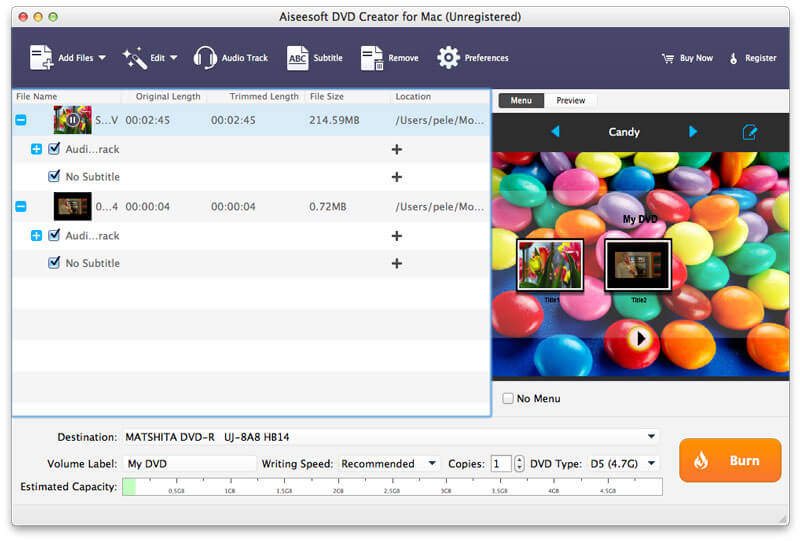
Aiseesoft DVD Creator for Mac lets you create DVDs easily on Mac OS X 10.9 or above (macOS Big Sur and macOS Monterey) from all kinds of popular video formats, such as MP4, AVI, MKV, VOB, FLV, MXF, MOV, etc.

Features:
1. Create DVD from any video
With DVD Creator for Mac, you can easily merge multiple video files in different formats and burn them into a single DVD or a DVD folder or into ISO image files.

2. Customize DVD menu
There are dozens of DVD menu templates built in this Mac DVD burning software, such as Animal, City, Festival, Plant, Scenery and more. You can personalize your own DVD menu by defining the menu frame and button, editing the menu text, defining its font, size and color, adding a background picture, and more.

3. Add audio tracks and subtitles
You are able to add multiple audio tracks as well as subtitles into your video files before burning DVD. You can even adjust the subtitle’s position, font, size or color and the audio track volume, and select the audio encoder/bitrate/channels as you like. Moreover, if the audio track doesn’t match the video scenes, this DVD burner for Mac allows you to adjust the audio latency, so do the subtitles.

Graphcat

4. Edit video effects before creating DVD
You can adjust the brightness, hue, saturation, contrast and the output volume, cut, crop, add watermark to your source videos to enhance the video quality. After that, you can burn the videos to most types of DVD+-R/RW/R DL, DVD-RAM, DVD-5(4.5G) and DVD-9(8.5GB) discs.

Vidmore Video Enhancer for Mac 1.0.8

Type: Shareware
Cost: $19.95
Size: 47.25 MB
Release date: Jan 12 2021
Platform: Mac OS X,
Publisher’s Site:  https://www.vidmore.com/
Publisher’s Product Page:  https://www.vidmore.com/video-enhancer/
Country: China


Vidmore Video Enhancer for Mac

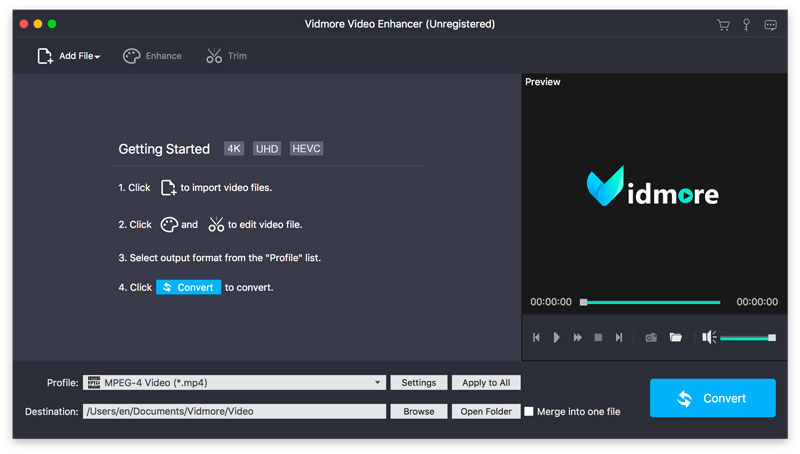
Vidmore Video Enhancer for Mac is skilled at improving video quality. It could upscale resolution, remove video noise, reduce video shaking. It also allows you to rotate/crop/trim your videos.

Key functions:

1. Upscale resolution, optimize brightness and contrast
Vidmore Video Enhancer for Mac enables you to upscale your videos from low resolution to high which will create cleaner videos for you. In addition, it could also adjust the brightness, contrast, hue of your videos to improve the light, color balance, etc.

2. Remove video noise, reduce video shaking
If you are annoyed with the noise of your videos, Vidmore Video Enhancer for Mac could help you. It is able to remove the disturbing noise of your videos. And it also allows you to fix the shaky videos and let you get more professional videos.

3. Rotate, crop, trim videos
Vidmore Video Enhancer for Mac could help you rotate videos vertically and horizontally as you want. Moreover, it lets you crop the video and cut off the part you do not want easily. You could also divide a long video into several short videos.

4. Merge videos, add watermark to videos
If you would like to merge your videos, Vidmore Video Enhancer for Mac could do this for you. It could not only merge your videos, but also add text or watermark to your videos and make your videos more wonderful.