Aiseesoft iPhone Unlocker 1.0.26

Type: Shareware
Cost: $39.96
Size: 43.99 MB
Release date: Apr 01 2021
Platform: Win2000,WinXP,Win7 x32,Win7 x64,Windows 8,Windows 10,WinServer,WinOther,WinVista,WinVista x64
Publisher’s Site:  https://www.aiseesoft.com
Publisher’s Product Page:  https://www.aiseesoft.com/iphone-unlocker/
Country: China

Aiseesoft iPhone Unlocker

PC410, Computer Services in Carroll County Maryland
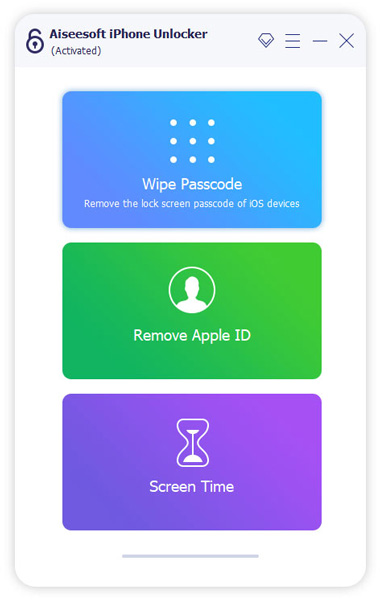
There are various reasons that you lose control of the lock screen passcode. If you are bothered how to bypass the lock screen when you forgot the passcode of your iPhone screen, or if you forgot the password connected to your Apple ID, or you want to remove the restrictions in Screen Time, Aiseesoft iPhone Unlocker can do you a great favor.

Key features:
1. Wipe iPhone passcode
If you are locked out of your iPhone because you forgot the passcode, whether your passcode is 4-digit, 6-digit, Touch ID and Face ID, Aiseesoft iPhone Unlocker can help you remove the passcode and unlock the locked iPhone easily.

2. Remove Apple ID
If you forgot your Apple ID or password, you will lose access to many Apple services. As long as your iOS device is configured well, this iPhone Unlocker allows you to remove the forgotten Apple ID and let you change a new Apple ID account to activate your iPhone.

3. Recover/Remove Screen Time Passcode
If you received a pop-up message saying that you have reached your limit on XX on your iPhone, you should enter the Screen Time passcode to change the settings. But what to do if you forgot the restriction passcode? iPhone Unlocker enables you to recover the passcode and remove passcode without data loss on iPhone or iPad.

Graphcat

WinGPG 1.0.3

Type: Freeware
Cost: $0
Size: 9.39 MB
Release date: Dec 29 2015
Platform: Win2000,WinXP,Win7 x32,Win7 x64,Windows 8,Windows 10,WinServer,WinOther,WinVista,WinVista x64
Publisher’s Site:  https://scand.com/
Publisher’s Product Page:  https://scand.com/products/wingpg/
Country: Belarus


WinGPG

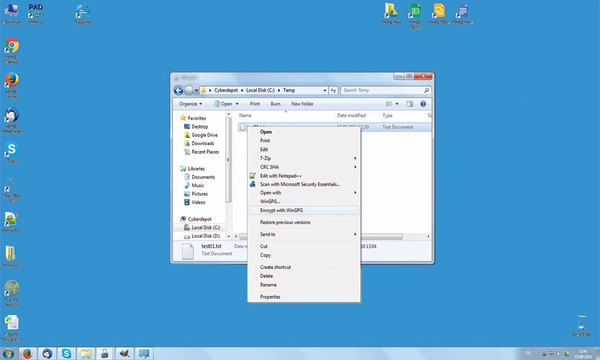
WinGPG developed by Scand Ltd. is a tray-based classical Windows application and a classic GPGv2 distribution (we use the cryptography from the official site without making any modifications).

It supports the following operations:
Encryption/Decryption (we offer automatic zipping at encryption time, so your files are ready to be transmitted via email or any instant messenger immediately)
Signature/Verification
Key management (create, import, export, revoke)

WinGPG main operational features are:
WinNT Explorer support via context menus
Global shortcuts working from the active explorer window or clipboard
Clipboard support for both texts and files
No complicated setup, you only run a batch file
WinGPG is a fully functional tool, which offers the user an opportunity to manage keys and files easily. Password protected keys, default keys, and other useful tricks are available with WinGPG.

Apeaksoft iPhone Data Recovery for Mac 1.1.92

Type: Shareware
Cost: $31.96
Size: 53.31 MB
Release date: Nov 04 2021
Platform: Mac OS X,
Publisher’s Site:  https://www.apeaksoft.com/
Publisher’s Product Page:  https://www.apeaksoft.com/iphone-data-recovery/
Country: China


Apeaksoft iPhone Data Recovery for Mac

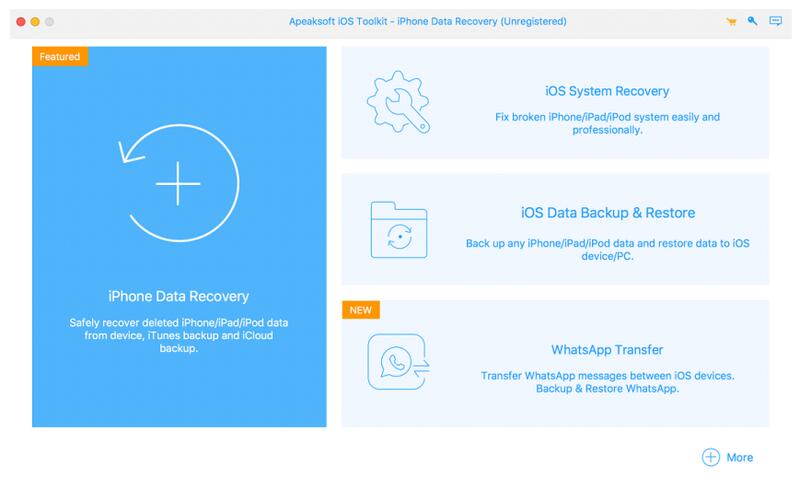
Apeaksoft iPhone Data Recovery for Mac can recover lost Messages, Contacts, Call History, Notes, QQ/WeChat data, etc. from iOS devices or from iTunes/iCloud backup files. It supports the latest iOS devices, including iPhone 13.

Key functions:

1. Recover lost data from iOS devices
If you want to recover lost data such as Contacts, Messages, Call history, Notes, Photos, Voice memos, QQ/WeChat data, media content of Line/Kik/Viber, etc. from your iOS devices, Apeaksoft iPhone Data Recovery for Mac could do you a favor.

2. Recover data from iTunes backup files/iCloud
Apeaksoft iPhone Data Recovery for Mac can recover lost data as long as your device has been backed up with iTunes/iCloud. So even you lose your data, with it, you are able to get your lost data back conveniently.

3. Back up iOS data and restore the data
The iOS Data Backup and Restore function can help you back up your iOS data to computer in one click and you could also restore your data to iOS device or computer without any hassle.

4. iOS System Recovery function
iOS System Recovery function can help you fix your iOS system back to normal state in various situations including stuck in recovery/DFU mode, white Apple logo, black screen, looping on start, etc. Moreover, this function also enables you to upgrade or downgrade iOS device system.

5. Transfer WhatsApp data
With the WhatsApp Transfer function, you could transfer your WhatsApp data between two iOS devices. In addition, you are able to back up WhataApp data to computer and restore the backed up data.