
RPM Remote Print Manager Elite 64 Bit 6.2.0.526.0

Type: Shareware
Cost: $750
Size: 64.42 MB
Release date: Mar 22 2021
Platform: Win2000,WinXP,Win7 x32,Win7 x64,Windows 8,Windows 10,WinServer,WinOther,WinVista,WinVista x64
Publisher’s Site:  http://www.brooksnet.com/
Publisher’s Product Page:  https://www.brooksnet.com/content/virtual-print-server
Country: United States of America
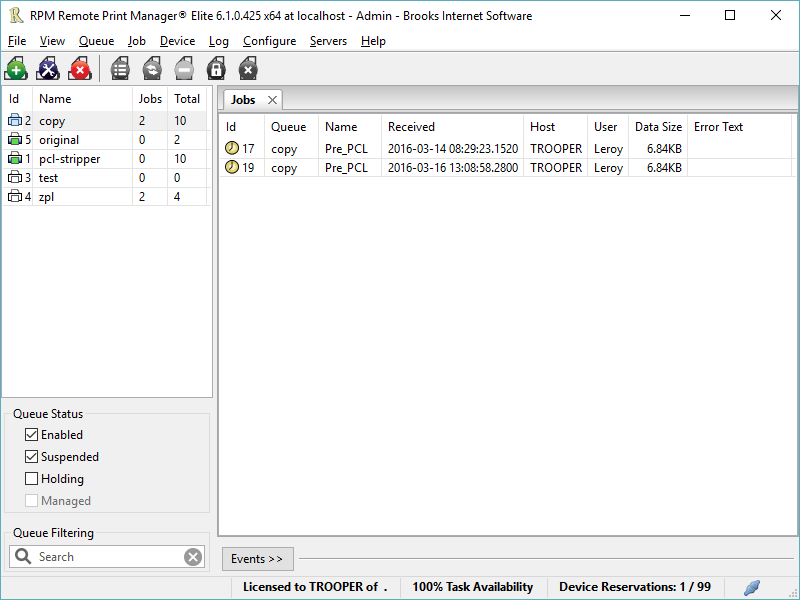

RPM Remote Print Manager Elite 64 Bit

PC410, Computer Services in Carroll County Maryland
Printing should be one click away. but there are so many problems which make printing difficult if not impossible. RPM Remote Print Manager (RPM) has grown through the years from all the print problems our customers have brought to us. We are here to help you solve your printing problems.

RPM is our virtual printer product. Our customers have been using RPM for 20 years!
RPM as virtual printer

RPM does what you expect a virtual PDF printer to do, and more:

convert incoming print jobs to other formats, such as PDF, TIFF and PCL
save multiple documents into a single document
print the same job to multiple printers
in one pass, send to a printer and save to disk
print the same job multiple times, using separate paper trays

Graphcat

RPM as print server

RPM is implemented as a Windows print server. Its core capabilities include:

managing your print workflow
send print jobs to any Windows printer
send print jobs to any printer on your network using core Windows print protocols, or LPR, or direct with port 9100
archive print jobs to local folders, shared folders, or anywhere via FTP
run any local application on your print job
send your print job via email as an attachment or in the message body

RPM also provides extensive data editing, manipulation and translation.

Windows version support

RPM 6.1 supports these versions of Windows: Vista, 7, Server 2008 (including R2), Windows 8 and 8.1, Server 2012 (including R2), and Windows 10. Support for Windows XP and Server 2003 has been dropped, so we no longer test new RPM versions on these older versions of Windows.

Q2ID 2021

Type: Demo
Cost: $199
Size: 46.16 MB
Release date: Jan 01 2021
Platform: Win2000,WinXP,Win7 x32,Win7 x64,Windows 8,Windows 10,WinServer,WinOther,WinVista,WinVista x64
Publisher’s Site:  http://www.markzware.com
Publisher’s Product Page:  https://markzware.com/products/q2id/
Country: United States of America


Q2ID

Q2ID is an InDesign plugin to quickly convert QuarkXPress documents in Adobe InDesign. No more re-creating documents from scratch. The Q2ID InDesign plugin gives you a big head-start on QuarkXPress to InDesign data conversion.

Our Q2ID Bundle Subscription gives you access to all current Q2ID plugin versions. You will have access to Q2ID for InDesign CC, CS6, CS5.5 and CS5 both Macintosh and Windows platforms with a single purchase and License.

Currently running Adobe InDesign CS5 but thinking of upgrading? You’ll be covered when you decide to upgrade to CS6 or CC.
If Adobe releases a new CC version which breaks compatibility with our current CC plugin, you’ll get the upgraded plugin for free.
What’s that you say? Quark released a new version? You’ll have access to the upgraded plugins which can convert the new Quark documents.
Easy License Management: Never Remember an Activation Code again!

Markzware’s Q2ID data conversion software converts the intricate details of the original QuarkXPress document and instantly re-creates the document within Adobe InDesign. Q2ID works in InDesign CC, CS6, CS5.5 or CS5 on both Macintosh and Windows platforms.

Items that convert from QuarkXPress using the Q2ID QuarkXPress to InDesign plugin include: page positioning, color models, fonts and styles, images, and text attributes, as well as tables, layers, blends, runarounds, linked text boxes, anchored boxes, and pantone colors.

Q2ID converts Quark 4 through Quark 10 documents. That gives you the ability to convert over 15 years worth of documents.

Read more here: https://markzware.com/products/q2id/

mysys 4.8.0

Type: Shareware
Cost: $29.95
Size: 103.30 MB
Release date: Jul 31 2021
Platform: Win2000,WinXP,Win7 x32,Win7 x64,Windows 8,Windows 10,WinServer,WinOther,WinVista,WinVista x64
Publisher’s Site:  http://www.integritech.ca
Publisher’s Product Page:  https://www.integritech.ca/index.php/products/mysys
Country: Canada


mysys

A Window into your System!

Do you have alot of files?
Do you spend too much time navigating hundreds of folders?
Do you sometimes forget where a file is?

mysys will be your new home away from all the pesky folders!

News Flash: Version 2 now reads the file tables directly dramatically improving DB creation speed!

If you have mapped network or encrypted drives a popup will ask which ones to include in the
database. Those drives will take longer to index depending on the network connection speed.

CD/DVD/Flash drives will not be indexed, only Fixed drives and optionally Network/encrypted drives.

Use the Schedule button to create a Windows Task Schedule so the indexing happens at
a time which is most convenient. To delete the task just click Cancel.

Once the database is created you are ready to find files, fast!

In the top left text box, type any filename and hit enter or click Search.

Wild cards are supported such as read*.txt.

You can use AND/OR/- like: this OR that
the – is to exclude like: this -notthat

Use double quotes to find whole phrases.

Use brackets like: (afoldername or anotherfolder) and (*.c or *.rc or *.h)
For that example you would check on the ‘Include folder names’ option and probably the ‘Exact match’ option also otherwise will find *.cs, *.css, *.hpp, etc…

You can use the Containing text box to search within the files found. Contents are never
indexed but uses a fast highly multi-threaded algorithm.

File sizes, Dates and Attributes are all read live off the disk, these are not stored in the database.
