
Tipard Total Media Converter 9.2.36

Type: Shareware
Cost: $46.75
Size: 38.23 MB
Release date: Jun 09 2021
Platform: Win2000,WinXP,Win7 x32,Win7 x64,Windows 8,Windows 10,WinServer,WinOther,WinVista,WinVista x64
Publisher’s Site:  https://www.tipard.com/
Publisher’s Product Page:  http://www.tipard.com/total-media-converter.html
Country: China

Tipard Total Media Converter

PC410, Computer Services in Carroll County Maryland
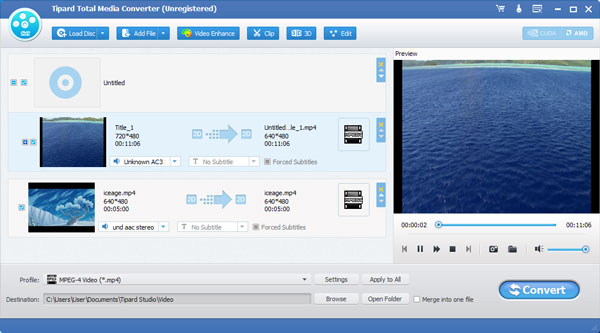
Tipard Total Media Converter can easily help you convert DVD and video files to any other video or audio formats. These video formats include MP4, AVI, MOV, M4V, WMV and so on. And the audio formats contain MP3, FLAC, WAV, WMA, AAC, ALAC, AC3 and more. Meanwhile, it can convert any DVD movie and video files to 3D video format like 3D MP4, 3D AVI, 3D MOV and so on. Besides, it is highly compatible with Windows 10.

Key functions:
1.Convert DVD disc to MP4, MOV, M4V and more
Tipard Total Media Converter can help you convert DVD disc, DVD folder, and ISO image file to any video such as MP4, MOV, M4V, MKV, AVI, WMV, TS and more. So you can enjoy them on your mobile devices.

2.Convert any video to MP4, MKV, AVI and so on
Tipard Total Media Converter supports any popular video formats like MP4, MKV, WMV, MOV, FLV, AVI and so on, and it also supports 1080p HD videos like TS, HD H.264, HD MPEG4, HD MP4 and so on.

3.Convert video/ DVD to MP3, FLAC, WAV and more
Tipard Total Media Converter can extract audio from any general video files and video movie, and convert it to any popular audio format like MP3, FLAC, WAV, WMA, AAC, ALAC, AC3 and more.

Graphcat

4.Powerful editing functions
This media converter software provides you with multiple editing functions. Firstly, you can trim a video into several segments. Secondly, you can adjust video effect like Brightness, Contrast, Saturation, Hue and Volume. Thirdly, you can add text/image watermark to the video.

5.Merge several videos and rename your new video
This software allows you to merge two or more videos into one file. Besides, you can name your new video with a unique name.

6.High converting speed
With the NVIDIA CUDA & AMD APP encoding technology, the converting speed of Tipard Total Media Converter has been greatly improved.

RationalPlan Multi Project for Linux 5.7

Type: Shareware
Cost: $149
Size: 43.81 MB
Release date: Apr 06 2021
Platform: Linux,Linux Console,Linux Gnome,Linux GPL,Linux Open Source
Publisher’s Site:  https://www.rationalplan.com/about/
Publisher’s Product Page:  https://www.rationalplan.com/on-premise/
Country: Romania


RationalPlan Multi Project for Linux

RationalPlan Multi Project by Stand By Soft is a powerful project management software designed to assist project managers in developing plans, allocating resources, tracking progress, managing budgets and analyzing workload.

If you are working in the area of construction, engineering, services&consulting, business, software development or even working on a simple student project then you can use RationalPlan. It will help you to complete your project as scheduled, on time and within budget.

If you have projects that are interrelated that is certain tasks from one project depend on other tasks from the other projects then you should opt in for a Multi Project version. Even more… you should choose a Multi Project version if you have resources that are working in multiple projects. Otherwise the Single Project version is enough.

Here are some key reasons for using RationalPlan Multi Project:
* concurrent management for multiple users by connecting to RationalPlan Project Server
* manage your company’s projects and share resources between them
* provides a clean way to break down your project, build schedules, allocate resources, and manage budgets
* get resources and finances under control (realistic cost estimates mechanisms, screening cash-flow time distribution for tasks and resources)
* gives you a step by step project guide that walks you through the project management process so you can lay down a project plan immediately
* different scenarios capability via multiple undo/redo levels will allow you to make changes and safely get back
* track project evolution regarding task’s completion, time and costs
* brings project’s critical issues to your attention

The application is covering project management area from WBS construction, project planning and scheduling to critical path management, overallocated resources detection, progress tracking, cost estimation etc.

Vue Injector 3.3.1

Type: Freeware
Cost: $0
Size: 505.00 kB
Release date: Apr 04 2020
Platform: WinXP,Win7 x32,Win7 x64,Windows 8,Windows 10,WinServer,WinOther,WinVista,WinVista x64,Linux,Linux Console,Linux Gnome,Linux GPL,Linux Open Source,Mac OS X,,Android,iPhone,iPad,iOS
Publisher’s Site:  https://scand.com/
Publisher’s Product Page:  https://scand.com/products/vue-injector/
Country: Belarus


Vue Injector

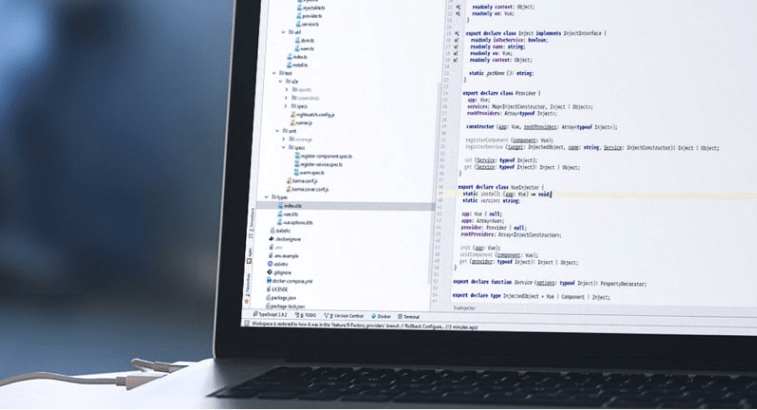
Vue Injector is an open-source dependency injection library for Vue.js created by a team of front-end developers at SCAND. It includes a number of instances that can be used for the implementation of the dependency injection pattern. Also, it includes the following:

Dependency injection for components
Construction of the injected services
Accessibility of Vue application from service
Utilization of decorators for convenient operation

The main benefits of Vue Injector:

Provides developers with the ability to utilize dependency injection an important design pattern that is not included in Vue.js framework by default
Provides convenient mechanism of data transfer
Allows creating both a service and a service factory
Allows requesting the service instead of creating it, providing the ability to depend on interfaces rather than concrete types
Provides the ability to implement event bus
Promotes the applications flexibility, efficiency, and robustness
Allows creating easily testable and maintainable applications

Visit https://scand.com/products/vue-injector/ to read the documentation and learn all the details.
