Wholeclear CSV to VCF Converter 6.0

Type: Shareware
Cost: $29
Size: 19.17 MB
Release date: Sep 25 2020
Platform: Win2000,WinXP,Win7 x32,Win7 x64,Windows 8,Windows 10,WinServer,WinOther,WinVista,WinVista x64
Publisher’s Site:  http://www.wholeclear.com/
Publisher’s Product Page:  http://www.wholeclear.com/converter/csv-to-vcf/
Country: United States of America


Wholeclear CSV to VCF Converter

PC410, Computer Services in Carroll County Maryland
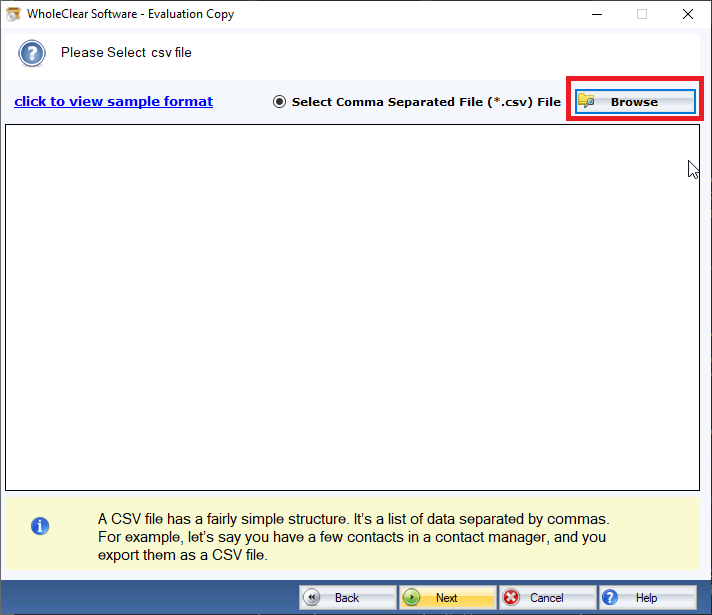
When it comes to converting data from Excel to VCF manually it requires conversion from Excel to CSV and then CSV to VCF. It is a complex method that needs technical expertise. Also, there is a risk of data loss. Don’t take the risk when third-party tools can able to convert data at a fast speed and with accuracy. WholeClear CSV to VCF is a straightforward app. You can use the app even if you are not so technically perfect. The app follows the user’s command for data migration by exporting only required CSV files to VCF. It generates a preview of the selective CSV files to let users choose the field they want to export. Thus, it helps to achieve an advanced data migration goal. The conversion app keeps the CSV file quality intact by exporting all contact fields such as name, address, phone number, and email address. More than one CSV file can be exported at a time. Hence, it supports bulk data migration. The WholeClear CSV to VCF Exporter is the first choice of professionals. The app is reliable. The license of the application is available for personal and professional users. The license for professional users has two categories- business and enterprise. The business version is for small businesses, while the enterprise version is for large organizations. Before you apply for its license, WholeClear offers a free trial of the app on your Windows system. Download the free version to examine the key functions of the app practically. It is the best way to closely analyze the key features of the program.

Aiseesoft FoneTrans 9.1.56

Type: Shareware
Cost: $39.96
Size: 1.67 MB
Release date: Apr 12 2021
Platform: Win2000,WinXP,Win7 x32,Win7 x64,Windows 8,Windows 10,WinServer,WinOther,WinVista,WinVista x64
Publisher’s Site:  https://www.aiseesoft.com
Publisher’s Product Page:  https://www.aiseesoft.com/ios-transfer/
Country: China


Aiseesoft FoneTrans

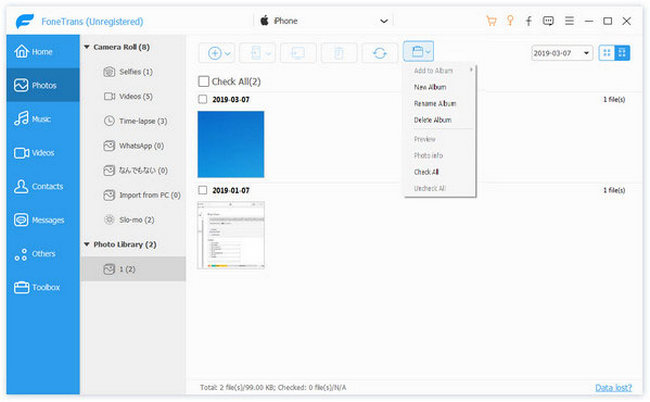
Aiseesoft FoneTrans is powerful iPhone transfer software, which does well in file transfer between iOS devices and computer. It can help you sync and manage photos, music, contacts, messages, videos, notes, calendars, Safari, eBooks and call log from iPhone/iPad/iPod. It’s compatible with the latest iOS 14. It also enables you to make iPhone ringtone and convert image format from HEIC to JPG/PNG and more. And now it enables you to rotate photos when previewing them. And the latest version has fixed the bugs in older version and added new powerful features.

Key Features:
1. Transfer file between iOS device and PC
FoneTrans can help you import video, music, photo and other media files from computer to iPhone/iPad/iPod for enjoyment anywhere and anytime. It also allows you to export files from iOS devices to computer/iTunes for backup.

2. Share files between iPhone/iPod/iPad
Apart from transferring files between computer and iOS devices, you are allowed to transfer files between any iOS devices for file sharing and the shareable files include music, movie, picture, TV show, Podcast, iTunes U, eBook, camera roll, ringtone, etc.

3. Back up iPhone SMS (MMS) and Contacts
With FoneTrans, you can copy SMS to PC for backup and they can be saved in excel, text or html format. Users can also back up the important contacts to PC in case of losing or damaging of their iDevice.

Graphcat

4. De-duplicate Function
To avoid repeated contacts/music, you can delete repeated ones or merge different contacts of the same person.

5. Ringtone Maker and HEIC Converter
In the toolbox, there are two other features that allow you to make ringtones for your iOS device at ease. You can also convert HEIC images to other common formats like JPG or PNG.

Recovery Explorer Professional 8.16

Type: Shareware
Cost: $199.95
Size: 17.60 MB
Release date: May 14 2021
Platform: Win2000,WinXP,Win7 x32,Win7 x64,Windows 8,Windows 10,WinServer,WinOther,WinVista,WinVista x64
Publisher’s Site:  https://www.sysdevlabs.com
Publisher’s Product Page:  https://www.r-explorer.com/recovery-explorer-professional.php
Country: Ukraine


Recovery Explorer Professional

Recovery Explorer Professional is a feature-packed software application for access and recovery of files in various cases of data loss or file system damage, easy comprehensible for both technical experts and home users. The software works with a broad set of devices, including RAID of various complexity, and supports a wide variety of file systems: FAT32/exFAT/NTFS/ReFS/ReFS3 of Windows, HFS+/APFS file systems of macOS, Ext2/Ext3/Ext4, UFS/UFS2, Adaptec UFS, big-endian UFS, XFS, ReiserFS, JFS, Btrfs, F2FS of Linux, ZFS of SUN/FreeNAS and VMFS/VMFS6 of VMware. In addition to physical storages and various disk images, the program handles virtual disks of VMware, Hyper-V, QEMU, XEN, VirtualBox and Parallels. What is more, the utility incorporates embedded decryption techniques for BitLocker, LUKS, TrueCrypt, VeraCrypt, eCryptFS, Apple FileVault 2 and encrypted APFS, which make use of the available password or decryption key and allow restoring files from an encrypted device like from one utilizing no encryption. MS Storage Spaces, Windows dynamic disks, Apple Core Storage, mdadm, LVM with thin provisioning Btrfs-RAID, Drobo BeyondRAID and RAID-Z volumes are automatically detected by the software for further data recovery or access to files. Besides, the application can boast a wide variety of tools for low-level analysis of data consistency and manual editing of contents of disks, partitions or files in the hexadecimal mode.
Operations management is enhanced with the help of separate tabs for each tool as well as the opportunity to preview the files to be recovered. Recovery Explorer Professional can be also used to handle failing drives with definition of parameters as to the access and usage of the device, and the possibility to read out the storage only once and save the processed data to a sparse image file.