
RPM Remote Print Manager Select 64 Bit 6.2.0.523

Type: Shareware
Cost: $324
Size: 53.01 MB
Release date: Oct 07 2020
Platform: Win2000,WinXP,Win7 x32,Win7 x64,Windows 8,Windows 10,WinServer,WinOther,WinVista,WinVista x64
Publisher’s Site:  http://www.brooksnet.com/
Publisher’s Product Page:  https://www.brooksnet.com/content/virtual-print-server
Country: United States of America
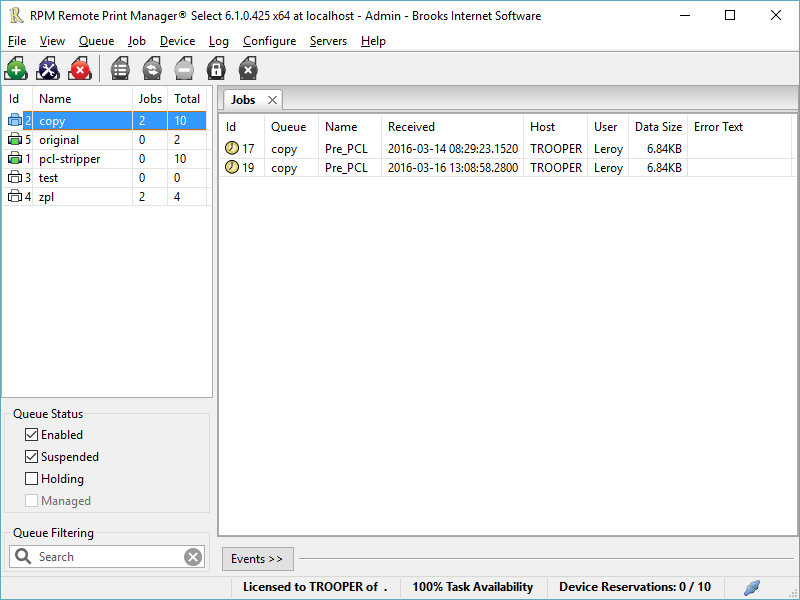

RPM Remote Print Manager Select 64 Bit

PC410, Computer Services in Carroll County Maryland
Printing should be one click away. but there are so many problems which make printing difficult if not impossible. RPM Remote Print Manager (RPM) has grown through the years from all the print problems our customers have brought to us. We are here to help you solve your printing problems.

RPM is our virtual printer product. Our customers have been using RPM for 20 years!
RPM as virtual printer

RPM does what you expect a virtual PDF printer to do, and more:

convert incoming print jobs to other formats, such as PDF, TIFF and PCL
save multiple documents into a single document
print the same job to multiple printers
in one pass, send to a printer and save to disk
print the same job multiple times, using separate paper trays

Graphcat

RPM as print server

RPM is implemented as a Windows print server. Its core capabilities include:

managing your print workflow
send print jobs to any Windows printer
send print jobs to any printer on your network using core Windows print protocols, or LPR, or direct with port 9100
archive print jobs to local folders, shared folders, or anywhere via FTP
run any local application on your print job
send your print job via email as an attachment or in the message body

RPM also provides extensive data editing, manipulation and translation.

Windows version support

RPM 6.1 supports these versions of Windows: Vista, 7, Server 2008 (including R2), Windows 8 and 8.1, Server 2012 (including R2), and Windows 10. Support for Windows XP and Server 2003 has been dropped, so we no longer test new RPM versions on these older versions of Windows.
Aiseesoft Mac Screen Recorder 2.0.60

Type: Shareware
Cost: $31.20
Size: 26.13 MB
Release date: Dec 28 2020
Platform: Mac OS X,
Publisher’s Site:  https://www.aiseesoft.com/
Publisher’s Product Page:  https://www.aiseesoft.com/screen-recorder/
Country: China


Aiseesoft Mac Screen Recorder

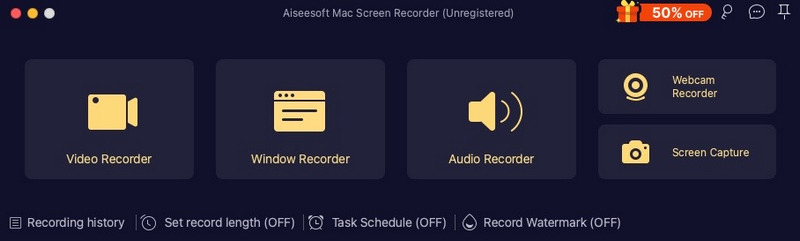
Aiseesoft Mac Screen Recorder makes it easy to record any video or audio played on your Mac. The powerful video recording function allows you to save almost any video to your computer, such as online streaming videos you cannot download, video tutorials you want to capture and video meetings you want to save. You can choose to record system audio of your computer or microphone voice.

Key features:

1. Record video and capture audio or take snapshots
Aiseesoft Mac Screen Recorder is a professional video recording app. You can set recording area in full screen or customized screen size to record videos with high quality. Besides, you can record any online music, radio, audio call and take a snapshot as per your need.

2. Highlight the mouse cursor as you wish
This is especially useful when you make video presentations. You can highlight the mouse cursor to make your action easier to be tracked on screen. Also you can define the color and the shape of the highlight.

3. Choose audio source as you like
Aiseesoft Mac Screen Recorder enables you to record various music, radio or online audio instead of downloading them. You can save the recorded audio in MP3/WMA/AAC/M4A for easy playback. This audio grabber can save any online audio, including audio track in MV, voice in teaching videos and more. You can choose to record the system sound or microphone voice or both according to your need.

4. Edit video/snapshot
This Mac Screen Recorder allows you to edit video/snapshot while screen recording, you can also draw new labels to output file.

CADopia 21 Standard 20.2.1.3407

Type: Demo
Cost: $495
Size: 225.41 MB
Release date: Oct 09 2020
Platform: Win2000,WinXP,Win7 x32,Win7 x64,Windows 8,Windows 10,WinServer,WinOther,WinVista,WinVista x64
Publisher’s Site:  http://www.cadopia.com
Publisher’s Product Page:  http://www.cadopia.com/compare-versions/
Country: United States of America


CADopia 21 Standard

CADopia 21 Standard (PERPETUAL license) is a full-featured CAD solution. The advanced features in this edition include ACIS 3D solid modeling, customization tools, PDF to DWG conversion, voice notes, and support for DGN files as underlays in addition to all standard drawing and drafting functions.

The following new features and refinements are included in CADopia 21 in addition to the complete set of standard drafting features of previous releases of CADopia.

Data Extraction Wizard
Associative hatching
Improved batch printing
Layer support in PDF import
Security enhancements

The major features supported in CADopia Standard are:

Powerful CAD functionality:
AutoCAD 2.5-2018 DWG Support
Export Adobe Acrobat (PDF) files from your drawings
Import PDF files and save as DWG file
Microstation DGN file Underlays
A comprehensive suite of drafting, design, and detailing tools
Supports standard CAD commands
Supports standard menu (.MNU) files
Optional Dark User Interface
Support for Digital Signature
New Layer Manager and Palette
2D Spiral
Redefine base point of a block
Edit block attribute properties
Dynamic custom coordinate system
Formulas in tables and export to Excel
Multileaders
Raster Image insertion and editing
Clipping support for references, images, and viewports
Quick input
Dimensioning an annotations
Annotation scaling
Pattern hatch
Curved text
Drawing tab
Heads-up display toolbar
Layer state manager
Polar tracking
Ribbon interface
Design Resources
Quick grouping and ungrouping
Drawing standards verification and support for DWS files
Complex Linetype
Dimensioning and annotations
Smart Dimensions
Dimensions on Sheets to Model Geometry
Attributes, text, multiline text
Template files
TrueType Fonts & more.
