
Vidmore Player for Mac 1.0.12

Type: Shareware
Cost: $29.95
Size: 35.47 MB
Release date: Jan 07 2021
Platform: Mac OS X,
Publisher’s Site:  https://www.vidmore.com/
Publisher’s Product Page:  https://www.vidmore.com/vidmore-player/
Country: China
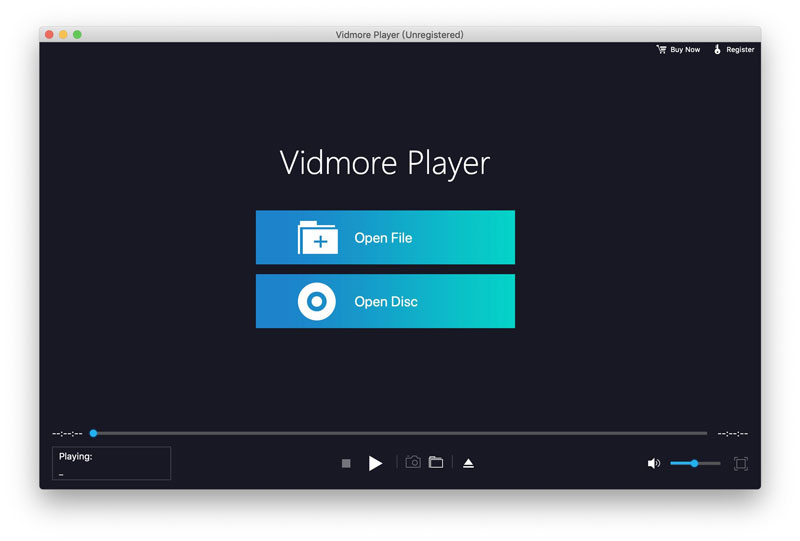

Vidmore Player for Mac

PC410, Computer Services in Carroll County Maryland
If you want to play your Blu-ray disc, Blu-ray folder/ISO files, Vidmore Blu-ray Player for Mac is your best choice. In addition, it could also play common videos, 4K UHD and 1080p/720p HD videos as you like.

Key functions:

1. Play Blu-ray disc/folder/ISO files
Vidmore Player for Mac is able to play Blu-ray disc, Blu-ray folder and Blu-ray ISO files with high image quality. It supports all Blu-ray disc types, such as BD-5, BD-9, BD-25, BD-50 and so on.

2. Play 4K UHD and 1080p/720 HD videos and common media files
Vidmore Player for Mac could not only play Blu-ray disc/folder/ISO files, but also play 4K UHD and 1080p/720p HD videos smoothly. With it, you could enjoy your videos with high image quality and perfect sound processing. It also allows you to play all kinds of common video/audio files, such as MP4, MPG, M4V, TS, MTS, M2TS, MXF, RM, VOB, AAC, WMA, M4A, etc. With the advanced audio decoding technologies like Dolby, DTS, AAC, TrueHD and more, you will get a perfect user experience.

Graphcat

3. Powerful editing function
Vidmore Player for Mac enables you to choose the subtitle or change the audio track of your videos. And with the quick navigation menu, you can easily change to the part you want to watch. In addition, you are able to adjust the video effects like hue, brightness, contrast, saturation, Gamma, etc. Moreover, you are able to take a snapshot while watching the Blu-ray or DVD movie.

WinX HD Video Converter for Mac 6.5.2

Type: Shareware
Cost: $29.95
Size: 38.57 MB
Release date: Dec 03 2020
Platform: Mac OS X,
Publisher’s Site:  http://www.macxdvd.com/
Publisher’s Product Page:  http://www.winxdvd.com/hd-video-converter-for-mac
Country: China


WinX HD Video Converter for Mac

Get World’s NO.1 fast HD video converter for macOS Sierra (10.12)/Mac OS X and 4K/1080p video downloader. Uniquely support hardware acceleration tech

WinX HD Video Converter for Mac is all-in-one HD video converter, 4K/HD video downloader, slideshow maker on Mac OS X. It is able to convert HD AVI, HD MPEG, HD TS, Quick Time HD, FLV, AVCHD, M2TS, MKV, WMV to iPhone, iPad, Galaxy, MP4 with high quality; auto detect and download 4K/1080p video from 300+ sites like Facebook, Dailymotion, Yahoo with up to 83x real-time faster speed; record video & game on Mac screen into video clips and convert recorded videos for playback.

How to Fast Convert AVCHD, M2TS, MKV, WMV videos to iPhone (7/Plus) iPad MP4 with High Quality?
Step 1, Import video into this MKV converter by clicking the "+ video" button.
Step 2, Select the output profile. You can choose converting MKV to iPhone, MKV to iPad, MKV to MP4.
Step 3, Click "Run" to start video conversion on Mac OS X.

How to download Facebook/Dailymotion/Yahoo, etc video with Fast Speed?
Step 1, Copy and paste the video link from Facebook/Dailymotion/Yahoo via the "RUL" pop-up window.
Step 2, Click "Analyze". It will auto detect all the information, such as resolution, format, size and code.
Step 3, Select your desired one and click "ok".

Key Features:

Uniquely support hardware accelerated video encoding and decoding technology to quicken the HD video convert and download speed.
Convert between HD Videos and SD Videos such as MKV to AVI, MKV to MP4, MPEG, WMV, MOV, 3GP, FLV.
Support HD-camcorder videos like Canon JVC MOD video to MP4/MPEG, Sony M2TS/MTS to MP4/AVI, etc.
Achieve mutual video conversion among AVI, MP4, MPEG, WMV, MOV, FLV, 3GP, Google TV, WebM, etc.
Convert videos for playback on Apple iPhone 7/Plus, 6/6 Plus, iPod/5, iPad/Air 2/Mini 3,Galaxy S7/S7 edge/Note 7, Xperia XZ and Xperia X Compact etc.
Support 1080p HD/ 4K UHD/ 3D videos downloading and keeps original audio video effect.

DocuFreezer 3.1.2010

Type: Freeware
Cost: $0
Size: 143.04 MB
Release date: Oct 22 2020
Platform: Win2000,WinXP,Win7 x32,Win7 x64,Windows 8,Windows 10,WinServer,WinOther,WinVista,WinVista x64
Publisher’s Site:  https://www.fcoder.com
Publisher’s Product Page:  https://www.docufreezer.com
Country: Latvia


DocuFreezer

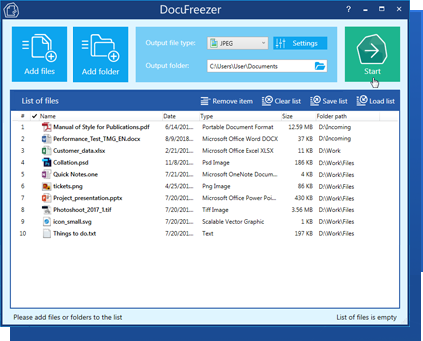
DocuFreezer is a batch file converter for Windows. DocuFreezer file conversion core processes different documents and images: Word, Excel, PowerPoint, Project documents, AutoCAD, SolidWorks, Solid Edge, Visio drawings, images, text files, and more. This simple software can batch convert multiple files at once. Popular scenarios & tasks: PDF to JPG, PDF to TIFF, DOC to PDF, XPS to PDF, XLS to PDF, JPG to PDF, Outlook emails to PDF, HTML to PDF, Text to PDF, OCR PDF to words, and more.

DocuFreezer automatically converts many files added to a list preserving the structure and color attributes of your original files. DocuFreezer output files are device independent and will be properly displayed on most PCs or other devices after conversion. The software can handle 70+ types of files and convert them to PDF, JPG, PNG, TIFF or TXT formats. It is also an OCR app – it can recognize text and save files to searchable PDF or TXT. You can find more information about DocuFreezer features at https://www.docufreezer.com

Users of Microsoft Office 2007 SP2, 2010 or 2013 (or newer versions) can benefit from the ability to convert Microsoft Office Word documents, Excel worksheets, PowerPoint presentations, Publisher, Visio files. Advanced options are also available for eDrawings, SolidWorks, AutoCAD, Solid Edge users – they can quickly save their DWG, DXF, DFT and other types of drawings to PDF or popular image formats.

What’s new in the latest version:
– Convert MathCAD Prime MCDX and MCTX files
– Set page range and extract PDF pages
– Reduce output PDF file size when converting Word DOC and DOCX
– Save output files to the source folder
– Arrange multiple document pages on one sheet
– Set compression for output TIFF files
– Improved TIFF to PDF conversion
– Improved conversion of AutoCAD to PDF and images
– Improved JPEG to PDF conversion for increased performance
– Fixed combining documents and images to a single multipage PDF
– Other improvements and fixes
