
Apeaksoft Screen Recorder 1.3.22

Type: Shareware
Cost: $19.96
Size: 1.67 MB
Release date: Nov 10 2020
Platform: Win2000,WinXP,Win7 x32,Win7 x64,Windows 8,Windows 10,WinServer,WinOther,WinVista,WinVista x64
Publisher’s Site:  https://www.apeaksoft.com/
Publisher’s Product Page:  https://www.apeaksoft.com/screen-recorder/
Country: China

Apeaksoft Screen Recorder

PC410, Computer Services in Carroll County Maryland
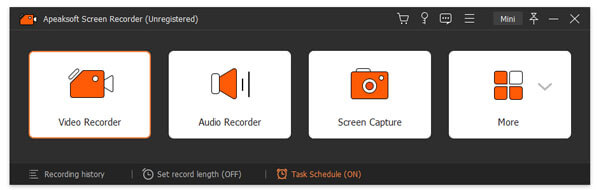
Apeaksoft Screen Recorder helps to capture almost any video played on your computer, including 4K videos. You can use this screen capture software to record various kinds of videos, like online movies, video conference, video tutorials, game play and other videos you want to save. When you record the screen, you can choose to record the sound of the video itself or record your own voice through microphone.

Key functions:

1. Record any videos on your computer
Apeaksoft Screen Recorder is professional video recording software. With this recording software, you don’t have to buy another downloader because it will save more time and money to record than download. It is more powerful than downloader because it can save more, including game play process, video meetings and online streaming videos, etc. You can record any formats of video on your computer, even 4K videos.

2. Highlight the mouse cursor as you want
This is especially useful when you make video presentations. You can highlight the mouse cursor to make your action easier to be tracked on screen. Also you can define the color and the shape of the highlight.

Graphcat

3. Record any audio source as you like
The highlight of this Screen Recorder lies in this feature. When you record a video, you can choose to record the voice of the video itself by using the system audio, or record your own voice by enabling microphone voice. The former one fits for recording movies while the latter one is fit for making video presentations. If you want to record a video meeting, you should turn both of them on.

Guiffy eXpert Windows 11.13

Type: Shareware
Cost: $60.00
Size: 52.08 MB
Release date: Oct 06 2020
Platform: Win2000,WinXP,Win7 x32,Win7 x64,Windows 8,Windows 10,WinServer,WinOther,WinVista,WinVista x64
Publisher’s Site:  https://www.guiffy.com
Publisher’s Product Page:  https://www.guiffy.com/Merge-Tool.html
Country: United States of America


Guiffy eXpert Windows

Guiffy eXpert is a visual file compare Diff tool, Merge tool, and Folder compare tool all-in-one that makes comparing, merging, and upgrading sources as easy and reliable as possible. Guiffy comes with: command line interfaces, an API package, Eclipse and NetBeans integrations and Explorer integration. Guiffy recognizes over 150 source file encoding formats (such as UTF8, UTF16, and many other mutlti-byte formats). Advanced visual compare features include in-line difference highlighting and syntax highlighting for more than 20 source code languages. Our Trustworthy 3-way merge, SureMerge, was designed from day 1 to avoid all the problems that plague other 3-way diff based merge tools. SureMerge surpasses all other merge tools with its intelligent hybrid algorithms and ease-of-use. See our SureMerge White Paper which includes test kit files for evaluating 3-way merge tools. Guiffy is implemented entirely in Java with a Swing GUI. Its cross-platform and available for: Windows(2000, XP, 2003, 2008, 2012, Vista x32 and x64, Windows 7 x32 and x64, Windows 8 x32 and x64, Windows 10 x32 and x64), MacOS X, Linux(any architecture or distribution), Unix(Solaris, HPUX, AIX, Others), and any Java-enabled platform. This download includes an easy-to-use Windows installer.

FaxTalk Multiline Server 10.0.0.1625

Type: Demo
Cost: $149.95
Size: 25.31 MB
Release date: Dec 01 2020
Platform: Win2000,WinXP,Win7 x32,Win7 x64,Windows 8,Windows 10,WinServer,WinOther,WinVista,WinVista x64
Publisher’s Site:  https://www.faxtalk.com
Publisher’s Product Page:  https://www.faxtalk.com/faxtalk-multiline-server-network-fax-server-software/
Country: United States of America


FaxTalk Multiline Server

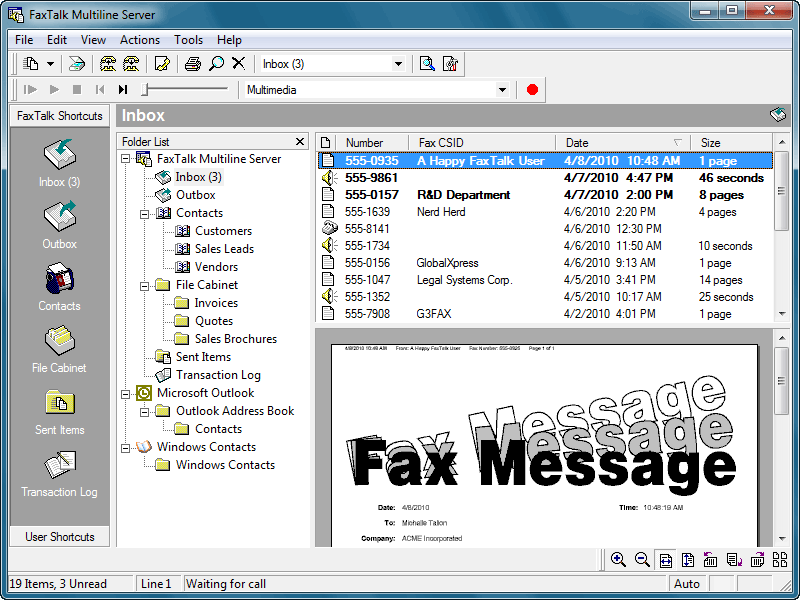
Easy to use network fax server software and broadcast fax software. With FaxTalk Multiline Server your network based users can stop waiting in line to use the fax machine and quickly and easily create and send faxes directly from their computer. Provide an affordable, reliable network based client/server faxing solution for your network based users. Avoid the expense and hassle of setting up individual fax software solutions for each user and eliminate the need for dedicated telephone lines to each computer. Users can submit faxes directly from their machine without a phone line or modem connected to their computer.

A computer acting as a "fax server" running the FaxTalk Multiline Server software would transmit the faxes submitted by users on the network. There is no need for a dedicated "server" machine to use FaxTalk Multiline Server as a fax server. Any computer with a standard fax modem connected to a telephone line can operate as the fax server on a network. If your fax volume requires additional lines you can simply add additional standard fax modems or multiport modems to handle a maximum of eight lines. Network users would use the FaxTalk FaxCenter Pro software running on each individual client machine to create and send faxes over the network to the fax server for transmission.

The FaxTalk software includes powerful fax capabilities including broadcast faxing, high-speed Super G3 (V34 Fax) support, 2D, ECM, delayed scheduling, sending faxes over the Internet to an email address, direct access to contacts from Microsoft Outlook, Windows Address Book and Windows Contacts, markup and annotation tools, ability to design custom cover pages, TWAIN scanner support, junk fax blocking, Caller ID, Distinctive Ring, forwarding of faxes to email and much more!
