
Apeaksoft Video Editor 1.0.28

Type: Shareware
Cost: $28.76
Size: 36.27 MB
Release date: Sep 22 2020
Platform: Win2000,WinXP,Win7 x32,Win7 x64,Windows 8,Windows 10,WinServer,WinOther,WinVista,WinVista x64
Publisher’s Site:  https://www.apeaksoft.com/
Publisher’s Product Page:  https://www.apeaksoft.com/video-editor/
Country: China
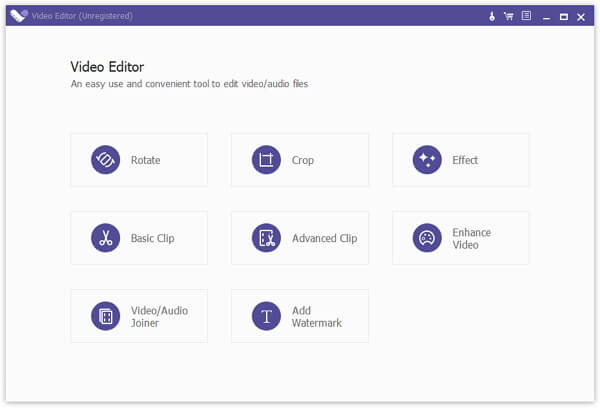

Apeaksoft Video Editor

PC410, Computer Services in Carroll County Maryland
Apeaksoft Video Editor is powerful video conversion and editing software, with it, you could convert your favourite videos to other formats as you like and you could also edit your videos such as adjusting resolution/brightness/contrast, reducing video shaking, rotating/cropping videos, adding watermark to videos, removing video noise. This program provides Basic Clip and Advanced Clip function for you. So you can clip one more video or audio files, or merge the video or audio files into one.

Key functions:

1. Convert your videos to various formats
With Apeaksoft Video Editor, you could convert your video and audio files to all kinds of formats, such as H.264/MPEG-4 AVC, AVI, WMV, ASF, WebM, AAC, AC3, AIFF, AMR, AU, FLAC and so on.

2. Enhance video quality
Apeaksoft Video Editor has powerful editing function, with it, you could adjust resolution/brightness/contrast of your videos, reduce video shaking, rotate/crop/clip videos, add watermark to videos, remove video noise and so on without any hassle. Even you are not familiar with it, you could use it easily.

Graphcat

3. Support various devices
Apeaksoft Video Editor could support various devices, for example, iPhone 11/11 Pro/11 Pro Max/XS/XS Max/X/XR, 8/8 Plus, etc. Samsung Galaxy, Motorola, Google, LG, Sony, HTC, etc. Wii, PS4, PS3, PSP, NDS and so on.

4. Fast conversion speed
The most important thing is Apeaksoft Video Editor could provide fast conversion speed for you, so you don’t need to wait long for the process. You could convert and edit your videos quickly and conveniently.
DataNumen Archive Repair 3.3

Type: Shareware
Cost: $199.95
Size: 13.75 MB
Release date: Dec 25 2020
Platform: Win2000,WinXP,Win7 x32,Win7 x64,Windows 8,Windows 10,WinServer,WinOther,WinVista,WinVista x64
Publisher’s Site:  https://www.datanumen.com
Publisher’s Product Page:  https://www.datanumen.com/archive-repair/
Country: Hong Kong


DataNumen Archive Repair

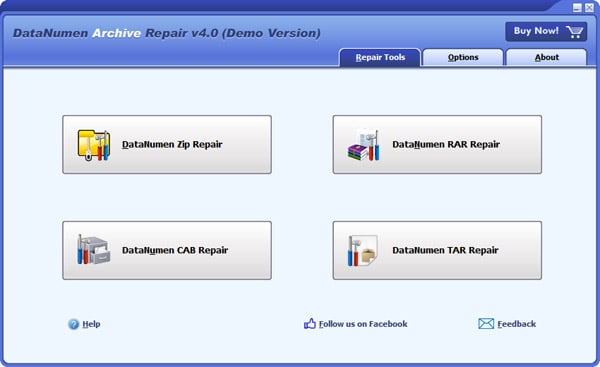
DataNumen Archive Repair(formerly Advanced Archive Repair) is an archive data recovery suite. It includes tools to recover data from corrupt or damaged RAR archives, Zip or SFX archives, Unix TAR archives, and CAB archives.

Main features:
1. Support to repair all subtypes of Zip files and all kinds of self-extracting files.
2. Support to repair all subtypes of RAR archives.
3. Support to repair standard Unix TAR files.
4. Support to repair all version of Microsoft cabinet files, compressed with MSZIP, LZX and Quantum methods.
5. Support to repair files on corrupted medias, such as floppy disks, Zip disks, CDROMs, etc.
6. Support to repair a batch of corrupt files.
7. Support integration with Windows Explorer, so you can repair a file with the context menu of Windows Explorer easily.
8. Support drag & drop operation.
9. Support command line parameters.

Apeaksoft iPhone Data Recovery 1.1.12

Type: Shareware
Cost: $55.96
Size: 1.73 MB
Release date: Oct 09 2020
Platform: Win2000,WinXP,Win7 x32,Win7 x64,Windows 8,Windows 10,WinServer,WinOther,WinVista,WinVista x64
Publisher’s Site:  https://www.apeaksoft.com/
Publisher’s Product Page:  https://www.apeaksoft.com/iphone-data-recovery/
Country: China


Apeaksoft iPhone Data Recovery

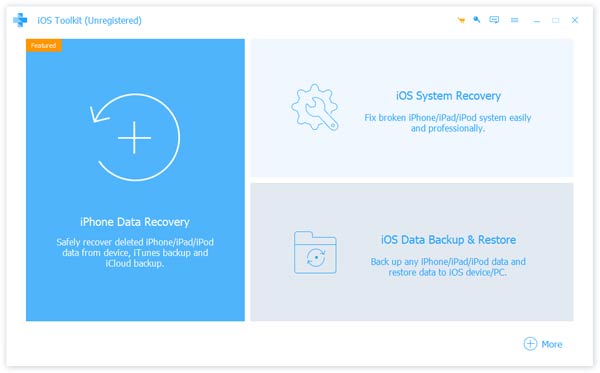
Apeaksoft iPhone Data Recovery can recover lost Messages, Contacts, Call History, Calendar, Notes, Voice memos, QQ/Wechat data, Photos, etc. from iOS devices or from iTunes/iCloud backup files. It supports many portable iOS devices, including iPhone 11/11 Pro/11 Pro Max/XS/XS Max/8/8 Plus/7/7 Plus, iPad Pro, iPad mini 4, iPod touch, etc. And it allows you to preview your lost data before recovery.

Key Functions:

1. Recover lost data from iOS devices
Apeaksoft iPhone Data Recovery is able to recover lost data such as Contacts, Text Messages/iMessages, Call history, Calendar, Notes, Reminder, Safari bookmark, Safari history, Photos, Voice memos from iPhone 11/11 Pro/11 Pro Max/XS/XS Max/XR/X/8/8 Plus/7/7 Plus, iPhone 4/3GS, iPod touch 4, iPad 1, etc.

2. Recover data from iTunes/iCloud backup files
No matter what type of your device is, Apeaksoft iPhone Data Recovery can recover lost data as long as your device has been backed up with iTunes/iCloud. So if your data was deleted incautiously or intentionally, you can get them back.

3. iOS System Recovery function
iOS System Recovery function can help you fix your iOS system back to normal in various situations including stuck in recovery mode, DFU mode, white Apple logo, black screen, looping on start, etc. without losing any data. In addition, with this function, you are able to upgrade or downgrade the iOS device system.

4. iOS Data Backup and Restore function
iOS Data Backup and Restore function can help you back up your iOS data to computer in one click and you can also preview and restore the backup (Contacts and Notes) to any iOS device without any data loss.
