Category Archives: Audio & Multimedia

Audio Encoders/Decoders, Audio File Players, Audio File Recorders, CD Burners, CD Players, Multimedia Creation Tools, Music Composers, Other, Presentation Tools, Rippers & Converters, Speech, Video Tools

AnyMP4 Video Converter Ultimate 7.2.50

Type: Shareware
Cost: $41.25
Size: 39.97 MB
Release date: Dec 17 2018
Platform: Win2000,WinXP,Win7 x32,Win7 x64,Windows 8,Windows 10,WinServer,WinOther,WinVista,WinVista x64
Publisher’s Site:  https://www.anymp4.com
Publisher’s Product Page:  https://www.anymp4.com/video-converter-ultimate/
Country: China

AnyMP4 Video Converter Ultimate

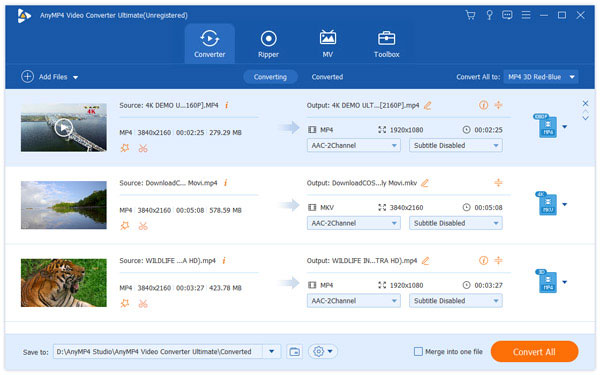
AnyMP4 Video Converter is used to help users convert any video to popular video (MKV, MOV, MTV, VOB, WMV, AVI, etc.) and audio (AAC, AIFF, AMR, etc.) formats with the super fast conversion speed and excellent output video/audio quality. What’s more, it is highly compatible with iPad mini 3/2, iPad Air 2, iPhone XS/XS Max/XR/X/8/8 Plus/7/7 Plus/6s/6, Samsung Galaxy S6 now.


Key Features

1.Convert any video/audio file including 4K video
This Video Converter Ultimate is able to help users convert any video/audio file, including 3GP, 3G2, AVI, DV, DIF, FLV, SWF, F4V, MOD, MJPG, MJPEG, MKV, VOB, DAT, MP4, M4V, MPV, QT, MOV, RM, RMVB, TOD, TS, TRP, TP, WMV, ASF, MPEG-2 HD, MPEG-4 HD, QuickTime HD, WMV HD, HD TS, HD MTS, HD M2TS, HD TRP video and AAC, AIF, AIFF, APE, OGG,etc audio.

2.Enhance video quality
Upscale video resolution, optimize the brightness and remove video noise to make your video more energetic. What?s more, you are allowed to rotate and flip your video to the right angle according to your needs.

3. Clip and merge videos
Clip a video to your desired time length segments by setting the start and end time. In addition, try to merge different videos to one.

4. Crop Video Frame and Add Video Watermarks
Also you can cut off unwanted playing areas of a video to fit your different portable players. Personalize your video with the image or text watermarks, and adjust its position, transparence, etc.

5. Define video or audio effect
This software enables you to define the output video or audio parameters, such as Video Encoder, Frame Rate, Video Bitrate, Resolution, and Audio Encoder, Sample Rate, Channels, Audio Bitrate. Also you can adjust the video brightness, contrast, saturation, hue and volume.

6. Convert one file to multiple formats
AnyMP4 Video Converter Ultimate enables users to select multiple output formats for the source video/audio, and then users can get multiple output video or audio formats at the same time.

Graphcat<

Aiseesoft FoneTrans 8.3.60

Type: Shareware
Cost: $29.97
Size: 69.35 MB
Release date: Feb 12 2019
Platform: Win2000,WinXP,Win7 x32,Win7 x64,Windows 8,Windows 10,WinServer,WinOther,WinVista,WinVista x64
Publisher’s Site:  https://www.anymp4.com
Publisher’s Product Page:  https://www.aiseesoft.com/ios-transfer/
Country: China


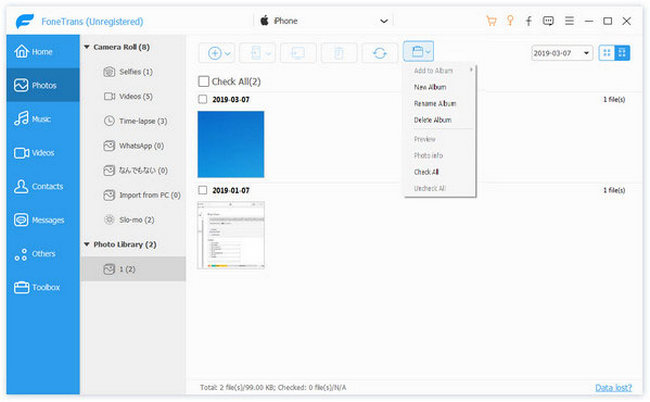
Aiseesoft FoneTrans

Aiseesoft FoneTrans is the first-granted iPhone Transfer software, which does well in file transfer between iOS devices and computer. It can transfer video, music, photo and many other multimedia files from computer to iOS device, including iPhone XS/XS Max/XR/X, etc. Now it becomes more powerful for its new functions, you can also use it as Ringtone maker, HEIC Converter as well. What’s more, you can convert all supported data between iDevices and computer/iTunes with one click.

Key Features

1. Transfer file between iOS device and PC
FoneTrans can help you import video, music, photo and other media files from computer to iPhone/iPad/iPod for enjoyment anywhere and anytime. It also allows you to export files from iOS devices to computer/iTunes for backup.

2. Share files between iPhone/iPod/iPad
Apart from transferring files between computer and iOS devices, you are enabled to transfer files between any iOS devices for file sharing and enjoyment and the shareable file includes music, movie, picture, TV show, Podcast, iTunes U, eBook, camera roll, ringtone, etc.

3. Backup iPhone SMS (MMS) and Contacts
With this transfer software, you can copy their SMS to PC for backup and they can be saved in excel, text or html format. Users can also backup the important contacts to PC in case of losing or damaging their iPhone, iPad or iPod.

4. De-duplicate Function
To avoid repeated contacts/music, this iOS Transfer software provides de-duplication function for you to delete repeated ones or merge different contacts of the same person.

5. Ringtone Maker
It has newly added a new functions that allows you to make ringtones for your iOS device at ease.

6. HEIC Converter
You can also use this iOS data manager as HEIC Converter to convert images in HEIC format to other common formats like JPG or PNG that can be opened and viewed on most portable devices.

Total Video Player Pro for Mac 3.0.1

Type: Shareware
Cost: $29.99
Size: 25.94 MB
Release date: Feb 28 2019
Platform: Mac OS X
Publisher’s Site:  http://www.macvideostudio.com
Publisher’s Product Page:  http://www.macvideostudio.com/total-video-player-mac.html
Country: Hong Kong


Total Video Player Pro for Mac

Total Video Player Pro for Mac is an excellent Blu-ray Video Player for Mac Subtitles, which is developed by EffectMatrix. This Video Player Mac Subtitles is the top-notch AVI Player for Mac and MKV Player Mac. It is equipped with powerful video play function makes you to perfectly Play 4K ultra HD AVI, MKV… movies on Mac without any lagging.

Key Features:
1. Worlds No.1 Blu-Ray Player!
Smoothly play all media discs including Blu-ray, DVD, VCD/SVCD, CD, DVB as well asBlu-ray Menu, ISO files, and BDMV folder.

2. Full Compatible With all Media Formats!
Play almost all video and audio formats such as MP4, AVI, MKV, TS, MTS, M2TS, FLV, MOD, RMVB, WMV, FLAC, WAV, WMA, MP3, AAC, AIFF and much more media formats!

3. Smoothly Play HD Video Files
Amazing 4K ultra HD media player, which use advanced decoding technology to avoid any video lagging! You can smoothly play any vivid 1080p HD and 4K ultra HD media files.

4. Powerful Subtitle Functions
Support embedded subtitles in MKV and MP4 files and adding external subtitle files. The Pro Version can automatically load subtitle that name is same as the video. It handles lots of subtitle formats and can edit subtitles font, text color and text size.

5. Easily Manage Media Files With Playlist
Provides you with professional playlist to easily manage medis files.

Other Functions:
1 Total Video Player for Mac Subtitles supports Retina and viewing file details.
2 Play incomplete or corrupted video.
3 No need to install any video codecs.
4 Enjoy same effect as 1080P full HD video even the movie is in 1080i format.
5 Select audio and subtitle track and set audio device.
6 ‘ A-B Loop’ function, with which you can enjoy your favorite video clips again and again!
7 The Movie Player for Mac Subtitles screen could be always pinned at the front.
8 Total Video Player for Mac with subtitles has more useful shortcuts.
9 Total Video Player for Mac subtitles supports Screenshot Capture.