Category Archives: Audio & Multimedia

Audio Encoders/Decoders, Audio File Players, Audio File Recorders, CD Burners, CD Players, Multimedia Creation Tools, Music Composers, Other, Presentation Tools, Rippers & Converters, Speech, Video Tools

Burnova 1.3.22

Type: Shareware
Cost: $25.16
Size: 57.92 MB
Release date: Nov 27 2018
Platform: Win2000,WinXP,Win7 x32,Win7 x64,Windows 8,Windows 10,WinServer,WinOther,WinVista,WinVista x64
Publisher’s Site:  http://www.aiseesoft.com
Publisher’s Product Page:  https://www.aiseesoft.com/burnova/
Country: China

Burnova

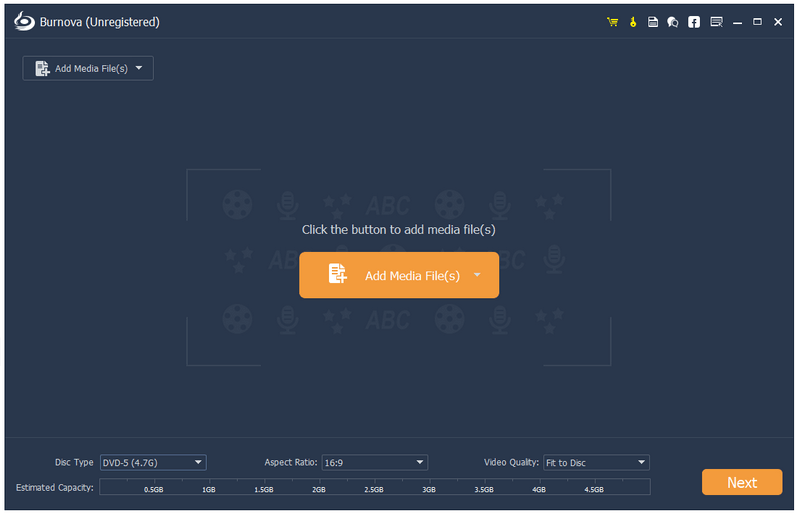
Burnova is compatible with almost all video formats for DVD/Blu-ray making. You are able to import video from MP4, AVI, WMV, MKV, M4V, MOV, M2TS/MTS, 3GP, VOB, FLV, MPEG, MPG, DV, RMVB, TOD, ASF, etc., even HD MPEG2, HD MPEG4, HD WMV, HD TS, HD MTS, HD TRP, and HD TP video files. It lets you add external audio track from MP3, AAC, AIFF, FLAC, WAV, WMA, OGG, AC3, MPA, MP2, etc. to make your own video.


Key Features:

1. Create various video files to Blu-ray disc/folder/iSO files
Aiseesoft Burnova has the function of creating any popular video to Blu-ray disc, Blu-ray folder and ISO files. And there are two Blu-ray types for you to choose: BD-25 and BD-50.And you can make movYou can make movies to various DVD types, like DVD-R, DVD+R, DVD-RW.

2. Customize your DVD/ Blu-ray
If editing functions is to fulfill your video content, then menu editing will be necessary to string together all content. Burnova provides you various templates (holiday, family, travel, wedding and more styles) to specify your different type of movies or videos. You can also add your own images as the background to tell your own story for the video. For the title, menu and play button, you are allowed to edit or drag the buttons to the place where you want them to put. For the opening film, you are capable of importing your favorite video clips.

3. Select your loved menu
This burnova allows you to attach menus before burning. User can choose the prefer menu template, select the menu frame and button style, edit the menu text content and define its font, size and color, even add the background picture, music and opening film to the menu.

4. Add and set audio track/subtitle
Users can add audio track and subtitle to the Blu-ray/DVD. To select your own audio track is also available for you.

Graphcat<

FoneCopy 1.2.20

Type: Shareware
Cost: $27.30
Size: 75.45 MB
Release date: Dec 25 2018
Platform: Win2000,WinXP,Win7 x32,Win7 x64,Windows 8,Windows 10,WinServer,WinOther,WinVista,WinVista x64
Publisher’s Site:  http://www.aiseesoft.com
Publisher’s Product Page:  https://www.aiseesoft.com/phone-transfer/
Country: China


FoneCopy

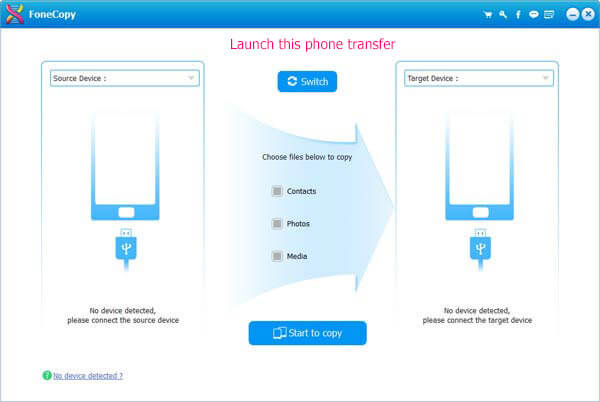
FoneCopy can copy your iPhone Music, Movies, Photos, Contacts and more other files to the other Apple device. It can detect more than 2 devices simultaneously. Don’t be afraid of losing data if your iPhone is dead or broken, FoneCopy can sync the files on your iPhone/iPad/iPod to another one with fast speed. It also allows users copy file from Android devices to iOS devices. It can supports devices such as iPhone XS/ XS Max/XR/ X/ 8/7/6S, etc, iPad mini 3, iPad Air 2, iPod touch 5 and so on.Moreover, it compatible with the new iTunes 12.3.
Key Features:
1. Transfer files between any two Apple devices
With this free powerful software, you can copy your iPhone files to another device such as iPhone 7 or iPad Air. This FoneCopy software makes it possible to backup Text content(3 types) and Media content(13 types) from one Phone to another, even from the dead or broken one.

2. Copy files from Android devices to iOS devices
Do you want to copy files from your Android device to the new iPhone? Fonecopy can help you transfer your important data from your Android devices to your new iPhone/iPad/iPod with no loss.

3. The supported transfer data
As for the Text content, it allows you transfer ePub, PDF, Contacts. As for the Media content, you can copy Music, Movies, TV Shows, Music Videos, Podcasts, iTunes U, Ringtones, Audio Books, Voice Memos, Photos, Camera Shot, Playlists, Albums.

4.Two transfer modes
For more secure data transmission, it provides two modes(transfer files to another device directly or transfer files after erasing the data on the target device) to transfer files. You can choose any one according to your need.

5. Compatible with all Apple devices and most Android devices
It is able to supports all Apple devices such as iPhone XS/XS Max/XR/X/6s/6s Plus/6/5, iPad Air 2/mini 3/2, iPad Pro, iPod Touch 5, iPod Nano 7, etc.
Android devices including Samsung GALAXY Note5/4/3, Samsung GALAXY S5/S4, HTC One (M8), HTC One (E8) and Xperia Z3, etc.

UkeySoft Spotify Music Converter 2.5.1

Type: Shareware
Cost: $39.95
Size: 18.77 MB
Release date: Jan 01 2019
Platform: Win2000,WinXP,Win7 x32,Win7 x64,Windows 8,Windows 10,WinServer,WinOther,WinVista,WinVista x64
Publisher’s Site:  https://www.ukeysoft.com
Publisher’s Product Page:  https://www.ukeysoft.com/spotify-music-converter/
Country: China


UkeySoft Spotify Music Converter

As we all know, the Spotify and Apple Music is the best music streaming service, both streaming music are encrypted with DRM (Digital Rights Management), Spotify uses Ogg Vorbis format and Apple Music uses M4P format. If you are not a Spotify Premium user, you cant enjoy Spotify tracks offline, you cant download or transfer your favorite Spotify songs/playlists/albums to other devices for offline playback, such as MP3 player, iPod Nano/Shuffle/Classic, PSP, PS4, car media player, memory card , etc. In additional, after you unsubscribed to the Spotify Premium service, you are not allow to enjoy Spotify tracks offline, in order to enjoy Spotify music offline on any devices, what you need to do is removing DRM from Spotify Music and convert them to MP3. To solve these problems, you can get help from UkeySoft Spotify Music Converter.

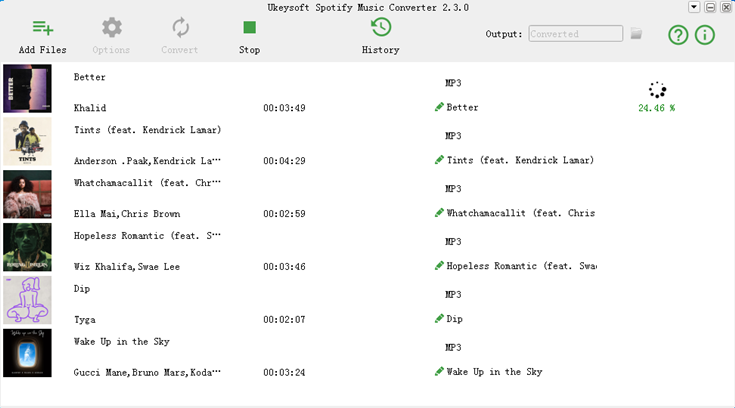
UkeySoft Spotify Music Converter also is a Spotify Music Downloader, Spotify to MP3 Converter and Spotify DRM Removal tool, it can help free Spotify users to remove DRM from Spotify music and make it possible to save Spotify songs onto local computer as MP3, AAC, FLAC or WAV format, after downloading songs from Spotify as DRM-free MP3, you can transfer and play it on any music player offline.

Besides, you can use UkeySoft Spotify Music Converter to convert Spotify music to mp3, aac, flac or wav format up to 5X faster speed. After conversion, you can get 100% lossless quality of Spotify music with ID3 tags preserved. After convert Spotify music to MP3, you can enjoy them without Spotify app and web player. As a Spotify DRM Remover tool, it able to remove DRM protection from Spotify songs, playlists & albums easily and allows you to download Spotify music streams for offline listening on any device, such as MP3 player, iPod, iPhone, Android phone, Zune, PSP, PS4/PS3, etc. You can also burn the converted Spotify music to CD or share Spotify music via Email.