Category Archives: System Utilities

Automation Tools, Backup & Restore, Benchmarking, Clipboard Tools, File & Disk Management, File Compression, Launchers & Task Managers, Other, Printer, Registry Tools, Shell Tools, System Maintenance, Text/Document Editors

DataNumen File Splitter 1.1

Type: Freeware
Cost: $0
Size: 1.21 MB
Release date: May 02 2019
Platform: Win2000,WinXP,Win7 x32,Win7 x64,Windows 8,Windows 10,WinServer,WinOther,WinVista,WinVista x64
Publisher’s Site:  https://www.datanumen.com
Publisher’s Product Page:  https://www.datanumen.com/file-splitter/
Country: Hong Kong


DataNumen File Splitter

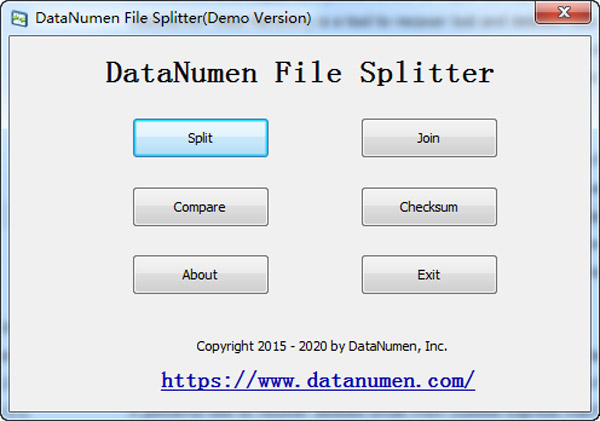
DataNumen File Splitter is a powerful tool to split and join large files.


Main Features:

1. Support to split a large file into small files, based on the specified size limit.

2. Support join several small files into one large file.

3. Support to compare two files byte by byte, to check whether the two files are identical to each other.

4. Support to calculate the MD5 check sum of a file.

5. Support all 32bit and 64bit versions of Windows 95/98/ME/NT/2000/XP/Vista/7/8/10 and Windows Server 2003/2008/2012.

Graphcat<

XePlayer 6.0.10.1

Type: Freeware
Cost: $0
Size: 341.33 MB
Release date: Jan 12 2019
Platform: Win2000,WinXP,Win7 x32,Win7 x64,Windows 8,Windows 10,WinServer,WinOther,WinVista,WinVista x64
Publisher’s Site:  http://www.xeplayer.com
Publisher’s Product Page:  http://www.xeplayer.com
Country: Canada


XePlayer

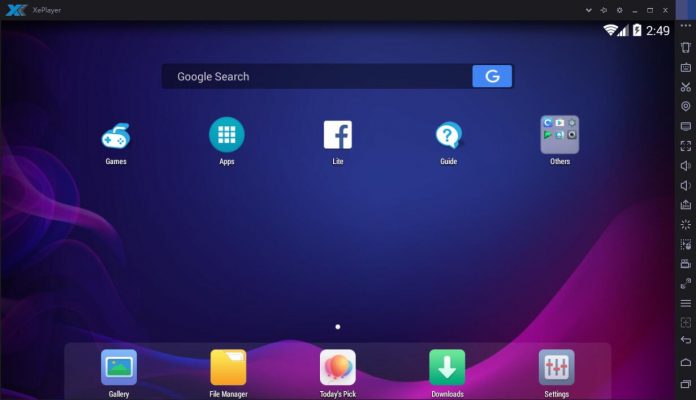
XePlayer is a best and free Android Emulator for pc that enables all Android games and apps to run smoothly in Windows systems. It built on x86 Architecture, support advanced features like OpenGL & hardware acceleration, run faster, more stability and compatibility than other Android Emulators. XePlayer Android Emulator for pc support video recording, gamepad & keyboard, and internal integrated Google Play store to compatible with all apps, more than 99% apps & games Running perfect on XePlayer.XePlayer Android Emulator is downloadable for Windows 7,8,10,xp and Laptop.Download XePlayer Android Emulator on PC and Start to playing games / apps now!
Salient Features of XePlayer:XePlayer is very quick and the emulator never freezes.You can see the highest performance with Xeplayer emulator.This Xeplayer is designed based on Android 4.4.2 Kernel and it is compatible with X86 and AMD.The response speed of Xeplayer android emulator is really quick and very stable.You can see Best Game Experience with Xeplayer. This is really a great android emulator to play all kinds of games on this emulator.You can see File Manager, Facebook Lite, Camera apps are already installed.Shaking features is also available in this emulator.Google Play Store and Browser is also available on Xeplayer emulator.Download Xeplayer Android Emulator For PC now!

System Mechanic Free 18.7.3.176

Type: Freeware
Cost: $0
Size: 572.00 kB
Release date: Jun 05 2019
Platform: Win2000,WinXP,Win7 x32,Win7 x64,Windows 8,Windows 10,WinServer,WinOther,WinVista,WinVista x64
Publisher’s Site:  https://www.iolo.com
Publisher’s Product Page:  http://www.iolo.com/landing/smfree/
Country: United States of America


System Mechanic Free

System Mechanic Free keeps your PC running at peak performance and stability with advanced PC optimization, repair and maintenance features. Using 7 safe and effective tools, its exclusive patented technology fixes registry problems, defrags hard drives, cleans up junk files, accelerates downloads, boosts Windows speed and ensures maximum ongoing system stability. Consistently top-rated since 1998, this award-winning performance solution has been used to keep over 75 million PCs worldwide problem-free and running like new.
System Mechanic Free delivers essential features that automatically resolve errors, slowdowns and crashes:
– Registry Tuner: A safe, effective, and highly advanced problem solver and error repair tool, Registry Tuner can diagnose and resolve many common root causes of mysterious freezes, slowdowns, and crashes.
– Startup Optimizer: Automatically eliminates startup bottlenecks that can choke the life out of a PC and make Windows take ages to start. Supercharges boot-times and frees up resources for improved overall performance.
– Memory Mechanic: Reclaims system RAM orphaned by memory leaks and sloppy programs for improved system responsiveness. Optimizes and defragments memory for snappier programs, downloads, and gaming experience.
– PC Cleanup: Performs a system-wide scan for junk and obsolete files left over from messy apps and unexpected restarts. Safely cleans out hazardous system-clogging clutter that accumulates over time through everyday use.
– Drive Accelerator: Performs advanced hard drive defragmentation for accelerated Windows load times, program startup, and overall system speed.
– Shortcut Repair: Finds and automatically fixes broken or corrupted Windows shortcut icons that can represent the root of frustrating problems on an otherwise stable PC.
– Internet Connection Repair: Automatically heals broken and chronically unstable internet connections to get you back online and keep you connected when you most need to be.