Category Archives: System Utilities

Automation Tools, Backup & Restore, Benchmarking, Clipboard Tools, File & Disk Management, File Compression, Launchers & Task Managers, Other, Printer, Registry Tools, Shell Tools, System Maintenance, Text/Document Editors

mysys 2.0

Type: Shareware
Cost: $29.95
Size: 32.24 MB
Release date: Feb 03 2019
Platform: Win2000,WinXP,Win7 x32,Win7 x64,Windows 8,Windows 10,WinServer,WinOther,WinVista,WinVista x64
Publisher’s Site:  http://www.integritech.ca
Publisher’s Product Page:  http://integritech.ca
Country: Canada


mysys

A Window into your System!


Do you have alot of files?
Do you spend too much time navigating hundreds of folders?
Do you sometimes forget where a file is?

mysys will be your new home away from all the pesky folders!

News Flash: Version 2 now reads the file tables directly dramatically improving DB creation speed!

If you have mapped network or encrypted drives a popup will ask which ones to include in the
database. Those drives will take longer to index depending on the network connection speed.

CD/DVD/Flash drives will not be indexed, only Fixed drives and optionally Network/encrypted drives.

Use the Schedule button to create a Windows Task Schedule so the indexing happens at
a time which is most convenient. To delete the task just click Cancel.

Once the database is created you are ready to find files, fast!

In the top left text box, type any filename and hit enter or click Search.

Wild cards are supported such as read*.txt.

You can use AND/OR/- like: this OR that
the – is to exclude like: this -notthat

Use double quotes to find whole phrases.

Use brackets like: (afoldername or anotherfolder) and (*.c or *.rc or *.h)
For that example you would check on the ‘Include folder names’ option and probably the ‘Exact match’ option also otherwise will find *.cs, *.css, *.hpp, etc…

You can use the Containing text box to search within the files found. Contents are never
indexed but uses a fast highly multi-threaded algorithm.

File sizes, Dates and Attributes are all read live off the disk, these are not stored in the database.

Graphcat<

DataKit Android Data Backup Restore 3.0.18

Type: Shareware
Cost: $16.50
Size: 40.08 MB
Release date: Dec 13 2018
Platform: Win2000,WinXP,Win7 x32,Win7 x64,Windows 8,Windows 10,WinServer,WinOther,WinVista,WinVista x64
Publisher’s Site:  https://ios-data-recovery.com/about-us/
Publisher’s Product Page:  https://ios-data-recovery.com/android-data-backup-restore/
Country: United States of America


DataKit Android Data Backup Restore

DataKit Android Data Backup & Restore
Backup Android Device Data to Windows
Android Data Backup & Restore is the Best third-party software for Android users to Backup their data to Windows or Mac. Just One Click You can backup all Android data to a computer. With it, you can back up photos, contacts, videos periodically on your phone and you don’t have to worry about losing them. Just connect your phone to computer and make a backup now!

Restore Backup Data to Android Device
With a previous backup, you can restore them to Android phone easily. You can selectively restore those data that you want to the device. And please note that the restored data from the backup will not overwrite the data on your phone, which is very helpful for us when we just want to transfer partial data of the backup to our phone. It supports almost all Android Device Manufacturers.

Supported Manufacturer: Samsung HTC, HUAWEI, Google(Nexus), LG, SONY, OnePlus, XiaoMi, OPPO, VIVO, Moto, Lenovo&more. This tool supports all phone models running Android OS.
Supported File Type: Contacts, Messages, Call Logs, Gallery, Videos, Audio, Documents.

AnyMP4 Android Data Recovery 2.0.8

Type: Shareware
Cost: $29.96
Size: 38.92 MB
Release date: Nov 26 2018
Platform: Win2000,WinXP,Win7 x32,Win7 x64,Windows 8,Windows 10,WinServer,WinOther,WinVista,WinVista x64
Publisher’s Site:  https://www.anymp4.com/
Publisher’s Product Page:  https://www.anymp4.com/android-data-recovery/
Country: China


AnyMP4 Android Data Recovery

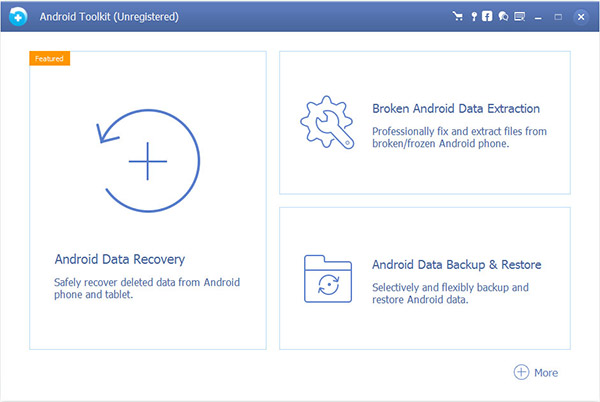
Android Data Recovery is the best data recovery app for Android. With this file recovery software, you can recover deleted text messages, photos, contacts, call history, videos, music and other lost document files from your Android phones, tablets and SD cards with just a few clicks. When you lost your Android data due to wrong deletion, and other accidental conditions (such as dropping you Android into water), you can find your lost and deleted Android data back with the help of this product. In addition, you can back up and transfer your important messages, photos and files on your computer.

Key Features:

1. Recover deleted text messages on Android phone
As the best Android Messages, Message Attachments recovery, it is easy to achieve the text message recovery function. You can export the retrieved text messages in either HTML or EXCEL formats to your PC.

2. Retrieve deleted Android photos
This powerful Android photo recovery software can recover your deleted photos from your Android phone in 1 click and save them on your PC with ease.

3. Restore lost contacts from Android
Don’t worry if you lost important contacts on your Android phone. This contacts recovery tool can restore these contacts from your phone to your computer.

4. Recover other lost data.
It can also retrieve many other lost files, such as Gallery, call history, videos, music and documents on your Android devices.

5. Broken Android Data Extraction function.
Android Data Extraction can help you fix frozen, crashed, locked, black screen, etc. Android devices back to normal and extract contacts, messages, photos, call logs and more from broken phone and tablets.

6. Android Data Backup & Restore function.
Android Data Backup & Restore can help you backup your Android data to computer in one click and can preview and restore backup to any Android Smartphone or tablets. It can support over 5000 Android devices.