
Type: Shareware
Cost: $39
Size: 10.02 MB
Release date: Jun 11 2018
Platform: Win2000,WinXP,Win7 x32,Win7 x64,Windows 8,Windows 10,WinServer,WinOther,WinVista,WinVista x64
Publisher’s Site: http://www.cdroller.com
Publisher’s Product Page: http://www.cdroller.com
Country: United States of America
Cost: $39
Size: 10.02 MB
Release date: Jun 11 2018
Platform: Win2000,WinXP,Win7 x32,Win7 x64,Windows 8,Windows 10,WinServer,WinOther,WinVista,WinVista x64
Publisher’s Site: http://www.cdroller.com
Publisher’s Product Page: http://www.cdroller.com
Country: United States of America
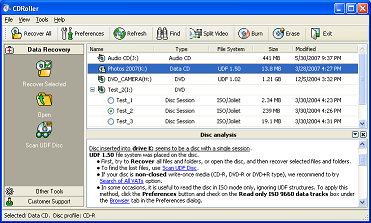

CDRoller is a handy and reliable software for data recovery from optical discs (CD/DVD/Blu-ray), hard and ssd drives, memory cards and other types of Windows drives. Key features:
1. Retrieves the data from the discs created by drag and drop CD/DVD/BD writing software, such as well-known Sonic (Roxio, Adaptec) and Ahead Nero software packages.
2. Includes built-in UDF Reader. No need to install the 3rd party UDF Reader.
3. Finds and recovers the lost DVD movies and photos, created by a wide set of standalone devices, including Hitachi, Canon, Panasonic, Samsung and Sony DVD camcorders as well as standalone video recorders. Converts a raw DVD-video (VOB or VRO files) into MPG files without loss of quality. Makes a new DVD-Video disc that can be played back in the most DVD players.
4. Includes built-in CD/DVD/BD burner and eraser integrated into common shell.
5. Recovers CD data written by Sony Mavica CD digital cameras.
6. Provides a direct access to raw disk data using a special driver, bypassing the restrictions imposed by Windows Vista/7/8 under standard user (non-administrative) account.
7. Retrieves the lost pictures, video and other types of files from flash memory card and drives.
8. Finds and retrieves the lost data on Hard Disk Drives (HDD), Solid-State Drives (SSD), floppy disks and other types of Windows disks/drives with FAT/NTFS file systems.
9. Finds and retrieves the lost files on UDF discs, including: accidently deleted files, files on quick-formatted disk, files on incorrectly closed disk, etc.
10. Examines disc sectors at low level.
11. Rescues the data from scratched, damaged or defective discs.
12. Retrieves back up files from the multisession discs.
13. Provides direct access to the hardware (CD/DVD/Blu-ray drives), bypassing the Windows File System.
14. Tests disc readability.
15. Extracts ISO Image file and burns it to a new disc.
16. All features are integrated into a common and easy-to-use intuitive shell.
1. Retrieves the data from the discs created by drag and drop CD/DVD/BD writing software, such as well-known Sonic (Roxio, Adaptec) and Ahead Nero software packages.
2. Includes built-in UDF Reader. No need to install the 3rd party UDF Reader.
3. Finds and recovers the lost DVD movies and photos, created by a wide set of standalone devices, including Hitachi, Canon, Panasonic, Samsung and Sony DVD camcorders as well as standalone video recorders. Converts a raw DVD-video (VOB or VRO files) into MPG files without loss of quality. Makes a new DVD-Video disc that can be played back in the most DVD players.
4. Includes built-in CD/DVD/BD burner and eraser integrated into common shell.
5. Recovers CD data written by Sony Mavica CD digital cameras.
6. Provides a direct access to raw disk data using a special driver, bypassing the restrictions imposed by Windows Vista/7/8 under standard user (non-administrative) account.
7. Retrieves the lost pictures, video and other types of files from flash memory card and drives.
8. Finds and retrieves the lost data on Hard Disk Drives (HDD), Solid-State Drives (SSD), floppy disks and other types of Windows disks/drives with FAT/NTFS file systems.
9. Finds and retrieves the lost files on UDF discs, including: accidently deleted files, files on quick-formatted disk, files on incorrectly closed disk, etc.
10. Examines disc sectors at low level.
11. Rescues the data from scratched, damaged or defective discs.
12. Retrieves back up files from the multisession discs.
13. Provides direct access to the hardware (CD/DVD/Blu-ray drives), bypassing the Windows File System.
14. Tests disc readability.
15. Extracts ISO Image file and burns it to a new disc.
16. All features are integrated into a common and easy-to-use intuitive shell.
 <
<
