
Category Archives: System Utilities

Automation Tools, Backup & Restore, Benchmarking, Clipboard Tools, File & Disk Management, File Compression, Launchers & Task Managers, Other, Printer, Registry Tools, Shell Tools, System Maintenance, Text/Document Editors

InjuredPixels 4.0

Type: Freeware
Cost: $0.00
Size: 548.00 kB
Release date: Feb 06 2017
Platform: Win2000,WinXP,Win7 x32,Win7 x64,Windows 8,Windows 10,WinServer,WinOther,WinVista,WinVista x64
Publisher’s Site:  http://www.aurelitec.com
Publisher’s Product Page:  http://www.aurelitec.com/injuredpixels/windows/
Country: Romania

InjuredPixels

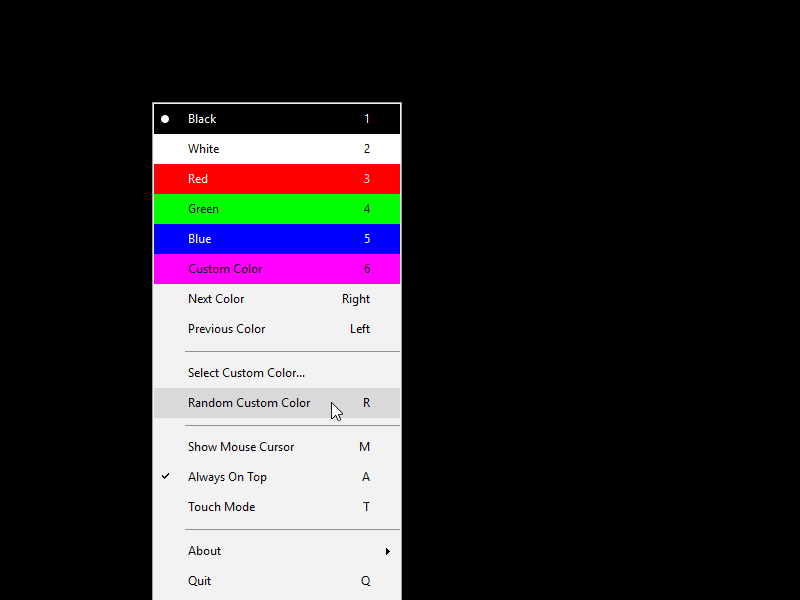
InjuredPixels can help you check your PC, laptop or tablet screen for dead pixels, scratches or defects. InjuredPixels can be used to test a new LCD monitor before purchasing, or an already purchased monitor during the warranty period (as you may get a replacement according to the manufacturer’s dead pixel policy). InjuredPixels fills the entire screen with a primary or custom color, allowing you to inspect the screen for pixels that do not match the selected color. The program is easy to use: click or use the arrow keys to cycle through colors or right-click to get the menu with the main commands. InjuredPixels can be run directly without having to install it on your computer: just download the portable version and run. Tiny, free and open source, and hosted on GitHub!

Graphcat<

MyPlayCity Uninstaller 2.0

Type: Freeware
Cost: $0
Size: 2.06 MB
Release date: Feb 14 2017
Platform: Win2000,WinXP,Win7 x32,Win7 x64,Windows 8,Windows 10,WinServer,WinOther,WinVista,WinVista x64
Publisher’s Site:  http://www.myplaycity.com
Publisher’s Product Page:  http://www.myplaycity.com/myplaycity-uninstaller/
Country: United States of America


MyPlayCity Uninstaller

Have you ever heard that the standard Windows install/uninstall application removes a program but remaining files and registry entries will be still on your computer? There is no sense to store these files but eventually they accrue and reduce working capacity of your PC. The most convenient, secure and fleet way to delete programs including remaining files is MyPlayCity Uninstaller. We advise you to use MyPlayCity Uninstaller for a total and absolute withdraw each time. Delete unnecessary files and clean up you disk space. Unnecessary files that remain after removal of programs can accrue over time and take up useful disk space and congest registry of your computer. MyPlayCity Uninstaller will help you to keep your PC fresh and clean due to its function of tracing and cleaning of remaining files. It will clean up folders and registry entries along with the program you delete. Besides, it deletes not only applications but also toolbars and add-ons from your browser. Many of applications you install automatically added to your start menu which leads to speed down processes of computers start and power off. With MyPlayCity Uninstaller you will need just one click to take programs away from start menu. Sometimes removing of just several applications allow your computer to start and shutdown much faster. MyPlayCity Uninstaller provides simply and totally removal of all unnecessary applications with all remaining files even if you are a beginner PC user. Intuitive design makes MyPlayCity Uninstaller very convenient and nicely to use.
Main features:
– The way of simply and totally removal of all unnecessary applications
– Remove crooked and out of control programs
– Trace and clean remaining files, folders and registry entries
– Stop useless applications from automatically loading at start menu
– Delete not only applications but also toolbars and add-ons from your browser

RescuePRO for Windows PC 6.0.0.1

Type: Demo
Cost: $39.99
Size: 14.84 MB
Release date: Feb 20 2017
Platform: Win2000,WinXP,Win7 x32,Win7 x64,Windows 8,Windows 10,WinServer,WinOther,WinVista,WinVista x64
Publisher’s Site:  http://www.LC-Tech.com
Publisher’s Product Page:  http://www.lc-tech.com/pc/sandisk-rescuepro-and-rescuepro-deluxe/
Country: United States of America


RescuePRO for Windows PC

RescuePRO is an easy-to-use application that recovers images, movies, sound files, documents, mail, videos, music and more. Recover data even if files were deleted, lost, corrupted or formatted. The wizard driven, user-friendly graphic interface makes it easy to recover your files with just a few mouse clicks.


This software is compatible with Memory Sticks, SmartMedia, CompactFlash, Floppy Disks, Palm Pilots, Windows CE devices, Digital Cameras and Camcorders, MP3 players, MMC, Microdrive, SD/SDHC, XD cards, PCMCIA, Video CD, DVD and most forms of digital media. The program works with any USB or FireWire Adaptor. Also features unique recovery algorithm for MPEG audio and MPEG video recovery (MPEG-1/2/3).

Simply insert your digital media into the reader, run the software and save the recovered files. There is no easier way to salvage those important files you thought were lost forever. The application then displays previews of the recoverable data.

Secure media wiping is also included for permanent deletion of data on your digital media. An imaging utility allows the creation of an image of your media for recovery at a later time. Advanced features include: now supports many high-end Digital Backs for SLR cameras, automatically saves the data as it is being scanned, supports media up to 64 GB and can run on Linux too.