Category Archives: System Utilities

Automation Tools, Backup & Restore, Benchmarking, Clipboard Tools, File & Disk Management, File Compression, Launchers & Task Managers, Other, Printer, Registry Tools, Shell Tools, System Maintenance, Text/Document Editors

File Joiner 2.02.5

Type: Shareware
Cost: $34.99
Size: 638.00 kB
Release date: Mar 06 2017
Platform: Win2000,WinXP,Win7 x32,Win7 x64,Windows 8,Windows 10,WinServer,WinOther,WinVista,WinVista x64
Publisher’s Site:  http://www.file-joiner.com
Publisher’s Product Page:  http://www.file-joiner.com
Country: United States of America

File Joiner

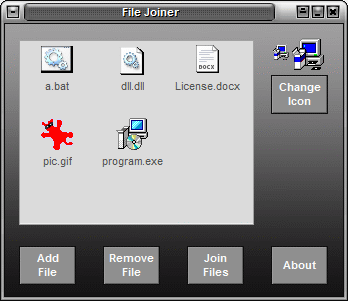
File Joiner is a tool that combines (binds) unlimited files (no matter their type) into a single standalone executable (a Container file). The Container (the final bound file) is a compiled program that, when opened, will automatically launch the included files. The joined files can be fully encrypted.


The official File-Joiner site is www.file-joiner.com

File Joiner can run any type of file from the bound file (the container) without affecting its direct functionality. For instance, if you bind an executable, a text file and an image file, when the Container file is run, the executable will be run too while the other files will be opened with the default image file viewer (IrfanView, Paint etc.) and text file viewer (Notepad, Wordpad etc.).

File Joiner is compatible with Windows 2k, XP, VISTA, Windows 7, Windows 8 and Windows 10 (32-bit and 64-bit).

Graphcat<

Digital Media Doctor 3.1 for Windows PC 3.1.5.1

Type: Demo
Cost: $24.95
Size: 5.88 MB
Release date: Jan 24 2017
Platform: Win2000,WinXP,Win7 x32,Win7 x64,Windows 8,Windows 10,WinServer,WinOther,WinVista,WinVista x64
Publisher’s Site:  http://www.LC-Tech.com
Publisher’s Product Page:  http://www.lc-tech.com/pc/digital-media-doctor/
Country: United States of America


Digital Media Doctor 3.1 for Windows PC

Digital Media Doctor works with most USB, FireWire and digital media readers. This software performs tests on digital media such as Palm Pilots, Digital Cameras, MP3 players, Digital Recorders and more. The application tests, benchmarks and reports on removable digital media using innovative testing algorithms.

The utility gives diagnostic tests to determine the integrity of the digital media. The included benchmark tests offer many modes of read and write to determine the performance of the digital media. Upon completion, the software displays a report on how well the media is functioning.

The diagnostic tests and benchmarking features include: Sequential Read, Random Access Read, Butterfly Read, Sequential Write, Random Access Write and Butterfly Write. Customizable options allow you to specify the number of blocks per read and length of time to test. Along with several other options, the software allows you to completely customize your own tests.

If you are concerned with the performance or reliability of your media, this application can help. The easy-to-use interface enables you to diagnose your media with just a few mouse clicks. The repair features even include: Back-up, Wipe, Format and Restore. In many cases this will fix any logical read errors on the media.

FastFolders 5.3.5

Type: Shareware
Cost: $15.00
Size: 783.00 kB
Release date: Jan 18 2017
Platform: Win2000,WinXP,Win7 x32,Win7 x64,Windows 8,Windows 10,WinServer,WinOther,WinVista,WinVista x64
Publisher’s Site:  http://www.desksoft.com
Publisher’s Product Page:  http://www.desksoft.com/FastFolders.htm
Country: Austria


FastFolders

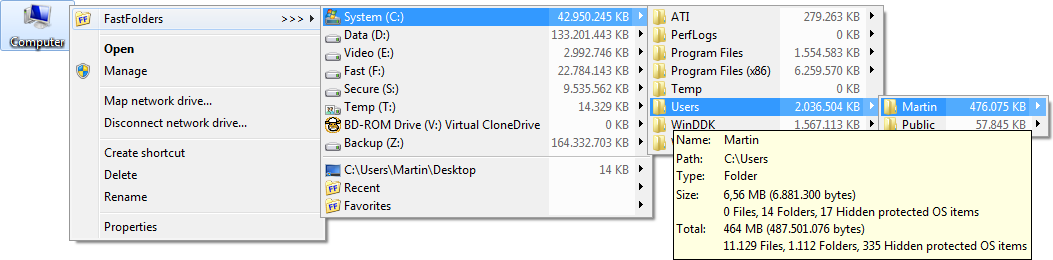
This system extension increases your productivity dramatically by giving you quick and easy access to folder contents and files. Without opening each and every folder, you can browse the directory structure starting at any point by clicking the right mouse button on a file, folder or drive. The program adds a menu item to the context menus of shell objects, which displays the directory structure and item size on demand. If you drag and drop an object on a folder or drive using the right mouse button, you can copy or move the object(s) to any folder of your computer by selecting it from the FastFolders menu. FastFolders can also show the total size of folders including their subfolders and files. This is extremely useful for getting an overview of the distribution of your files and the disk space they occupy.