Category Archives: System Utilities

Automation Tools, Backup & Restore, Benchmarking, Clipboard Tools, File & Disk Management, File Compression, Launchers & Task Managers, Other, Printer, Registry Tools, Shell Tools, System Maintenance, Text/Document Editors

STOR2RRD 1.35-1

Type: Freeware
Cost: $0
Size: 2.25 MB
Release date: Dec 02 2016
Platform: Linux,Linux Console,Linux Gnome,Linux GPL,Linux Open Source
Publisher’s Site:  http://www.stor2rrd.com
Publisher’s Product Page:  http://www.stor2rrd.com
Country: Czech Republic


STOR2RRD

Free storage and SAN performance and capacity monitoring for EMC VNX VNXe Unity, IBM FlashSystem, Storwize, SVC, XIV, DS3000, DS4000 and DS5000, Hitachi HUS VSP VSP-G HUS-VM AMS,HP 3PAR XP7, NetApp FAS E-series, Brocade,Cisco MDS and Nexus.
The tool offers you end-to-end views of your storage environment including NAS and SAN and can save you significant money in operation monitoring and by predicting utilization bottlenecks in your virtualized environment.
You can also generate policy-based alerts, view overall health status of your systems, reduce service downtime, use capacity and forecasting data, and simplify the identification of virtualization or cloud aspirant.

Graphcat<

Tenorshare Windows Boot Genius 3.0.0.1

Type: Shareware
Cost: $54.95
Size: 253.72 MB
Release date: Aug 05 2014
Platform: Win2000,WinXP,Win7 x32,Win7 x64,Windows 8,Windows 10,WinServer,WinOther,WinVista,WinVista x64
Publisher’s Site:  http://www.tenorshare.com
Publisher’s Product Page:  http://www.tenorshare.com/products/windows-boot-genius.html
Country: United States of America


Tenorshare Windows Boot Genius

Windows Boot Genius is the comprehensive windows boot savior. It can repair crashed or corrupted operating system and help you solve Windows boot up issues like blank/blue screen, freezing screen, etc. It can do that, and much more.


key features of Windows Boot Genius:
1.Lets you burn bootable .iso file to CD or USB drive, you can use the boot CD/USB to boot inaccessible system and recover system files.

2.Various Windows Boot Repair Tools, for example: boot file repair, boot sector repair, registry repair, registry editor, etc. They can help you solve Windows boot failure issues like black/blue screen of death, system crash, etc.

3.Reset, Change or Remove Windows Local and Domain Password for Windows 10/8/7/Vista/XP and Windows server 2008/2003, etc.

4.Backup, Clone, Restore Windows Operating System, Hard Disk and Partitions

5. Recover Lost, Deleted or Formatted Data, allow you to recover deleted, formatted or corrupted data and partition table from hard drive and other removable media.

6. Recover and Backup Microsoft Product Key for Windows operating system, Microsoft office.

7. Support Windows 10/8.1/8/7/Vista/XP and all computer brands: Dell, Acer, Asus, Sony, HP, Toshiba, Lenovo, etc.

Tenorshare iPhone Data Recovery 7.1.0.0

Type: Shareware
Cost: $49.95
Size: 17.58 MB
Release date: Nov 05 2016
Platform: Win2000,WinXP,Win7 x32,Win7 x64,Windows 8,Windows 10,WinServer,WinOther,WinVista,WinVista x64
Publisher’s Site:  http://www.tenorshare.com
Publisher’s Product Page:  http://www.tenorshare.com/products/iphone-data-recovery-win.html
Country: United States of America


Tenorshare iPhone Data Recovery

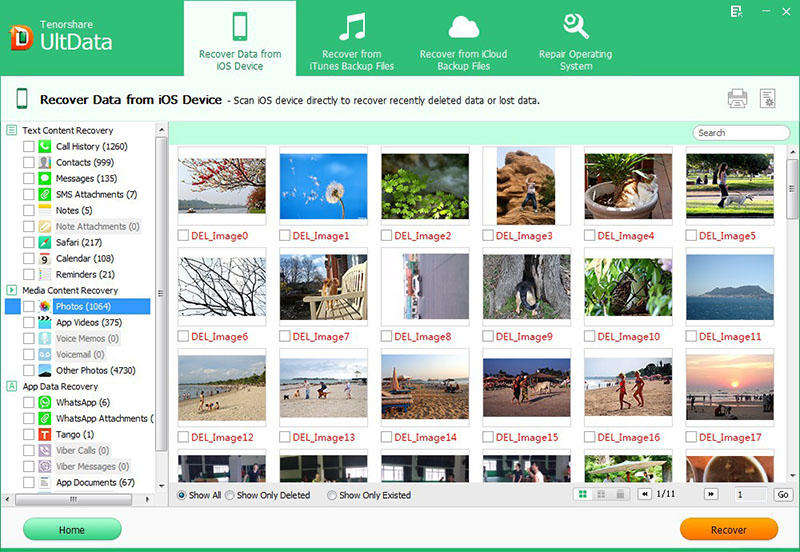
Tenorshare iPhone Data Recovery is the top-ranking data recovery software which can easily recover all deleted or lost data directly from iPhone without any backup file, restore iPhone data from iTunes backup file or restore iPhone data from iCloud backup. With high functionality, it can retrieve lost data from damaged, crashed, broken or smashed iPhone, and retrieve lost data after jailbreak, iOS upgrade, factory setting.

Key features of Tenorshare iPhone Data Recovery are:
1. 3 smart data recovery modes are provided:
Restore data directly from iPhone without backup file. Recover iPhone data from iTunes backup file. Restore iPhone data from iCloud backup file.
2. 20 types of iPhone files are supported: photos, call history, contacts, text messages, WhatsApp (messages, photos, videos), SMS attachments, notes, Safari bookmarks, calendar, reminders, voice memos, camera roll, Tango and videos.
3. Preview lost files all like photos, messages, contacts, notes, call history, etc. to decide what you want to recover before data recovery.
4. Backup iPhone data on local computer freely, or sync recovered contacts, messages and notes directly to iPhone.
5. Easy-to-handle.
6. Free technical support and full money-back guarantee.